HTML5 Forms Complete Guide – Semantic Form Design Tutorial for Beginners
HTML5 Forms Complete Guide
Forms are one of the most important parts of web development.
From login pages to registration systems, payment gateways, surveys, and contact pages — forms are used everywhere.
Modern websites use HTML5 Forms because they provide:
- Better validation
- Mobile-friendly inputs
- Improved accessibility
- Cleaner semantic structure
- Better user experience
In this guide, you will learn:
- Semantic form structure
- HTML5 input types
- Form validation
- Tables and lists inside forms
- Responsive form design
Best practices for SEO and accessibility
What is an HTML5 Form?
An HTML form collects user input and sends data to a server.
Basic syntax:
<form>
    Form Elements
</form>
Forms can contain:
- Textboxes
- Password fields
- Email fields
- Radio buttons
- Checkboxes
- Dropdowns
- File uploads
- Buttons
- Textareas
Why Use Semantic HTML5 in Forms?
Semantic design improves:
- SEO
- Accessibility
- Screen reader compatibility
- Code readability
- Search engine understanding
Instead of using unnecessary <div> tags, use:
- <form>
- <fieldset>
- <legend>
- <label>
- <section>
- <article>
Basic Semantic Form Structure
<form>

    <fieldset>

        <legend>Registration Form</legend>

        <label for="name">Full Name</label>
        <input type="text" id="name">

    </fieldset>

</form>
Important HTML5 Input Types
|
Input Type |
Purpose |
|
text |
Single-line text |
|
|
Email validation |
|
password |
Hidden password |
|
number |
Numeric values |
|
tel |
Phone number |
|
date |
Date picker |
|
file |
File upload |
|
url |
Website URL |
|
search |
Search box |
|
range |
Slider control |
|
color |
Color picker |
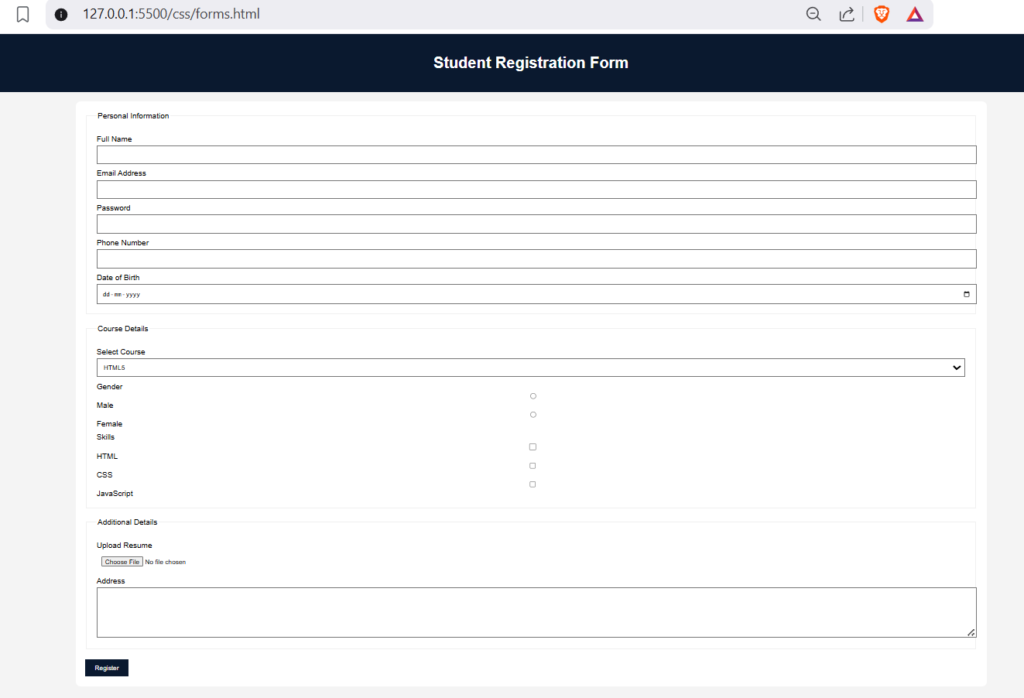
Complete Semantic Registration Form Example
<!DOCTYPE html>
<html lang="en">

<head>
    <meta charset="UTF-8">
    <meta name="viewport" content="width=device-width, initial-scale=1.0">
    <title>HTML5 Registration Form</title>

    <style>

        body{
            font-family: Arial;
            background:#f4f4f4;
            margin:0;
            padding:0;
        }

        header{
            background:#0a192f;
            color:white;
            padding:20px;
            text-align:center;
        }

        main{
            width:60%;
            margin:auto;
            background:white;
            padding:20px;
            margin-top:20px;
            border-radius:10px;
        }

        fieldset{
            margin-bottom:20px;
            padding:20px;
        }

        label{
            display:block;
            margin-top:10px;
        }

        input, textarea, select{
            width:100%;
            padding:10px;
            margin-top:5px;
        }

        button{
            background:#0a192f;
            color:white;
            padding:10px 20px;
            border:none;
            cursor:pointer;
        }

    </style>

</head>

<body>

<header>
    <h1>Student Registration Form</h1>
</header>

<main>

<form>

<fieldset>

<legend>Personal Information</legend>

<label for="fullname">Full Name</label>
<input type="text" id="fullname" required>

<label for="email">Email Address</label>
<input type="email" id="email" required>

<label for="password">Password</label>
<input type="password" id="password" minlength="6">

<label for="phone">Phone Number</label>
<input type="tel" id="phone">

<label for="dob">Date of Birth</label>
<input type="date" id="dob">

</fieldset>

<fieldset>

<legend>Course Details</legend>

<label>Select Course</label>

<select>

<option>HTML5</option>
<option>CSS3</option>
<option>JavaScript</option>
<option>Bootstrap</option>

</select>

<label>Gender</label>

<input type="radio" name="gender"> Male
<input type="radio" name="gender"> Female

<label>Skills</label>

<input type="checkbox"> HTML
<input type="checkbox"> CSS
<input type="checkbox"> JavaScript

</fieldset>

<fieldset>

<legend>Additional Details</legend>

<label>Upload Resume</label>
<input type="file">

<label>Address</label>
<textarea rows="5"></textarea>

</fieldset>

<button type="submit">Register</button>

</form>

</main>

</body>
</html>
HTML5 Form Validation
HTML5 provides built-in validation without JavaScript.
Required Field
<input type=”text” required>
Minimum Length
<input type=”password” minlength=”6″>
Maximum Length
<input type=”text” maxlength=”20″>
Email Validation
<input type=”email”>
Placeholder Attribute
Displays hint text inside input fields.
<input type=”text” placeholder=”Enter Full Name”>
Readonly and Disabled Fields
Readonly
<input type=”text” value=”Admin” readonly>
Disabled
<input type=”text” disabled>
Using Lists Inside Forms
<ul>
    <li>HTML5</li>
    <li>CSS3</li>
    <li>JavaScript</li>
</ul>
Using Tables Inside Forms
<table border="1">

<tr>
    <th>Course</th>
    <th>Fees</th>
</tr>

<tr>
    <td>HTML5</td>
    <td>2000</td>
</tr>

</table>
Adding Multimedia Elements in Forms
Video
<video controls width="400">
    <source src="demo.mp4" type="video/mp4">
</video>
Audio
<audio controls>
    <source src="song.mp3" type="audio/mpeg">
</audio>
Semantic Layout for Forms
Recommended structure:
<header>
<nav>
<main>
<section>
<form>
<fieldset>
<footer>
This improves:
- Accessibility
- Search engine indexing
- Responsive layout structure
Best Practices for HTML5 Forms
|
Best Practice |
Benefit |
|
Use labels |
Better accessibility |
|
Use semantic tags |
Improved SEO |
|
Validate fields |
Reduce errors |
|
Use placeholders carefully |
Better UX |
|
Keep forms short |
Higher conversions |
|
Add responsive design |
Mobile compatibility |
Common Mistakes Beginners Make
|
Mistake |
Solution |
|
Missing labels |
Always use <label> |
|
Using only div tags |
Use semantic structure |
|
No validation |
Use required/minlength |
|
Large forms |
Divide using fieldset |
|
Poor mobile layout |
Use responsive CSS |
Responsive Form Design Tips
Use Percentage Width:
input{
    width:100%;
}
Use Media Queries:
@media(max-width:768px){

main{
    width:90%;
}

}
Summary
HTML5 forms are essential for modern web development.
By using semantic HTML5 tags, proper validation, responsive layouts, and accessible design, you can create professional and SEO-friendly web forms.
Once you master HTML5 forms, you can move toward advanced frontend technologies like:
- Bootstrap
- Tailwind CSS
- React
- Next.js
Practice by building:
- Login forms
- Registration systems
- Contact pages
- Survey forms
- Feedback applications
The more projects you create, the stronger your frontend development skills become.
Example Code and Output
Output of Example Code: