HTML5 Forms Complete Guide
Forms are one of the most important parts of web development.
From login pages to registration systems, payment gateways, surveys, and contact pages — forms are used everywhere.
Modern websites use HTML5 Forms because they provide:
- Better validation
- Mobile-friendly inputs
- Improved accessibility
- Cleaner semantic structure
- Better user experience
In this guide, you will learn:
- Semantic form structure
- HTML5 input types
- Form validation
- Tables and lists inside forms
- Responsive form design
Best practices for SEO and accessibility
What is an HTML5 Form?
An HTML form collects user input and sends data to a server.
Basic syntax:
<form>
    Form Elements
</form>
Forms can contain:
- Textboxes
- Password fields
- Email fields
- Radio buttons
- Checkboxes
- Dropdowns
- File uploads
- Buttons
- Textareas
Why Use Semantic HTML5 in Forms?
Semantic design improves:
- SEO
- Accessibility
- Screen reader compatibility
- Code readability
- Search engine understanding
Instead of using unnecessary <div> tags, use:
- <form>
- <fieldset>
- <legend>
- <label>
- <section>
- <article>
Basic Semantic Form Structure
<form>

    <fieldset>

        <legend>Registration Form</legend>

        <label for="name">Full Name</label>
        <input type="text" id="name">

    </fieldset>

</form>
Important HTML5 Input Types
|
Input Type |
Purpose |
|
text |
Single-line text |
|
|
Email validation |
|
password |
Hidden password |
|
number |
Numeric values |
|
tel |
Phone number |
|
date |
Date picker |
|
file |
File upload |
|
url |
Website URL |
|
search |
Search box |
|
range |
Slider control |
|
color |
Color picker |
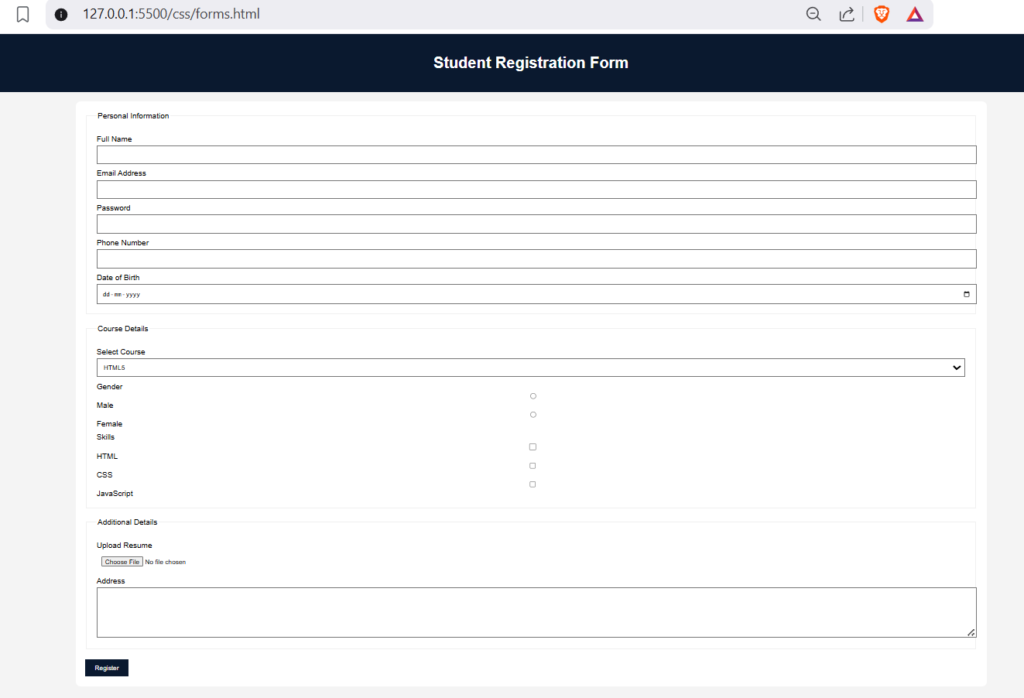
Complete Semantic Registration Form Example
<!DOCTYPE html>
<html lang="en">

<head>
    <meta charset="UTF-8">
    <meta name="viewport" content="width=device-width, initial-scale=1.0">
    <title>HTML5 Registration Form</title>

    <style>

        body{
            font-family: Arial;
            background:#f4f4f4;
            margin:0;
            padding:0;
        }

        header{
            background:#0a192f;
            color:white;
            padding:20px;
            text-align:center;
        }

        main{
            width:60%;
            margin:auto;
            background:white;
            padding:20px;
            margin-top:20px;
            border-radius:10px;
        }

        fieldset{
            margin-bottom:20px;
            padding:20px;
        }

        label{
            display:block;
            margin-top:10px;
        }

        input, textarea, select{
            width:100%;
            padding:10px;
            margin-top:5px;
        }

        button{
            background:#0a192f;
            color:white;
            padding:10px 20px;
            border:none;
            cursor:pointer;
        }

    </style>

</head>

<body>

<header>
    <h1>Student Registration Form</h1>
</header>

<main>

<form>

<fieldset>

<legend>Personal Information</legend>

<label for="fullname">Full Name</label>
<input type="text" id="fullname" required>

<label for="email">Email Address</label>
<input type="email" id="email" required>

<label for="password">Password</label>
<input type="password" id="password" minlength="6">

<label for="phone">Phone Number</label>
<input type="tel" id="phone">

<label for="dob">Date of Birth</label>
<input type="date" id="dob">

</fieldset>

<fieldset>

<legend>Course Details</legend>

<label>Select Course</label>

<select>

<option>HTML5</option>
<option>CSS3</option>
<option>JavaScript</option>
<option>Bootstrap</option>

</select>

<label>Gender</label>

<input type="radio" name="gender"> Male
<input type="radio" name="gender"> Female

<label>Skills</label>

<input type="checkbox"> HTML
<input type="checkbox"> CSS
<input type="checkbox"> JavaScript

</fieldset>

<fieldset>

<legend>Additional Details</legend>

<label>Upload Resume</label>
<input type="file">

<label>Address</label>
<textarea rows="5"></textarea>

</fieldset>

<button type="submit">Register</button>

</form>

</main>

</body>
</html>
HTML5 Form Validation
HTML5 provides built-in validation without JavaScript.
Required Field
<input type=”text” required>
Minimum Length
<input type=”password” minlength=”6″>
Maximum Length
<input type=”text” maxlength=”20″>
Email Validation
<input type=”email”>
Placeholder Attribute
Displays hint text inside input fields.
<input type=”text” placeholder=”Enter Full Name”>
Readonly and Disabled Fields
Readonly
<input type=”text” value=”Admin” readonly>
Disabled
<input type=”text” disabled>
Using Lists Inside Forms
<ul>
    <li>HTML5</li>
    <li>CSS3</li>
    <li>JavaScript</li>
</ul>
Using Tables Inside Forms
<table border="1">

<tr>
    <th>Course</th>
    <th>Fees</th>
</tr>

<tr>
    <td>HTML5</td>
    <td>2000</td>
</tr>

</table>
Adding Multimedia Elements in Forms
Video
<video controls width="400">
    <source src="demo.mp4" type="video/mp4">
</video>
Audio
<audio controls>
    <source src="song.mp3" type="audio/mpeg">
</audio>
Semantic Layout for Forms
Recommended structure:
<header>
<nav>
<main>
<section>
<form>
<fieldset>
<footer>
This improves:
- Accessibility
- Search engine indexing
- Responsive layout structure
Best Practices for HTML5 Forms
|
Best Practice |
Benefit |
|
Use labels |
Better accessibility |
|
Use semantic tags |
Improved SEO |
|
Validate fields |
Reduce errors |
|
Use placeholders carefully |
Better UX |
|
Keep forms short |
Higher conversions |
|
Add responsive design |
Mobile compatibility |
Common Mistakes Beginners Make
|
Mistake |
Solution |
|
Missing labels |
Always use <label> |
|
Using only div tags |
Use semantic structure |
|
No validation |
Use required/minlength |
|
Large forms |
Divide using fieldset |
|
Poor mobile layout |
Use responsive CSS |
Responsive Form Design Tips
Use Percentage Width:
input{
    width:100%;
}
Use Media Queries:
@media(max-width:768px){

main{
    width:90%;
}

}
Summary
HTML5 forms are essential for modern web development.
By using semantic HTML5 tags, proper validation, responsive layouts, and accessible design, you can create professional and SEO-friendly web forms.
Once you master HTML5 forms, you can move toward advanced frontend technologies like:
- Bootstrap
- Tailwind CSS
- React
- Next.js
Practice by building:
- Login forms
- Registration systems
- Contact pages
- Survey forms
- Feedback applications
The more projects you create, the stronger your frontend development skills become.
Example Code and Output
Output of Example Code: