AJAX and Fetch API – Complete Guide to Asynchronous JavaScript and API Integration (2026)
Introduction
Modern websites rarely reload pages when data changes.
Examples:
- Gmail loads emails without refreshing.
- Facebook loads new posts dynamically.
- Amazon updates products instantly.
- YouTube loads comments asynchronously.
This is possible because of AJAX and Fetch API.
These technologies allow web applications to communicate with servers and APIs without reloading the webpage.
What is AJAX?
AJAX stands for:
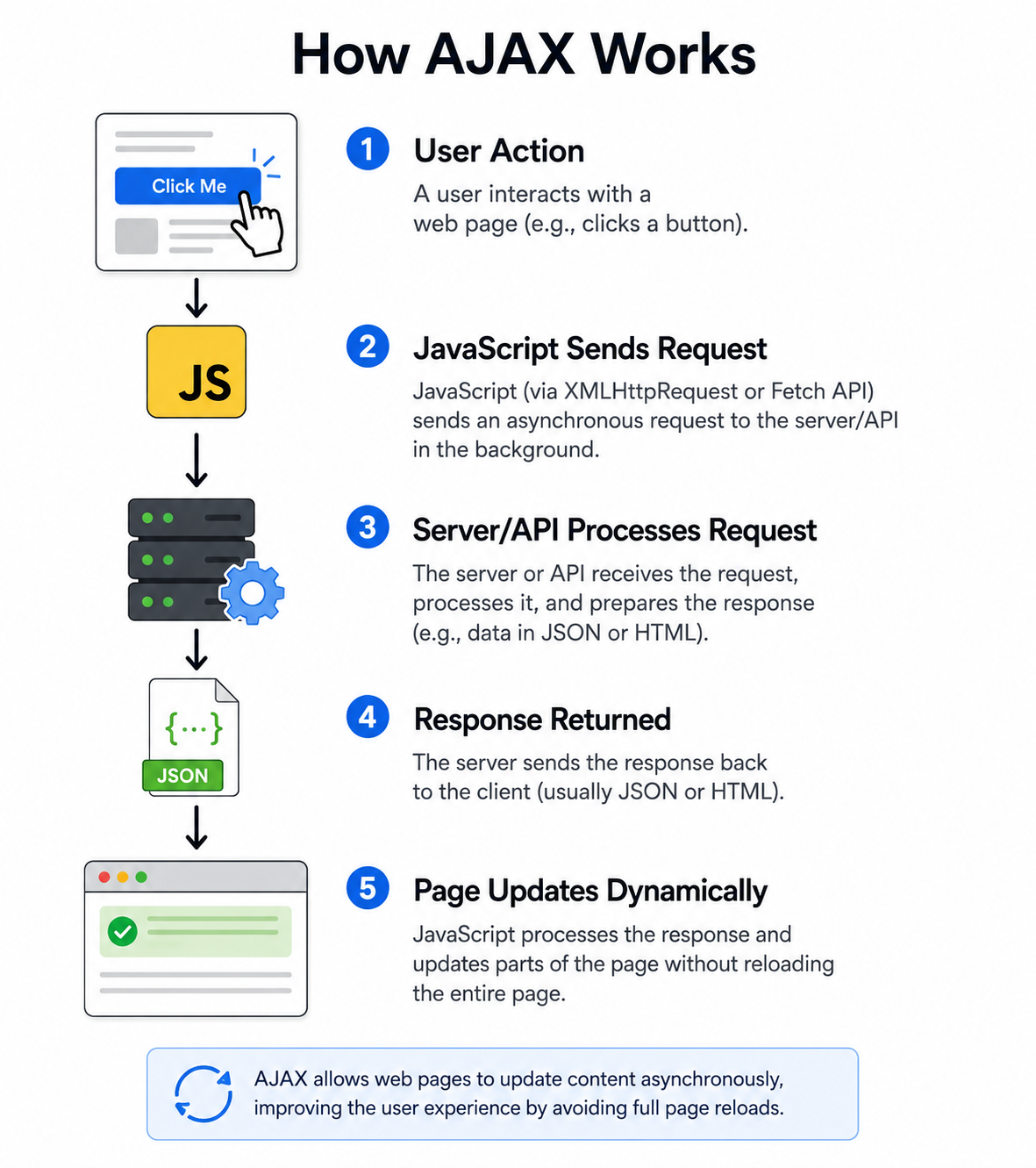
Asynchronous JavaScript And XML- Sending requests to servers
- Receiving data from servers
- Updating webpage content dynamically
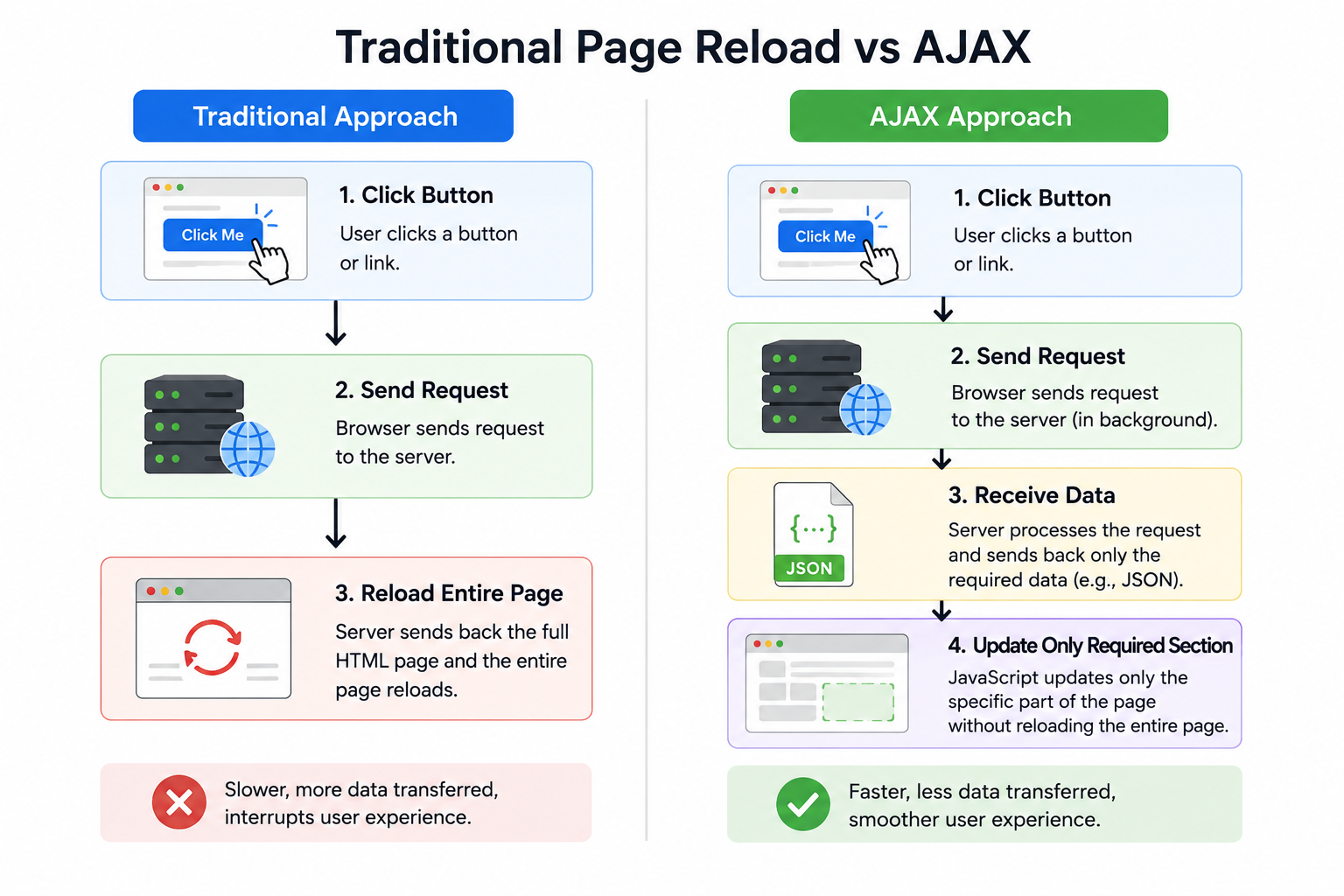
- Avoiding full page reloads
Why Use AJAX?
Faster User Experience: Only required data is loaded.
Reduced Server Load: Less unnecessary page rendering.
Dynamic Content Updates: Update specific webpage sections.
Better Performance: Improves responsiveness.
How AJAX Works
Traditional Page Reload vs AJAX
Understanding APIs
What is an API?
API stands for:
Application Programming InterfaceExamples:
- Weather API
- Google Maps API
- Payment API
- Social Media API
What is JSON?
Most APIs return data in JSON format.
Example:
{
  "id":1,
  "name":"Akshay",
  "course":"JavaScript"
}Making AJAX Requests Using XMLHttpRequest
Before Fetch API, AJAX used XMLHttpRequest.
Example
<button onclick="loadData()">
Load Data
</button>

<p id="result"></p>
function loadData(){
let xhr =
new XMLHttpRequest();
xhr.open(
"GET",
"https://jsonplaceholder.typicode.com/users/1",
true
);
xhr.onload = function(){
if(xhr.status === 200){
document.getElementById("result")
.innerHTML =
xhr.responseText;
}
};
xhr.send();
}Problems with XMLHttpRequest
- More code
- Complex syntax
- Difficult error handling
- Callback nesting
To solve these problems, JavaScript introduced Fetch API.
What is Fetch API?
Fetch API is the modern way to communicate with servers.
Advantages:
- Cleaner syntax
- Promise-based
- Easier error handling
- Better readability
Basic Fetch API Syntax
fetch(url)
.then(response => response.json())
.then(data => {
    console.log(data);
});
First Fetch API Example
<button onclick="getUser()">
Get User
</button>

<div id="result"></div>
function getUser(){
fetch(
"https://jsonplaceholder.typicode.com/users/1"
)
.then(response => response.json())
.then(data => {
document.getElementById("result")
.innerHTML =
data.name;
})
.catch(error => {
console.log(error);
});
}Understanding Promises
Fetch API returns a Promise.
A Promise has three states:
Pending
Fulfilled
Rejectedfetch(url)
.then(success)
.catch(error);Fetch API GET Request
GET retrieves data.
fetch(
"https://jsonplaceholder.typicode.com/posts"
)

.then(response => response.json())

.then(data => {

console.log(data);

});
Display API Data on Webpage
<div id="posts"></div>fetch(
"https://jsonplaceholder.typicode.com/posts"
)
.then(response => response.json())
.then(data => {
let output = "";
data.slice(0,5).forEach(post => {
output += `
<h3>${post.title}</h3>
<p>${post.body}</p>
`;
});
document.getElementById("posts")
.innerHTML = output;
});Fetch API POST Request
POST sends data to server.
fetch(
"https://jsonplaceholder.typicode.com/posts",
{

method:"POST",

headers:{
"Content-Type":"application/json"
},

body:JSON.stringify({

title:"JavaScript",

body:"Fetch API Tutorial"

})

}

)

.then(response => response.json())

.then(data => {

console.log(data);

});
PUT Request
Used to update existing records.
fetch(
"https://jsonplaceholder.typicode.com/posts/1",
{

method:"PUT",

headers:{
"Content-Type":"application/json"
},

body:JSON.stringify({

title:"Updated Title"

})

}

)
.then(response => response.json())
.then(data => console.log(data));
DELETE Request
fetch(
"https://jsonplaceholder.typicode.com/posts/1",
{
method:"DELETE"
}
)
.then(response => {

console.log(
"Record Deleted"
);

});
Async and Await
Async/Await makes asynchronous code easier to read.
Example
async function getData(){

let response =
await fetch(
"https://jsonplaceholder.typicode.com/users"
);

let data =
await response.json();

console.log(data);

}

getData();
Error Handling
async function getData(){

try{

let response =
await fetch(
"https://jsonplaceholder.typicode.com/users"
);

let data =
await response.json();

console.log(data);

}
catch(error){

console.log(
"Error:",
error
);

}

}
Loading Spinner Example
<button onclick="loadUsers()">
Load Users
</button>

<div id="loading"></div>
async function loadUsers(){
loading.innerHTML =
"Loading...";
let response =
await fetch(
"https://jsonplaceholder.typicode.com/users"
);
let users =
await response.json();
loading.innerHTML =
"Data Loaded";
}Mini Project 1: Random User Generator
Features
✔ Fetch API
✔ JSON Parsing
✔ Dynamic DOM Updates
Complete Code
<!DOCTYPE html>
<html>

<head>
<title>Random User Generator</title>
</head>

<body>

<h1>Random User Generator</h1>

<button onclick="loadUser()">
Generate User
</button>

<div id="user"></div>

<script>

async function loadUser(){

let response =
await fetch(
"https://randomuser.me/api/"
);

let data =
await response.json();

let person =
data.results[0];

document.getElementById("user")
.innerHTML = `
<h2>
${person.name.first}
${person.name.last}
</h2>

<img src="${person.picture.large}">
`;

}

</script>

</body>
</html>
Mini Project 2: Weather App
Features
- API Integration
- User Input
- Dynamic Results
Workflow
Enter City
     ↓
Fetch Weather API
     ↓
Display Weather DataMini Project 3: Product Search Application
Features
- Fetch Products
- Search Products
- Dynamic Filtering
Example API
https://fakestoreapi.com/products- Fetch API
- Arrays
- filter()
- Dynamic DOM Manipulation
AJAX vs Fetch API
| Feature | AJAX | Fetch API |
|---|---|---|
| Syntax | Complex | Simple |
| Promises | No | Yes |
| Error Handling | Difficult | Easy |
| Modern Usage | Less | Preferred |
| Readability | Lower | Higher |
Common Interview Questions
- What is AJAX?
- What is Fetch API?
- Difference between AJAX and Fetch API?
- What is JSON?
- What is a Promise?
- What are async and await?
- Difference between GET and POST?
- What is REST API?
- How does Fetch API handle errors?
- What is JSON.parse()?
Best Practices
- Use Fetch API instead of XMLHttpRequest
- Use async/await for cleaner code
- Handle errors using try-catch
- Validate API responses
- Display loading indicators
- Keep API keys secure
Summary
In this tutorial, we learned:
AJAX Fundamentals
- What AJAX is
- How asynchronous requests work
- XMLHttpRequest basics
Fetch API
- GET Requests
- POST Requests
- PUT Requests
- DELETE Requests
- JSON Handling
Modern JavaScript
- Promises
- Async/Await
- Error Handling
Practical Projects
- Random User Generator
- Weather Application
- Product Search App
AJAX and Fetch API are essential skills for modern web development because almost every application communicates with APIs and servers dynamically.