JavaScript DOM Manipulation and Event Handling – Complete Guide (2026)
Why Learn DOM?
The DOM (Document Object Model) allows JavaScript to:
- Access HTML elements
- Modify webpage content
- Change styles dynamically
- Handle user interactions
- Create dynamic webpages
Without DOM, JavaScript cannot interact with HTML.
What is DOM?
When a webpage loads, the browser converts HTML into a tree-like structure called the DOM.
Example:
<body>
<h1 id="title">
Welcome
</h1>
<button>
Click Me
</button>

</body>
DOM Tree:
Document
|
|-- HTML
    |
    |-- Body
         |
         |-- H1
         |
         |-- Button
Accessing Elements
getElementById()
<h1 id="title">
Hello World
</h1>
let heading =
document.getElementById("title");
console.log(heading);querySelector()
document.querySelector("h1");

document.querySelector(".card");

document.querySelector("#title");
querySelectorAll()
let items =
document.querySelectorAll("li");
Changing Content
innerHTML
document.getElementById("title")
.innerHTML =
"Welcome to JavaScript";
innerText
document.getElementById("title")
.innerText =
"Updated Text";
Changing CSS Dynamically
document.getElementById("title")
.style.color = "blue";

document.getElementById("title")
.style.fontSize = "40px";
Working with Attributes
Get Attribute
let image =
document.getElementById("photo");

console.log(
image.getAttribute("src")
);
Set Attribute
image.setAttribute(
"width",
"300"
);
Creating New Elements
let para =
document.createElement("p");

para.innerText =
"New Paragraph Added";
Adding Elements
document.body.appendChild(para);Removing Elements
let item =
document.getElementById("box");

item.remove();
Event Handling
An event occurs when the user interacts with the webpage.
Examples:
- Click
- Double Click
- Mouse Over
- Mouse Out
- Key Press
- Form Submit
Click Event
<button id="btn">
Click Me
</button>document.getElementById("btn").addEventListener("click",function(){
alert("Button Clicked");
}
);Mouse Events
box.addEventListener(
"mouseover",
function(){

box.style.background =
"red";

}
);
Keyboard Events
input.addEventListener(
"keyup",
function(){

console.log(
input.value
);

}
);
Form Validation Project
<input type="text" id="username">

<button onclick="validate()">
Submit
</button>
function validate(){
let user =
document.getElementById("username").value;
if(user==""){
alert("Please Enter Username");
}
}Event Object
button.addEventListener(
"click",
function(event){

console.log(event);

}
);
Event Bubbling
<div id="parent">

<button id="child">
Click
</button>

</div>Child
ParentEvent Delegation
document
.getElementById("list")
.addEventListener(
"click",
function(event){

console.log(
event.target
);

}
);
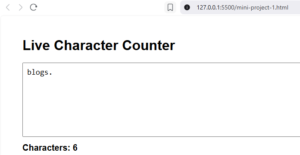
Mini Project 1: Live Character Counter
Students love this project.
<textarea id="text"></textarea>

<p id="count">
0
</p>text.addEventListener(
"keyup",
function(){
count.innerHTML =
text.value.length;
}
);
Output:
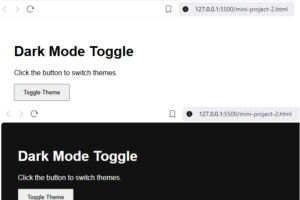
Mini Project 2: Dark Mode Toggle
<button id="theme">
Dark Mode
</button>theme.addEventListener(
"click",
function(){
document.body.classList.toggle(
"dark"
);
}
);
Output:
Mini Project 3: To-Do List
Covers:
- createElement()
- appendChild()
- remove()
- Events
- DOM
Output:

Excellent for SEO and student learning.
What you Learn from These Projects
| Project | Concepts Covered |
|---|---|
| Live Character Counter | DOM Selection, Events, innerHTML |
| Dark Mode Toggle | classList, Event Handling, CSS Manipulation |
| To-Do List | createElement(), appendChild(), remove(), Dynamic DOM |
Common Interview Questions
What is DOM?
Difference between innerHTML and innerText?
What is Event Handling?
What is addEventListener()?
What is Event Bubbling?
What is Event Delegation?
Difference between querySelector and querySelectorAll?
Summary
In this tutorial, we explored practical applications of JavaScript DOM Manipulation and Event Handling through three mini projects.
Live Character Counter
Demonstrated how JavaScript can listen to keyboard events and update webpage content dynamically in real time.
Dark Mode Toggle
Showed how to modify CSS classes using JavaScript and create interactive user interfaces.
To-Do List Application
Introduced dynamic element creation using:
createElement()appendChild()remove()- Event Handling
- DOM Manipulation
These projects provide a strong foundation for building interactive web applications and prepare learners for advanced topics such as:
- Form Validation
- Local Storage
- Session Storage
- AJAX and Fetch API
- jQuery
- React
- Full Stack Development
By mastering DOM manipulation and events, developers can transform static HTML pages into dynamic, user-friendly web applications.