


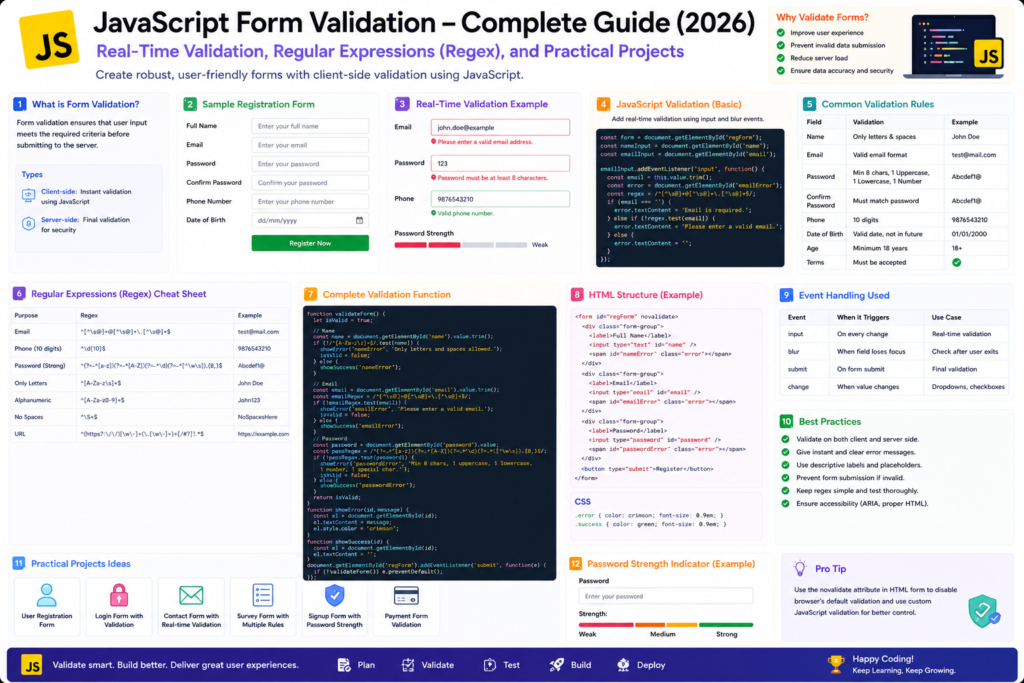
Introduction
Form Validation is the process of checking user input before submitting data to a server.
Validation helps:
- Prevent incorrect data entry
- Improve user experience
- Reduce server load
- Enhance security
- Maintain data consistency
Examples:
- Email must be valid
- Password should meet complexity requirements
- Phone number should contain only digits
- Required fields should not be empty
Why Form Validation is Important?
Without validation:
- Users can submit blank forms
- Invalid email addresses can be entered
- Weak passwords may be accepted
- Incorrect data may be stored
With Validation:
- Data quality improves
- Better user experience
- Reduced errors
- Improved security
Types of Validation
1. Client-Side Validation
Performed in the browser using:
- HTML5 Validation
- JavaScript Validation
Example:
<input type="email" required>2. Server-Side Validation
Performed on the server using:
- PHP
- Node.js
- ASP.NET
- Java
Server-side validation should always be implemented even if client-side validation exists.
Basic JavaScript Validation
Check Empty Field
<input type="text" id="username">

<button onclick="validate()">
Submit
</button>
function validate(){
let username =
document.getElementById("username").value;
if(username === ""){
alert("Username is required");
return false;
}
}Real-Time Validation
Real-time validation checks user input while typing.
Example
<input type="text" id="username">

<span id="message"></span>
let username =
document.getElementById("username");
username.addEventListener(
"keyup",
function(){
if(username.value.length < 5){
document.getElementById("message")
.innerHTML =
"Minimum 5 characters required";
}
else{
document.getElementById("message")
.innerHTML =
"Valid Username";
}
});Understanding Regular Expressions (Regex)
What is Regex?
Regex (Regular Expression) is a pattern used to match and validate text.
Examples:
- Email Validation
- Phone Number Validation
- Password Validation
- URL Validation
Common Regex Patterns
| Validation | Pattern |
|---|---|
/^[^\s@]+@[^\s@]+\.[^\s@]+$/ |
|
| Mobile Number | /^[0-9]{10}$/ |
| Password | /^(?=.*[A-Z])(?=.*[0-9]).{8,}$/ |
| Username | /^[a-zA-Z0-9_]{5,15}$/ |
Email Validation Using Regex
<input type="text" id="email">

<button onclick="validateEmail()">
Validate </button>
function validateEmail(){
let email =
document.getElementById("email").value;
let pattern =
/^[^\s@]+@[^\s@]+\.[^\s@]+$/;
if(pattern.test(email)){
alert("Valid Email");
}
else{
alert("Invalid Email");
}
}Mobile Number Validation
function validateMobile(){

let mobile =
document.getElementById("mobile").value;

let pattern =
/^[0-9]{10}$/;

if(pattern.test(mobile)){

alert("Valid Mobile Number");

}
else{

alert("Invalid Mobile Number");

}

}
Password Validation
Requirements:
- Minimum 8 characters
- One uppercase letter
- One number
function validatePassword(){

let password =
document.getElementById("password").value;

let pattern =
/^(?=.*[A-Z])(?=.*[0-9]).{8,}$/;

if(pattern.test(password)){

alert("Strong Password");

}
else{

alert("Weak Password");

}

}
Confirm Password Validation
function checkPassword(){

let password =
document.getElementById("password").value;

let confirmPassword =
document.getElementById("confirmPassword").value;

if(password === confirmPassword){

alert("Passwords Match");

}
else{

alert("Passwords Do Not Match");

}

}
Complete Registration Form Validation
Features
– Required Fields
– Email Validation
– Mobile Validation
– Password Validation
– Confirm Password Validation
Complete Code
<!DOCTYPE html>
<html lang="en">
<head>

<meta charset="UTF-8">

<title>Registration Form Validation</title>

<style>

body{
font-family:Arial;
max-width:600px;
margin:auto;
padding:20px;
}

input{
width:100%;
padding:10px;
margin-bottom:10px;
}

button{
padding:10px;
}

.error{
color:red;
}

.success{
color:green;
}

</style>

</head>

<body>

<h1>Registration Form</h1>

<form id="myForm">

<input type="text" id="name" placeholder="Full Name">

<input type="text" id="email" placeholder="Email">

<input type="text" id="mobile" placeholder="Mobile Number">

<input type="password" id="password" placeholder="Password">

<input type="password" id="confirmPassword" placeholder="Confirm Password">

<button type="submit">Register</button>

</form>

<p id="message"></p>

<script>

document.getElementById("myForm")
.addEventListener("submit",function(event){

event.preventDefault();

let email = document.getElementById("email").value;

let mobile = document.getElementById("mobile").value;

let password = document.getElementById("password").value;

let confirmPassword = document.getElementById("confirmPassword").value;

let emailPattern = /^[^\s@]+@[^\s@]+\.[^\s@]+$/;

let mobilePattern = /^[0-9]{10}$/;

let passwordPattern = /^(?=.*[A-Z])(?=.*[0-9]).{8,}$/;

if(!emailPattern.test(email)){

message.innerHTML = "Invalid Email";

return;

}

if(!mobilePattern.test(mobile)){

message.innerHTML = "Invalid Mobile Number";

return;

}

if(!passwordPattern.test(password)){

message.innerHTML = "Weak Password";

return;

}

if(password !== confirmPassword){

message.innerHTML = "Passwords Do Not Match";

return;

}

message.innerHTML = "Registration Successful";

message.className = "success";

});

</script>

</body>
</html>
Mini Project 1: Real-Time Username Validation
Features
- Real-Time Validation
- Keyup Event
- Dynamic Messages
Complete Code
<!DOCTYPE html>
<html>
<head>
<title>Username Validation</title>
</head>

<body>

<h2>Username Validation</h2>

<input type="text" id="username">

<p id="result"></p>

<script>

let username = document.getElementById("username");

username.addEventListener("keyup",function(){

if(username.value.length < 5){

result.innerHTML = "Minimum 5 characters required";

result.style.color = "red";

}
else{

result.innerHTML = "Valid Username";

result.style.color = "green";

}

});

</script>

</body>
</html>
Mini Project 2: Password Strength Checker
Features
- Regex
- Real-Time Validation
- Password Strength Indicator
Complete Code
<!DOCTYPE html>
<html>
<head>
<title>Password Strength Checker</title>
</head>

<body>

<h2>Password Strength Checker</h2>

<input type="password" id="password">

<p id="strength"></p>

<script>

document
.getElementById("password")
.addEventListener(
"keyup",
function(){

let password = this.value;

let strength = document.getElementById("strength");

if(password.length < 6){

strength.innerHTML = "Weak Password";

strength.style.color = "red";

}
else if(password.length < 10){

strength.innerHTML = "Medium Password";

strength.style.color = "orange";

}
else{

strength.innerHTML = "Strong Password";

strength.style.color = "green";

}

});

</script>

</body>
</html>
Mini Project 3: Login Form Validation
Features
- Empty Field Validation
- Email Validation
- Password Validation
- Prevent Form Submission
Complete Code
<!DOCTYPE html>
<html>
<head>

<title>Login Validation</title>

</head>

<body>

<h2>Login Form</h2>

<form id="loginForm">

<input type="text" id="email" placeholder="Email">

<br><br>

<input type="password" id="password" placeholder="Password">

<br><br>

<button type="submit"> Login </button>

</form>

<p id="message"></p>

<script>

document.getElementById("loginForm").addEventListener("submit",function(event){

event.preventDefault();

let email = document.getElementById("email").value;

let password = document.getElementById("password").value;

if(email === ""){

message.innerHTML = "Email Required";

return;

}

if(password === ""){

message.innerHTML = "Password Required";

return;

}

message.innerHTML = "Login Successful";

});

</script>

</body>
</html>
Common Interview Questions
- What is Form Validation?
- Why is Form Validation important?
- What is Client-Side Validation?
- What is Server-Side Validation?
- What is Regex?
- Difference between HTML Validation and JavaScript Validation?
- What is preventDefault()?
- How does Regex validate emails?
- Why should server-side validation always be used?
Summary
In this tutorial, we explored JavaScript Form Validation from basic to advanced concepts.
Topics Covered
- Client-Side Validation
- Server-Side Validation
- Real-Time Validation
- Regular Expressions (Regex)
- Email Validation
- Mobile Number Validation
- Password Validation
- Confirm Password Validation
- Registration Form Validation
- Login Form Validation
- Practical Projects
Form validation is one of the most important skills in web development because it improves user experience, data quality, and application security.