


Introduction to JavaScript Design Patterns
Modern software applications often consist of thousands or even millions of lines of code. As applications grow, managing the codebase becomes increasingly difficult. Without a proper structure, code becomes repetitive, difficult to maintain, and prone to bugs.
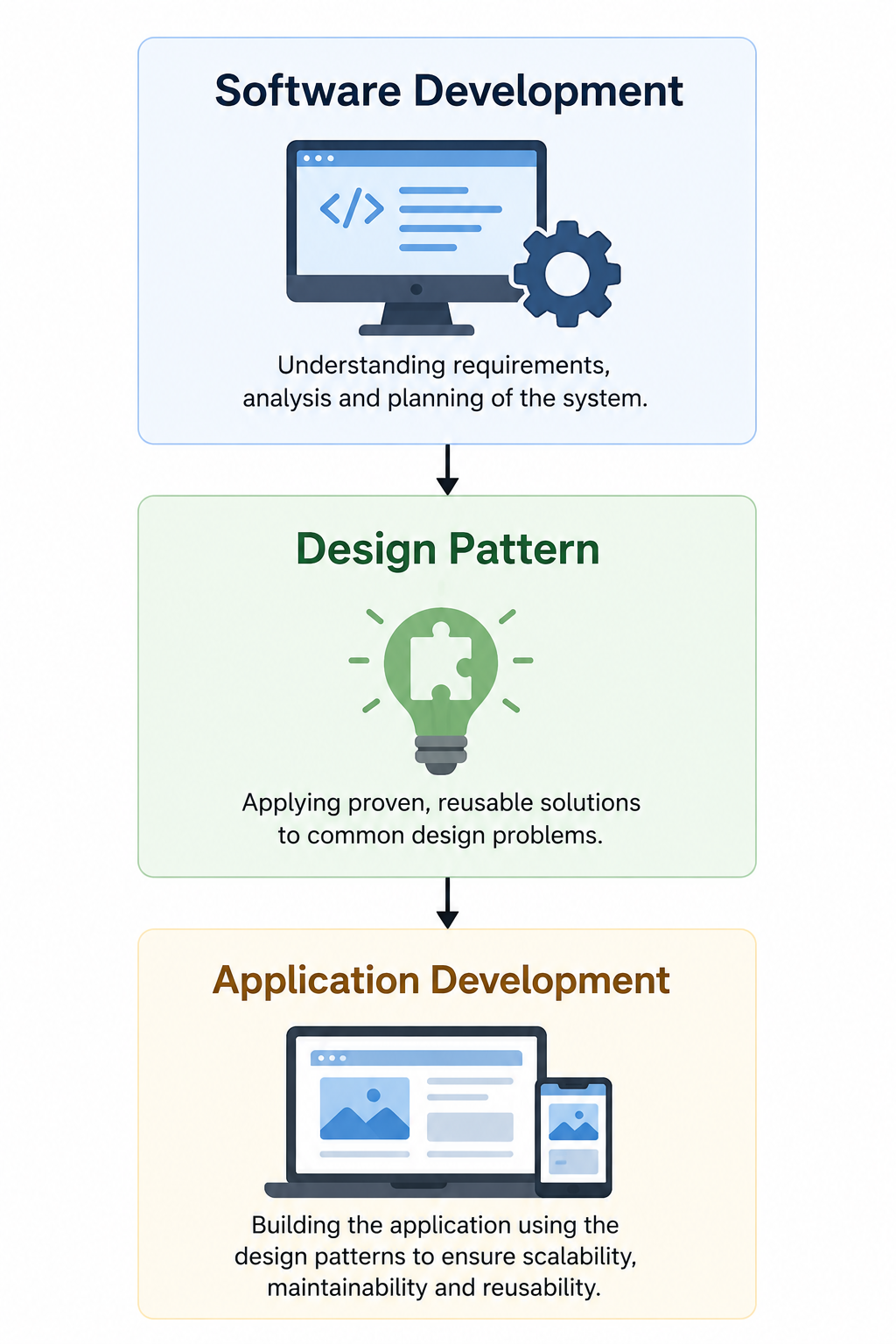
Design Patterns provide proven, reusable solutions to common software design problems. They are not ready-made code or libraries but well-established templates that help developers write clean, maintainable, scalable, and reusable applications.
In modern JavaScript development, design patterns are widely used in frameworks and libraries such as React, Angular, Vue.js, Express.js, Node.js, and many enterprise applications.
Understanding design patterns helps developers move beyond writing code that simply works to writing code that is organized, extensible, and easy to maintain.
What are Design Patterns?
A Design Pattern is a reusable solution to a commonly occurring software design problem.
Rather than solving a problem from scratch every time, developers can apply a design pattern that has already been tested and refined over many years.
Design patterns describe:
- How objects interact
- How responsibilities are distributed
- How code should be organized
- How software can remain flexible as requirements change
A design pattern is not a complete program. Instead, it provides a blueprint that developers adapt to their own applications.
Definition of Design Pattern
A design pattern is:
A general, reusable solution to a commonly occurring problem in software design.
It is important to understand that a design pattern is not:
- A programming language
- A framework
- A library
- A complete algorithm
Instead, it is a recommended approach for solving recurring software design challenges.
Why Do We Need Design Patterns?
Suppose you are building an online shopping application.
Initially, you might have only a few JavaScript files.

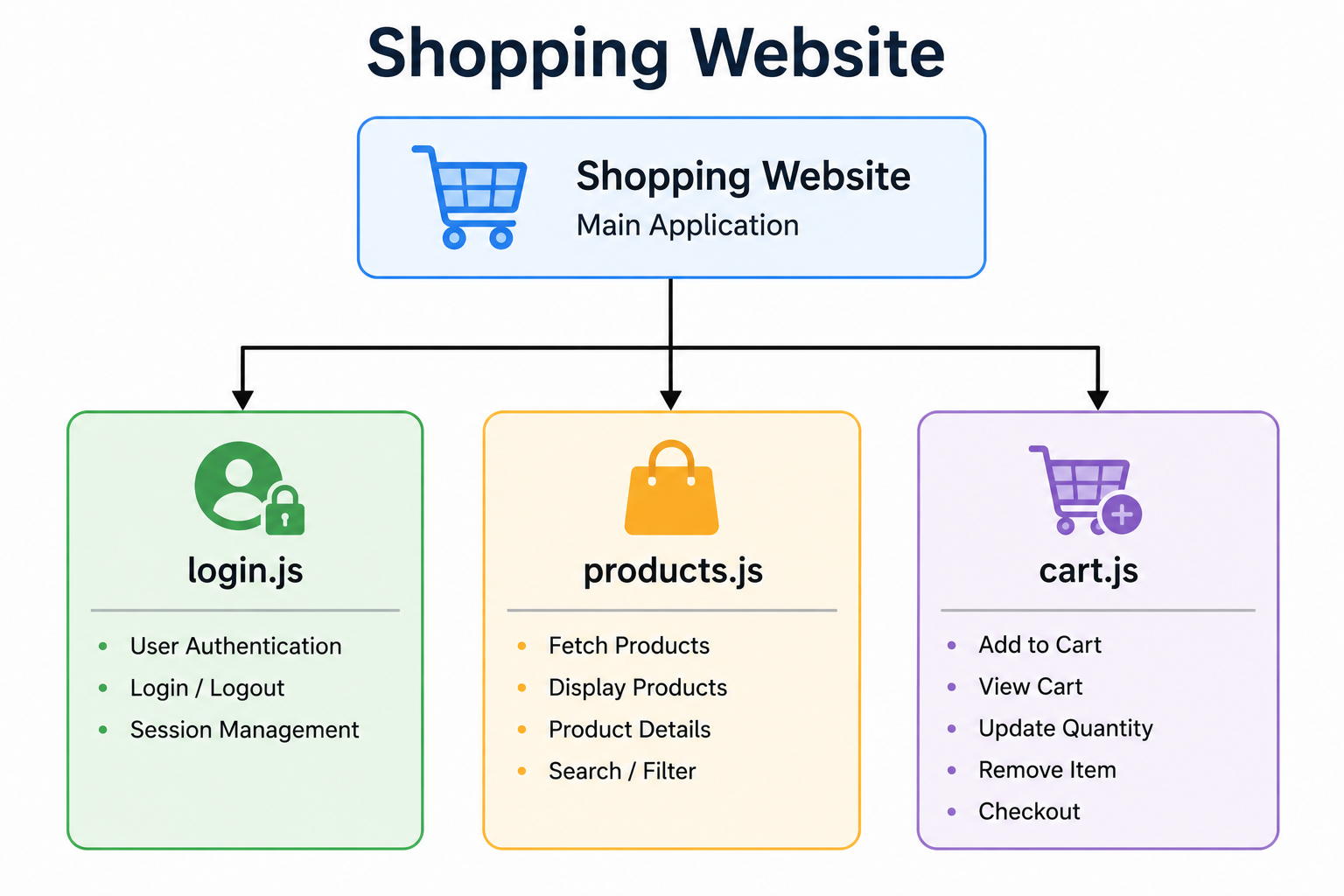
As new features are added, the project grows.

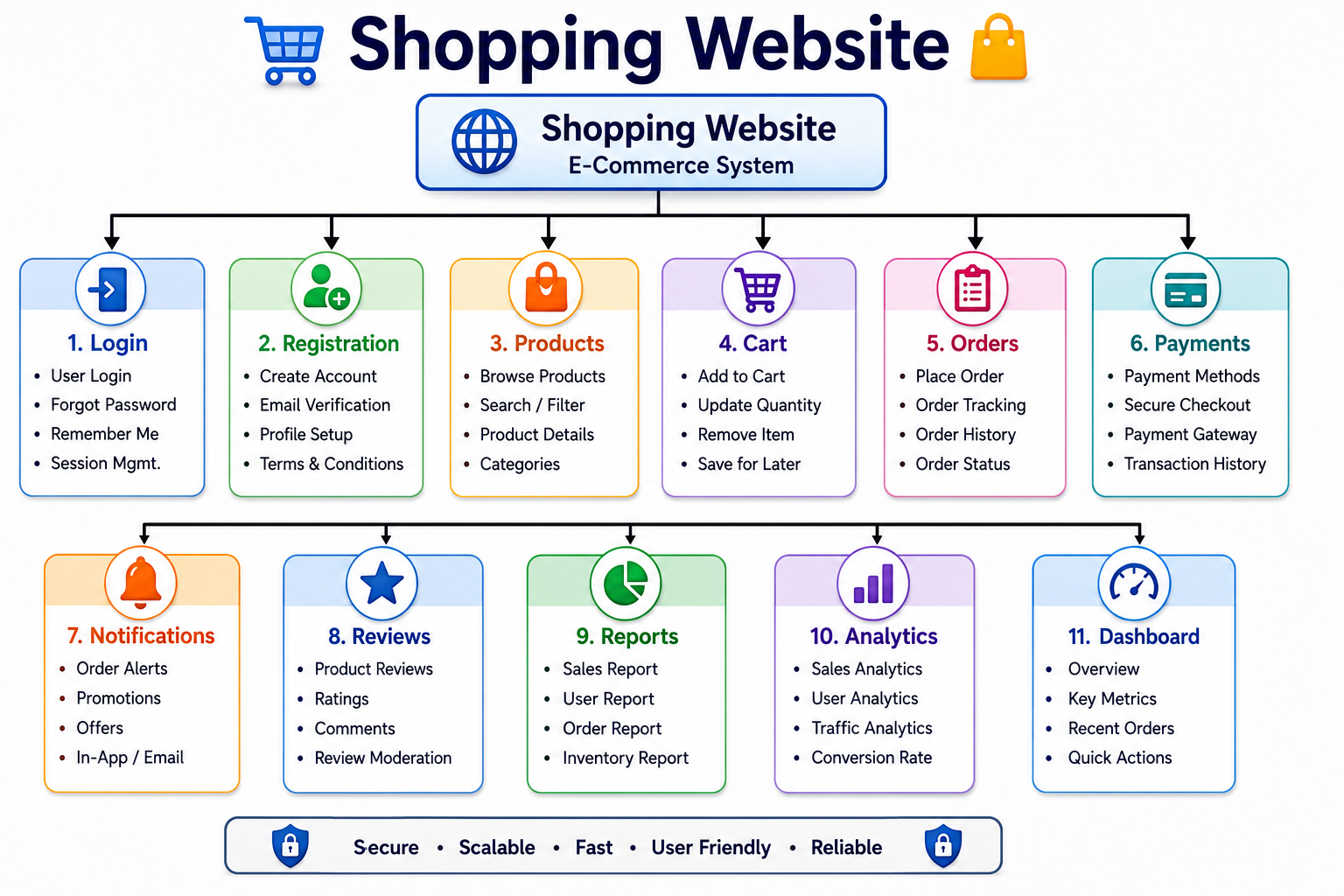
Without proper organization:
- Functions become duplicated.
- Objects become tightly coupled.
- Updating one module affects many others.
- Debugging becomes difficult.
- Testing requires more effort.
Design patterns solve these problems by providing standardized approaches to software architecture.
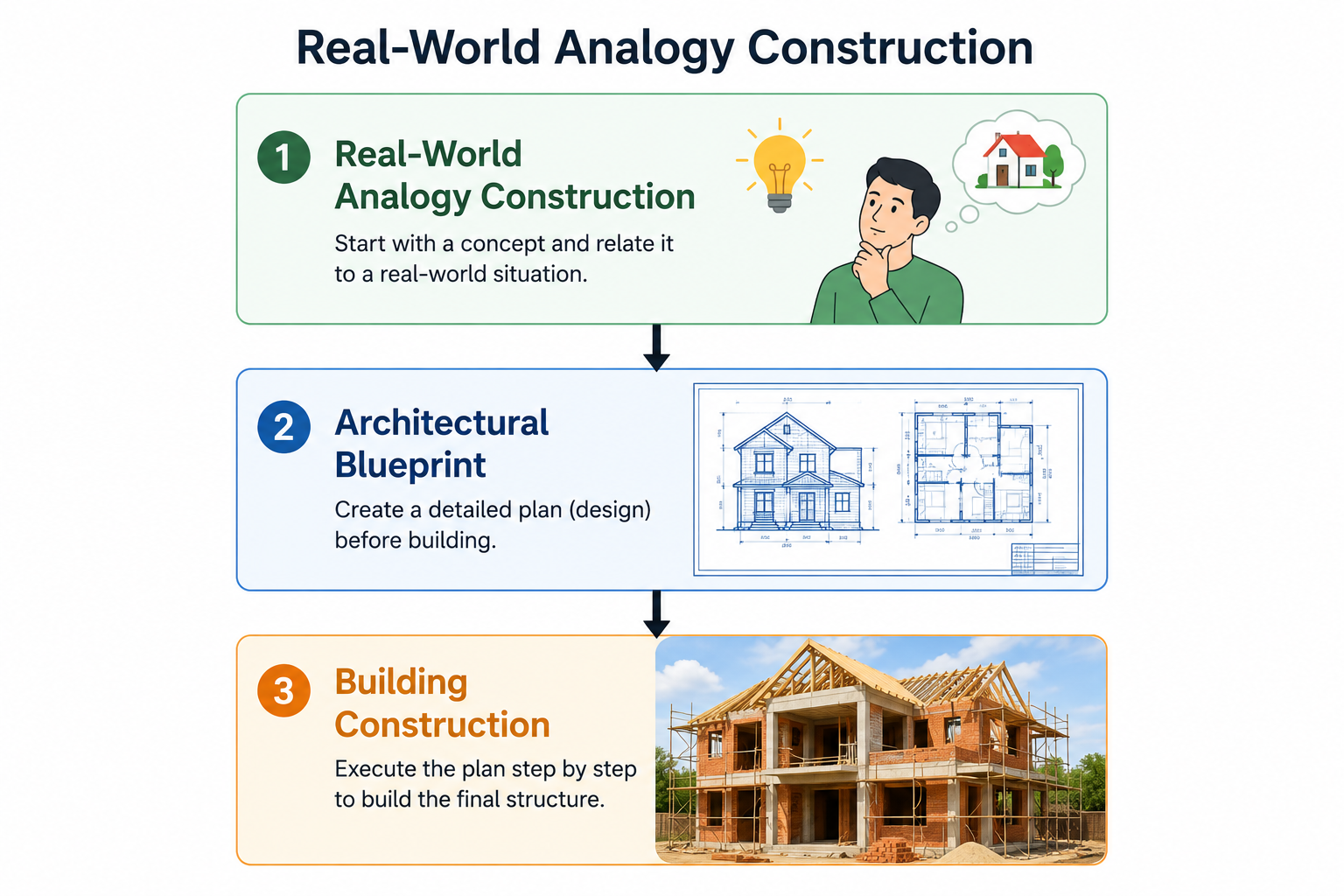
Real-World Analogy
Imagine constructing a residential building.
Architects do not redesign every door, staircase, or window from scratch. Instead, they use proven architectural designs that have been successfully implemented in many buildings.
Similarly, software developers reuse proven software design solutions.
Likewise,


History of Design Patterns
The concept of design patterns originated in architecture.
Architect Christopher Alexander introduced reusable architectural design concepts in the 1970s.
Later, four software engineers adapted these ideas for software development.
They published the famous book:
Design Patterns: Elements of Reusable Object-Oriented Software (1994)
These authors became known as the Gang of Four (GoF).
The Gang of Four (GoF)
The Gang of Four consists of:
- Erich Gamma
- Richard Helm
- Ralph Johnson
- John Vlissides
Their book introduced 23 classic software design patterns, which continue to influence modern software engineering.
Why are Design Patterns Important in JavaScript?
JavaScript has evolved from a simple scripting language into one of the world’s most widely used programming languages.
Today it powers:
- Frontend applications
- Backend servers
- Mobile applications
- Desktop applications
- Progressive Web Apps
- Cloud services
As applications become larger, developers require standardized methods for organizing code.
Design patterns help developers:
- Reduce code duplication
- Improve maintainability
- Increase scalability
- Encourage reusable code
- Simplify debugging
- Improve collaboration among teams
Where are Design Patterns Used?
Design patterns appear throughout modern JavaScript development.
Examples include:
| Technology | Uses Design Patterns |
|---|---|
| React | Component Pattern, Observer Pattern |
| Angular | Dependency Injection, Singleton |
| Vue.js | Observer Pattern |
| Node.js | Module Pattern |
| Express.js | Middleware Pattern |
| Redux | Observer Pattern |
| Next.js | Module Pattern |
Even if developers are unaware of them, they are already using design patterns through modern frameworks.
Characteristics of Good Design Patterns
A good design pattern should:
- Solve a common problem.
- Be reusable.
- Improve code readability.
- Promote loose coupling.
- Encourage maintainability.
- Support scalability.
- Be easy to understand.
Design Patterns vs Algorithms
Many beginners confuse design patterns with algorithms.
They are fundamentally different.
| Design Pattern | Algorithm |
|---|---|
| Solves software design problems | Solves computational problems |
| Focuses on architecture | Focuses on logic |
| Reusable design | Step-by-step procedure |
| Flexible implementation | Fixed sequence of operations |
| Example: Singleton | Example: Binary Search |
Design Patterns vs Frameworks
A framework provides ready-made functionality.
A design pattern provides guidance.
| Design Pattern | Framework |
|---|---|
| Concept | Software platform |
| Flexible implementation | Predefined architecture |
| Language-independent | Language/framework specific |
| Optional | Usually mandatory within the framework |
Example:
React is a framework/library.
Singleton is a design pattern.
Design Patterns vs Libraries
Libraries provide reusable code.
Design patterns provide reusable design solutions.
| Design Pattern | Library |
|---|---|
| Concept | Code |
| Abstract | Concrete implementation |
| Solves architecture | Solves programming tasks |
| No installation | Installed and imported |
Benefits of Design Patterns
Using design patterns provides several advantages.
Improved Code Reusability
Developers can reuse proven solutions instead of creating new ones every time.
Better Maintainability
Well-organized applications are easier to update and debug.
Scalability
Applications can grow without becoming difficult to manage.
Loose Coupling
Objects become less dependent on one another.
This improves flexibility.
Better Team Collaboration
Standard design approaches make code easier for other developers to understand.
Faster Development
Developers spend less time solving recurring architectural problems.
Limitations of Design Patterns
Although design patterns are extremely useful, they should not be used everywhere.
Some limitations include:
- Additional complexity for small applications.
- Learning curve for beginners.
- Incorrect pattern selection may reduce performance.
- Overengineering simple applications.
When Should You Use Design Patterns?
Use design patterns when:
- Building medium or large applications.
- Developing reusable components.
- Working in a development team.
- Designing scalable software.
- Solving recurring architectural problems.
Avoid unnecessary patterns in very small applications.
Categories of Design Patterns
The Gang of Four classified design patterns into three major categories.
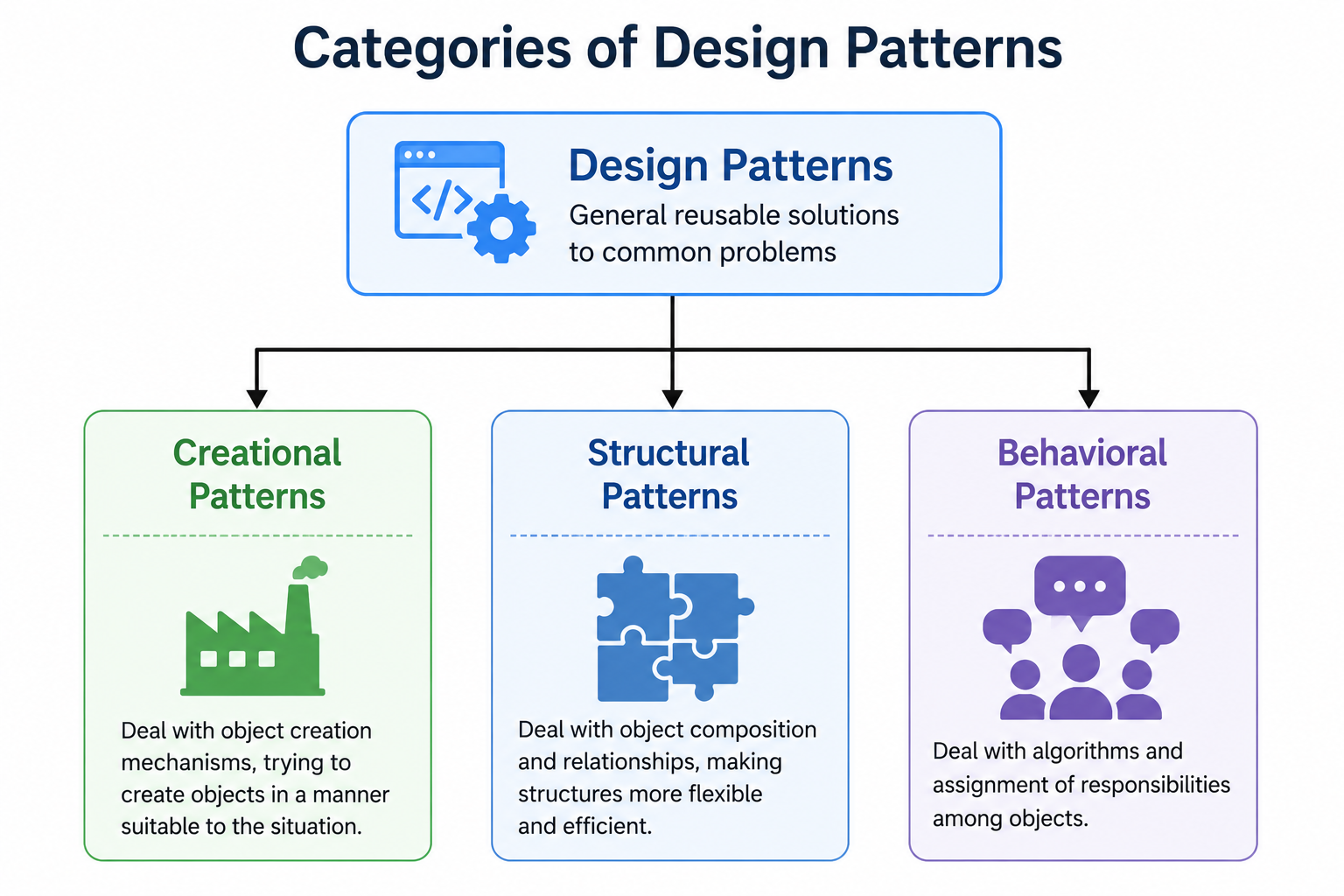

1. Creational Design Patterns
These patterns focus on object creation.
Instead of creating objects directly, they provide flexible methods for object creation.
Examples:
- Singleton
- Factory
- Prototype
2. Structural Design Patterns
These patterns describe how objects and classes are organized into larger structures.
Examples:
- Module
- Adapter
- Facade
- Decorator
3. Behavioral Design Patterns
Behavioral patterns focus on communication between objects.
Examples:
- Observer
- Strategy
- Command
- State
Design Pattern Selection Workflow
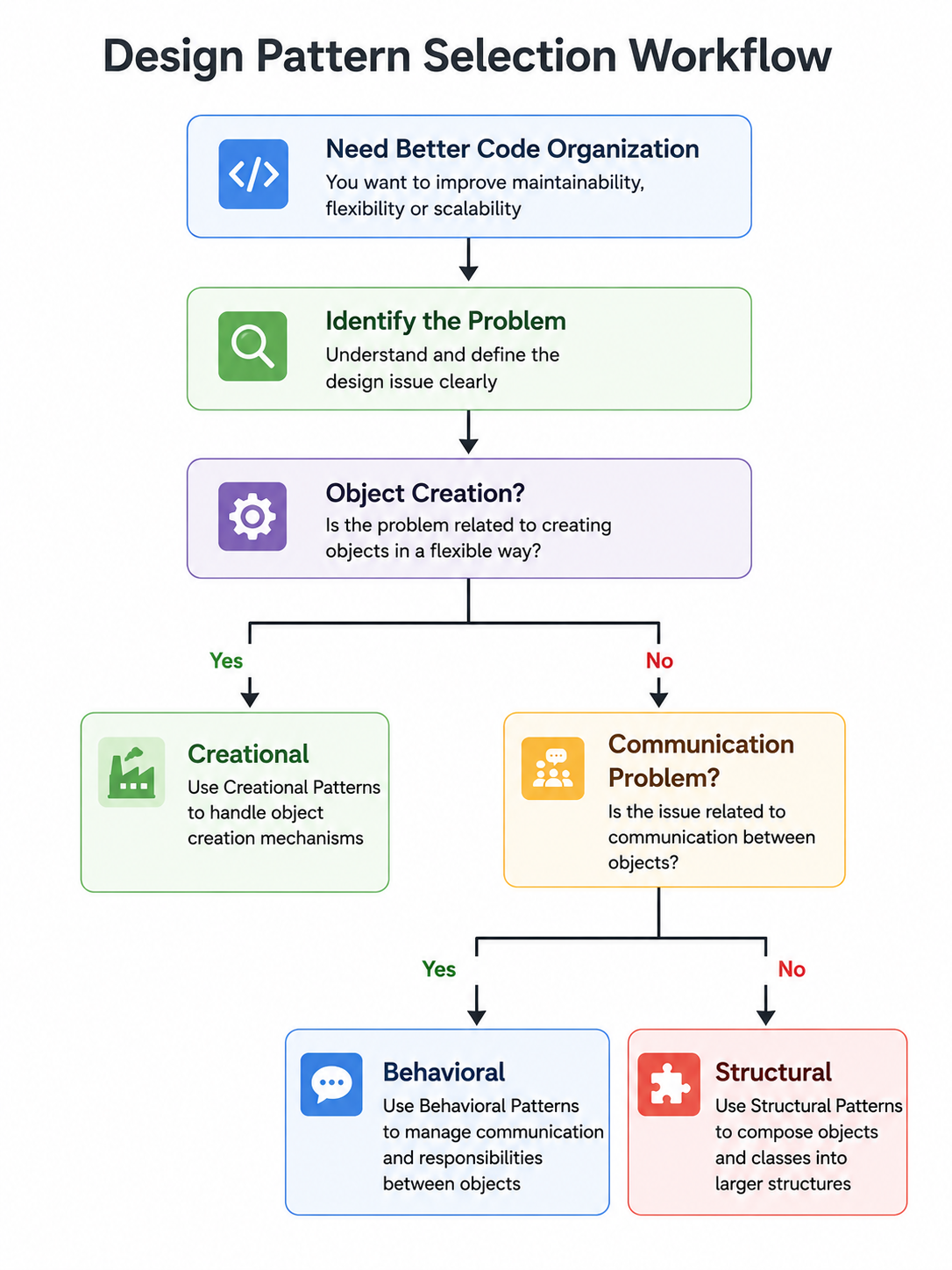

Design Pattern Categories at a Glance
| Category | Purpose | Examples |
|---|---|---|
| Creational | Create objects efficiently | Singleton, Factory, Prototype |
| Structural | Organize classes and objects | Module, Adapter, Facade, Decorator |
| Behavioral | Manage communication between objects | Observer, Strategy, Command, State |
Why Learn Design Patterns Before React and Node.js?
Modern JavaScript frameworks rely heavily on design patterns.
For example:
- React uses component-based architecture and observer concepts.
- Redux follows the observer pattern.
- Express uses middleware, which resembles the chain of responsibility pattern.
- Node.js uses the module pattern extensively.
Understanding design patterns first makes learning these frameworks much easier.
Best Practices
- Choose a pattern only when it solves a real problem.
- Keep designs simple and readable.
- Prefer composition over unnecessary inheritance.
- Follow SOLID principles alongside design patterns.
- Avoid using patterns just because they are popular.
Common Mistakes
- Treating design patterns as complete solutions.
- Applying patterns to very small programs.
- Using multiple patterns unnecessarily.
- Ignoring readability in favor of complexity.
- Choosing a pattern without understanding the problem it solves.
Singleton Design Pattern in JavaScript
What is the Singleton Pattern?
The Singleton Pattern is a Creational Design Pattern that ensures only one instance of a class is created throughout the application’s lifecycle.
Whenever another object is requested, the existing object is returned instead of creating a new one.
In simple words,
One Class → One Object → Shared Everywhere
Singleton is one of the most widely used design patterns in JavaScript because many applications require only a single instance of certain objects such as configuration managers, database connections, loggers, authentication services, and caches.
Definition
The Singleton Pattern is a design pattern that:
- Creates only one object.
- Provides a global access point.
- Prevents multiple object creation.
- Shares the same instance throughout the application.
Why Do We Need the Singleton Pattern?
Imagine a web application where every page creates a new database connection.

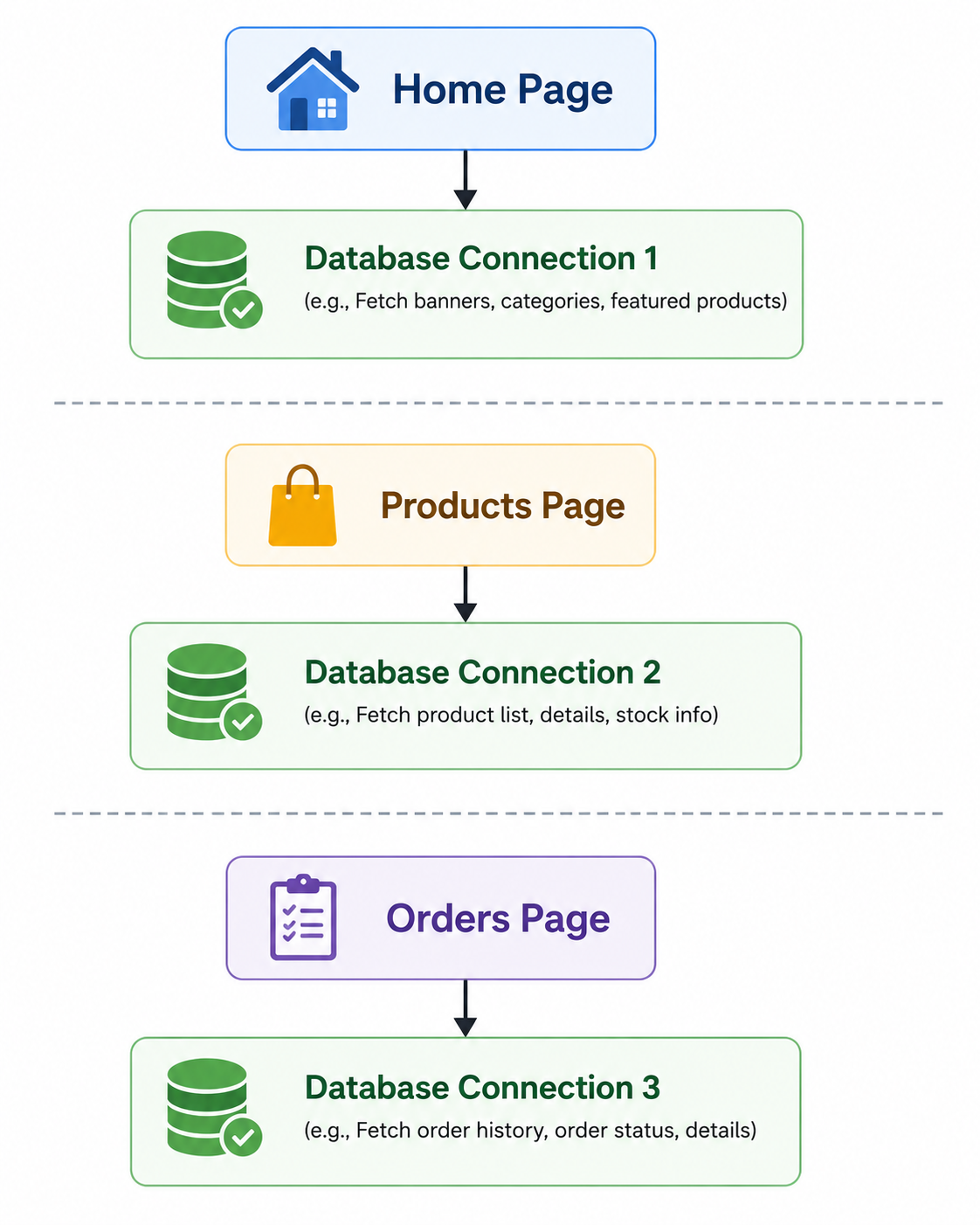
Problems:
- Unnecessary memory usage
- Multiple active connections
- Slower performance
- Difficult resource management
Instead,
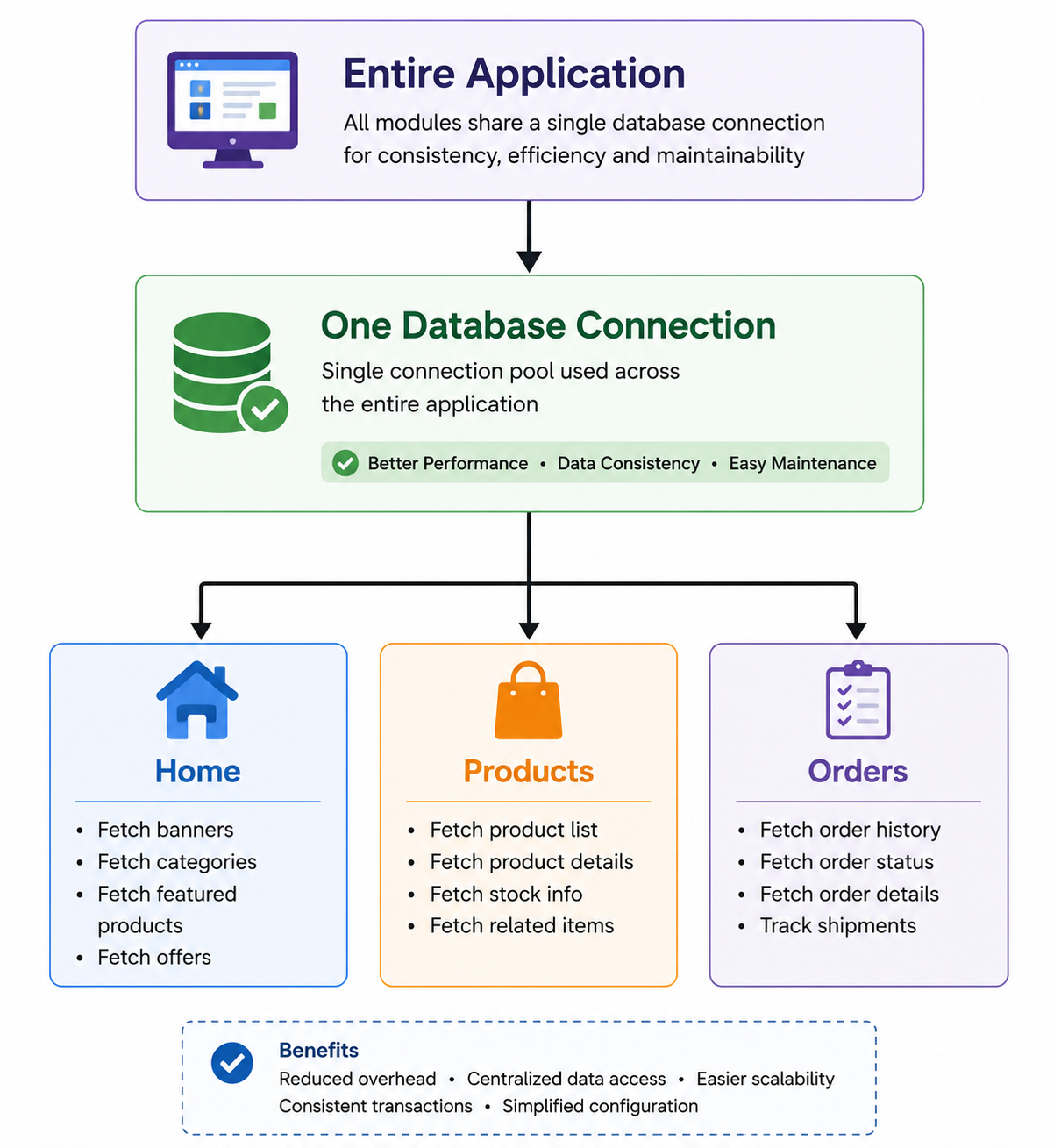

Every module uses the same database connection.
This is exactly what the Singleton Pattern provides.
Real-World Analogy
Consider a Printer in an office.
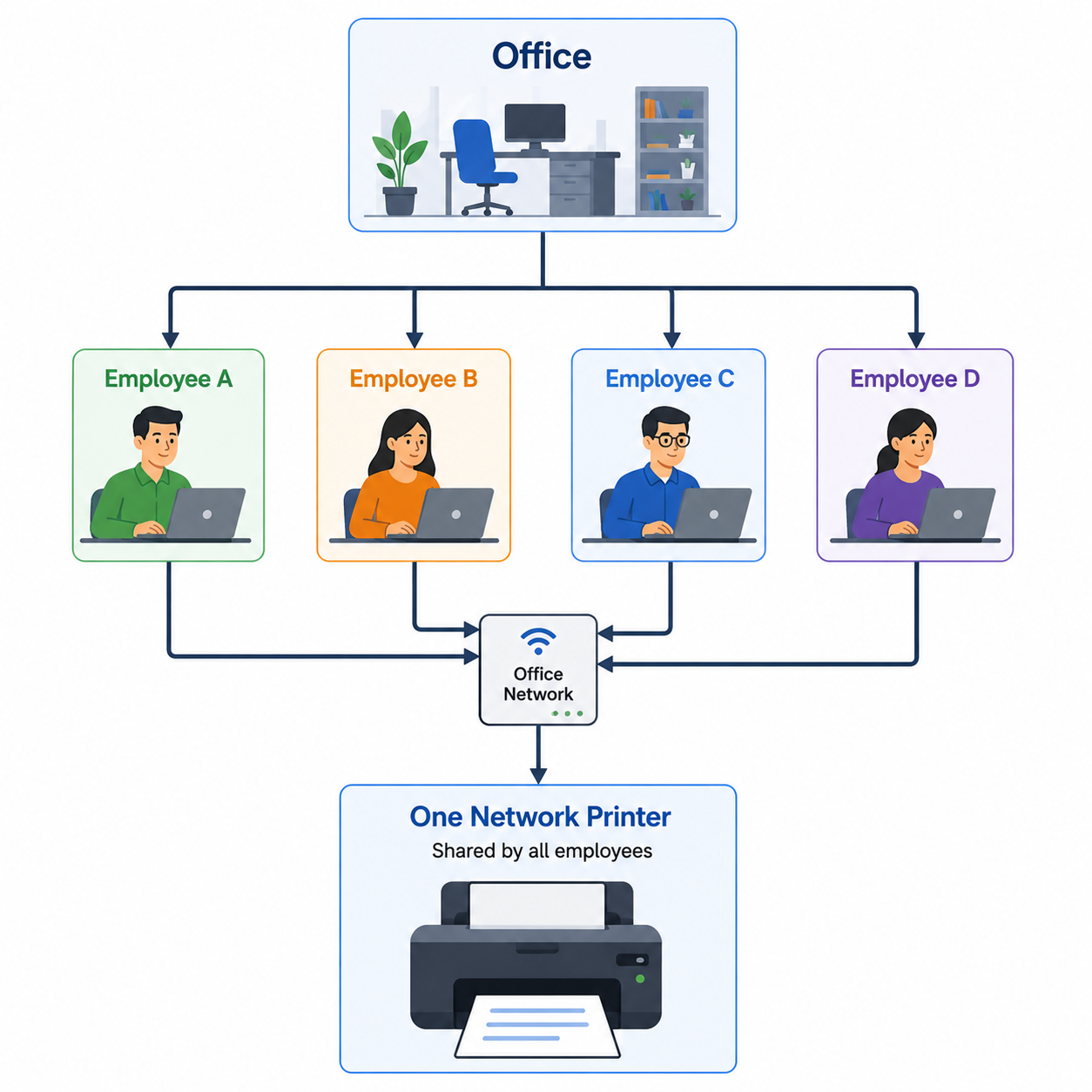

Creating a separate printer for every employee would waste resources.
Singleton works in the same way.
Characteristics of Singleton Pattern
A Singleton object:
- Has only one instance.
- Is created only once.
- Is shared throughout the application.
- Provides global access.
- Prevents duplicate objects.
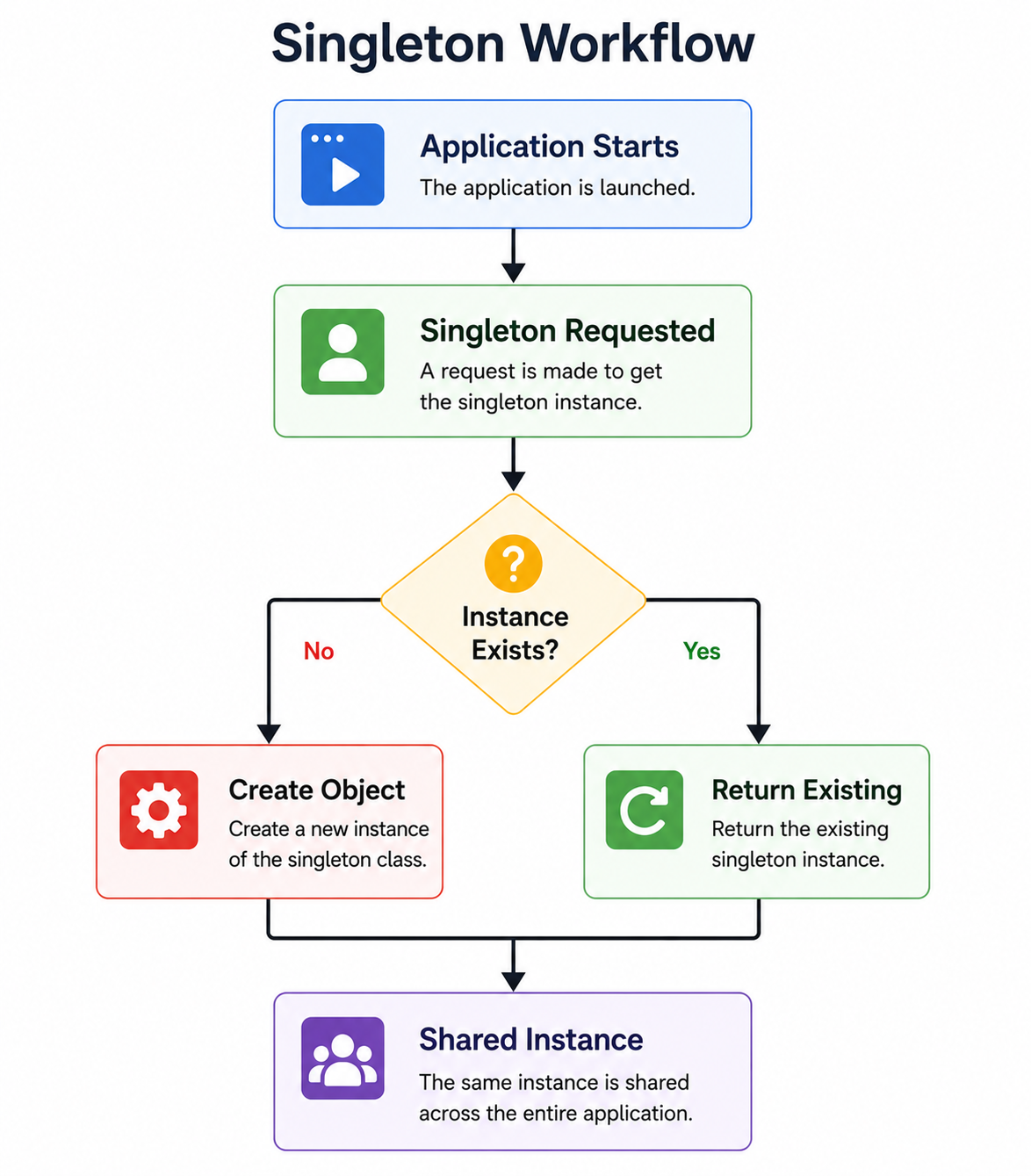
Singleton Workflow
Application Starts

        │

        ▼

Singleton Requested

        │

        ▼

Instance Exists?

   ┌───────────────┐

   │               │

  No              Yes

   │               │

   ▼               ▼

Create Object   Return Existing

        │

        └──────────────► Shared Instance
Normal Object Creation
Without Singleton
class Database{

}

const db1 = new Database();

const db2 = new Database();

console.log(db1 === db2);falseExplanation
Every new keyword creates a completely new object.
Singleton Object Creation
With Singleton

Implementing Singleton Pattern
There are multiple ways to implement Singleton in JavaScript.
- Using ES6 Classes
- Using Closures
- Using Modules
- Using Static Properties
The ES6 Class approach is the easiest to understand.
Example 1: Basic Singleton Class
class Singleton{

    static instance;

    constructor(){

        if(Singleton.instance){

            return Singleton.instance;

        }

        Singleton.instance=this;

    }

}

const obj1=new Singleton();

const obj2=new Singleton();

console.log(obj1===obj2);trueExplanation
When the second object is created,
JavaScript checks
Singleton.instancethe constructor returns the same object.
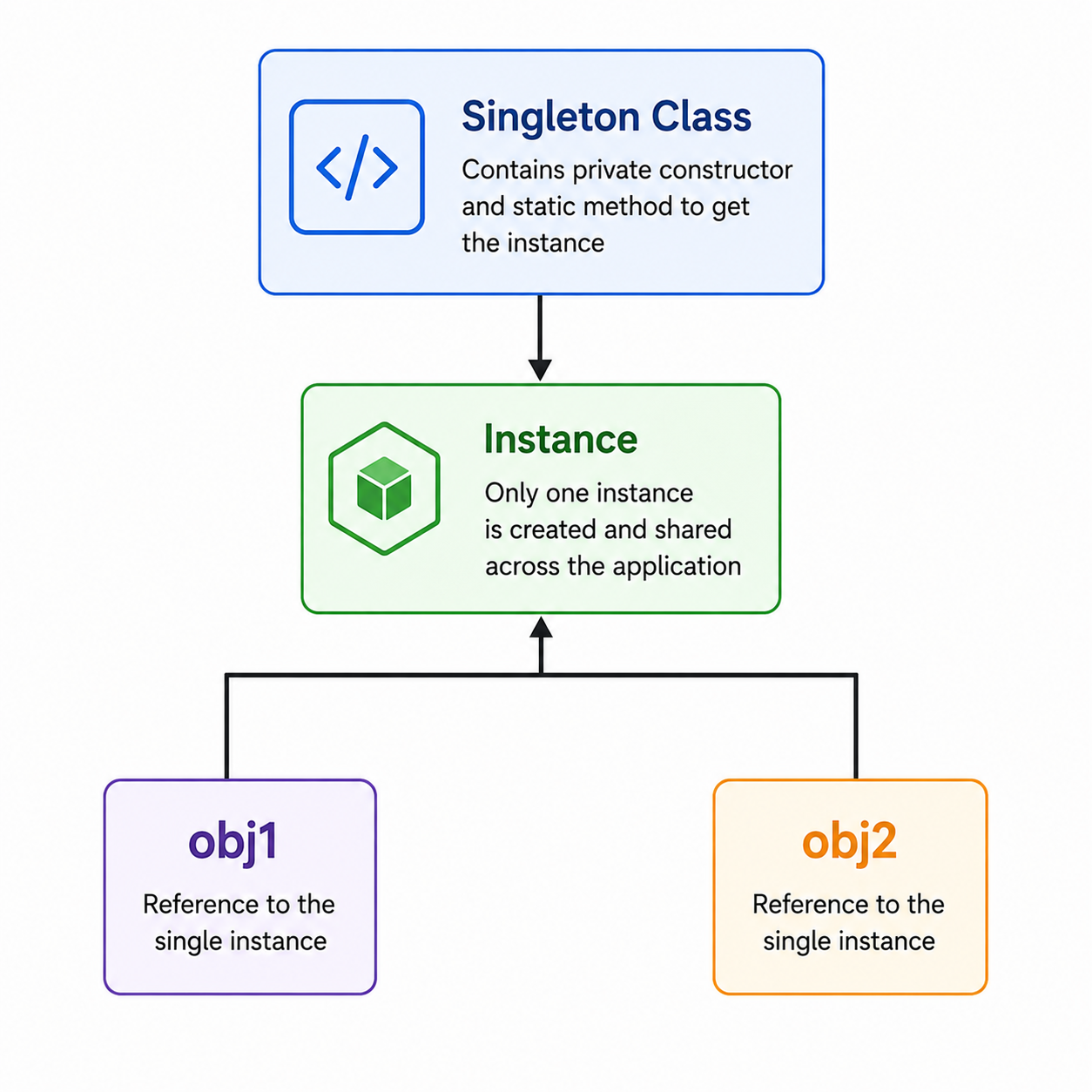
Memory Representation
Both variables point to the same object.

Example 2: Configuration Manager
Many applications load configuration only once.
class Configuration{

    static instance;

    constructor(){

        if(Configuration.instance){

            return Configuration.instance;

        }

        this.theme="Light";

        this.language="English";

        Configuration.instance=this;

    }

}

const config1=new Configuration();

const config2=new Configuration();

config2.theme="Dark";

console.log(config1.theme);

console.log(config2.theme);Dark
DarkExplanation
Both variables reference the same configuration object.
Changing one object automatically updates the other.
Example 3: Logger
Applications usually require only one logger.
class Logger{

    static instance;

    constructor(){

        if(Logger.instance){

            return Logger.instance;

        }

        Logger.instance=this;

    }

    log(message){

        console.log("[LOG]",message);

    }

}

const logger1=new Logger();

const logger2=new Logger();

logger1.log("Application Started");

console.log(

logger1===logger2

);[LOG] Application Started
trueExample 4: Local Storage Manager
Instead of repeatedly accessing Local Storage directly,
one manager controls all operations.
class StorageManager{

    static instance;

    constructor(){

        if(StorageManager.instance){

            return StorageManager.instance;

        }

        StorageManager.instance=this;

    }

    save(key,value){

        localStorage.setItem(

        key,

        value

        );

    }

    get(key){

        return localStorage.getItem(

        key

        );

    }

}

const storage=new StorageManager();

storage.save(

"name",

"Akshay"

);

console.log(

storage.get("name")

);AkshayExample 5: Theme Manager
class ThemeManager{

    static instance;

    constructor(){

        if(ThemeManager.instance){

            return ThemeManager.instance;

        }

        this.theme="Light";

        ThemeManager.instance=this;

    }

    changeTheme(theme){

        this.theme=theme;

    }

}

const t1=new ThemeManager();

const t2=new ThemeManager();

t2.changeTheme("Dark");

console.log(t1.theme);DarkSingleton vs Normal Class
| Normal Class | Singleton |
|---|---|
| Multiple objects | One object |
| More memory | Less memory |
| Independent objects | Shared object |
| No global access | Global access |
| Used for general objects | Used for shared resources |
Advantages of Singleton Pattern
Memory Efficient
Only one object is created.
Global Access
Every module accesses the same instance.
Better Resource Management
Useful for database connections and loggers.
Prevents Duplicate Objects
Avoids unnecessary object creation.
Easier Configuration Management
Configuration remains consistent throughout the application.
Disadvantages of Singleton Pattern
- Behaves like a global variable if overused.
- Difficult to unit test.
- Reduces flexibility.
- Can introduce hidden dependencies.
- Not suitable for every class.
Real-World Applications
Singleton Pattern is commonly used for:
- Database Connection
- Logger
- Configuration Manager
- Authentication Manager
- Cache Manager
- Session Manager
- Theme Manager
- API Client
- File Manager
- Printer Manager
When Should You Use Singleton?
Use Singleton when:
- Only one object should exist.
- The object is shared by the entire application.
- Creating multiple instances wastes resources.
- Global access is required.
When Should You Avoid Singleton?
Avoid Singleton when:
- Multiple independent objects are needed.
- Each user requires a separate object.
- The object stores user-specific data.
- Testing requires isolated instances.
Best Practices
- Use Singleton only when a single shared instance is truly required.
- Keep the Singleton class focused on one responsibility.
- Avoid storing unrelated business logic inside a Singleton.
- Use lazy initialization when object creation is expensive.
- Combine Singleton with modules for better organization.
Common Mistakes
- Creating multiple instances accidentally.
- Using Singleton for every class.
- Treating Singleton as a replacement for dependency injection.
- Storing excessive application state in a Singleton.
- Making Singleton responsible for unrelated tasks.
Interview Questions
1. What is the Singleton Pattern?
A design pattern that ensures only one instance of a class exists and provides global access to it.
2. Why is Singleton considered a Creational Pattern?
Because it controls how objects are created and ensures that only one object is instantiated.
3. Name three real-world applications of the Singleton Pattern.
- Database Connection
- Logger
- Configuration Manager
4. What is the main advantage of Singleton?
It saves memory and ensures consistent access to shared resources.
5. Can Singleton reduce application performance?
If misused, it can create unnecessary global state and make applications harder to test and maintain.
Factory Design Pattern in JavaScript
What is the Factory Pattern?
The Factory Pattern is a Creational Design Pattern that provides a centralized way to create objects without exposing the object creation logic to the client.
Instead of using the new keyword throughout the application, a factory function or factory class is responsible for creating and returning the appropriate object.
In simple words,
The Factory Pattern creates objects for you based on the provided requirements.
This makes applications more flexible, scalable, and easier to maintain.
Definition
The Factory Pattern is a design pattern that:
- Creates objects without exposing object creation logic.
- Centralizes object creation.
- Returns different object types based on input.
- Reduces coupling between object creation and object usage.
Why Do We Need the Factory Pattern?
Suppose you are building an e-commerce website.
Without the Factory Pattern:
const admin = new Admin();
const customer = new Customer();
const seller = new Seller();Problems:
- Repeated object creation code
- Difficult maintenance
- Hard to introduce new object types
- Tight coupling
Instead, use a factory.
const user = UserFactory.createUser("Admin");Real-World Analogy
Imagine ordering a coffee from a coffee shop.
You don’t prepare the coffee yourself.
Instead,
Customer

     │

     ▼

Coffee Factory

     │

───────────────

│      │      │

Espresso

Latte

Cappuccino
The factory prepares and returns the correct coffee.
Characteristics of Factory Pattern
A Factory:
- Centralizes object creation.
- Hides creation logic.
- Creates different object types.
- Makes applications scalable.
- Reduces duplicate code.
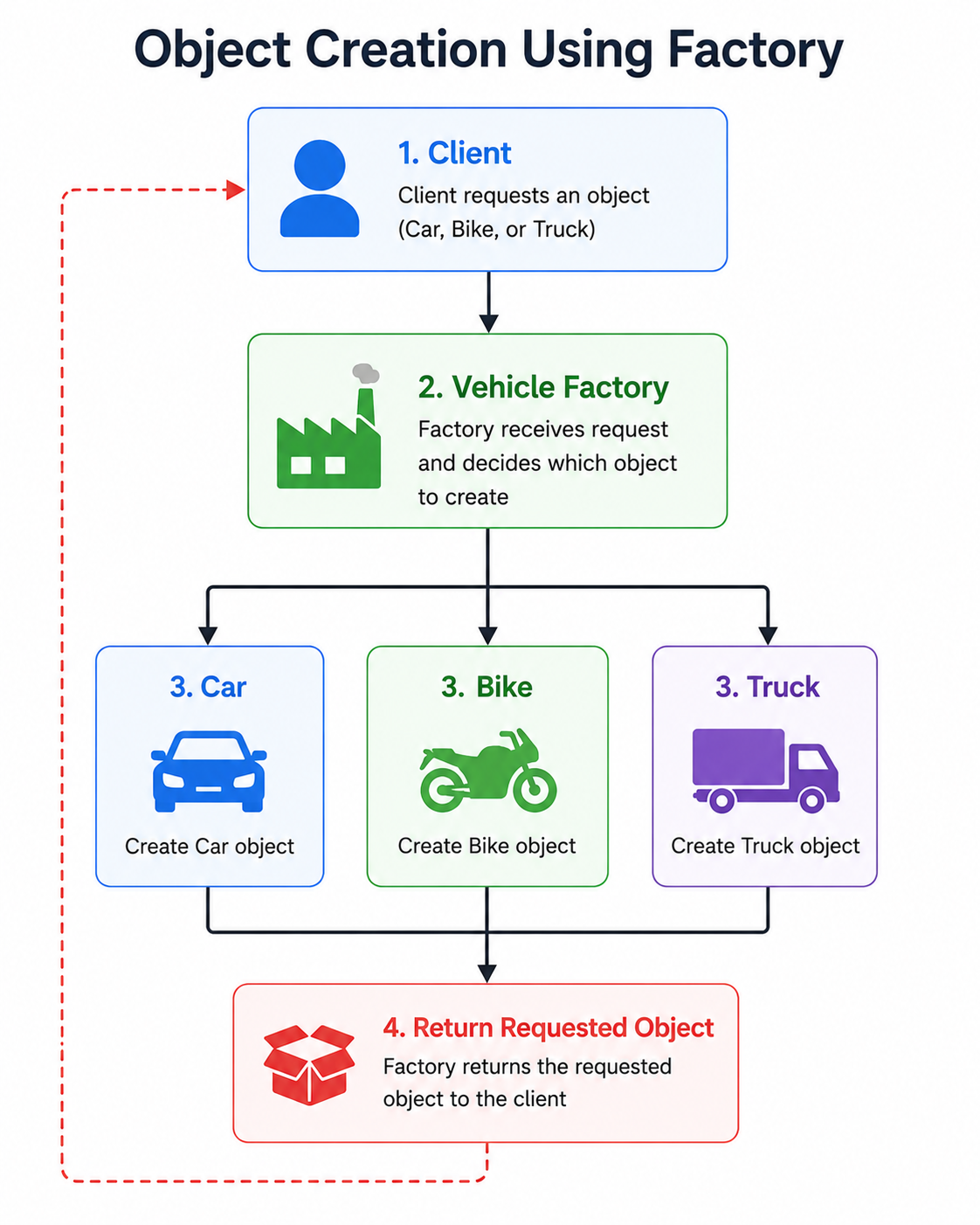
Factory Pattern Workflow
Application

      │

      ▼

Factory

      │

Select Object Type

      │

───────────────

│       │      │

Car    Bike   Truck

      │

      ▼

Return Object
Traditional Object Creation
Without Factory
class Car{}

class Bike{}

const car = new Car();

const bike = new Bike();
Every object is created manually.
Object Creation Using Factory

Example 1: Simple Factory Function
function vehicleFactory(type){

    if(type==="car"){

        return {

            type:"Car"

        };

    }

    if(type==="bike"){

        return{

            type:"Bike"

        };

    }

}

const vehicle1=

vehicleFactory("car");

const vehicle2=

vehicleFactory("bike");

console.log(vehicle1);

console.log(vehicle2);{type:"Car"}
{type:"Bike"}Explanation
Instead of writing
new Car();

new Bike();
the factory creates the correct object automatically.
Example 2: Vehicle Factory Using Classes
class Car{

    drive(){

        console.log(

        "Driving Car"

        );

    }

}

class Bike{

    drive(){

        console.log(

        "Riding Bike"

        );

    }

}

class VehicleFactory{

    static createVehicle(type){

        if(type==="car")

            return new Car();

        if(type==="bike")

            return new Bike();

    }

}

const vehicle=

VehicleFactory.createVehicle("car");

vehicle.drive();
Output
Driving CarExample 3: Employee Factory
class Manager{

    work(){

        console.log(

        "Managing Team"

        );

    }

}

class Developer{

    work(){

        console.log(

        "Writing Code"

        );

    }

}

class EmployeeFactory{

    static createEmployee(role){

        if(role==="manager")

            return new Manager();

        if(role==="developer")

            return new Developer();

    }

}

const employee=

EmployeeFactory.createEmployee(

"developer"

);

employee.work();
Output
Writing CodeExample 4: Notification Factory
Many applications send notifications through different channels.
Notification

      │

───────────────

│       │      │

Email   SMS   Push
class Email{
send(){
console.log(
"Email Sent"
);
}
}
class SMS{
send(){
console.log(
"SMS Sent"
);
}
}
class Push{
send(){
console.log(
"Push Notification Sent"
);
}
}
class NotificationFactory{
static create(type){
switch(type){
case "email":
return new Email();
case "sms":
return new SMS();
case "push":
return new Push();
}
}
}
const notification=
NotificationFactory.create(
"email"
);
notification.send();Email SentExample 5: Authentication Factory
Modern applications support multiple authentication methods.
Authentication

       │

───────────────

│        │

Google  GitHub

         │

      Facebook
class Google{
login(){
console.log(
"Google Login"
);
}
}
class GitHub{
login(){
console.log(
"GitHub Login"
);
}
}
class AuthenticationFactory{
static create(provider){
switch(provider){
case "google":
return new Google();
case "github":
return new GitHub();
}
}
}
const auth=
AuthenticationFactory.create(
"github"
);
auth.login();Output
GitHub LoginExample 6: Shape Factory
class Circle{

    draw(){

        console.log("Circle");

    }

}

class Rectangle{

    draw(){

        console.log("Rectangle");

    }

}

class ShapeFactory{

    static create(shape){

        if(shape==="circle")

            return new Circle();

        if(shape==="rectangle")

            return new Rectangle();

    }

}

const object=

ShapeFactory.create(

"circle"

);

object.draw();
Output
CircleFactory Pattern Workflow Example

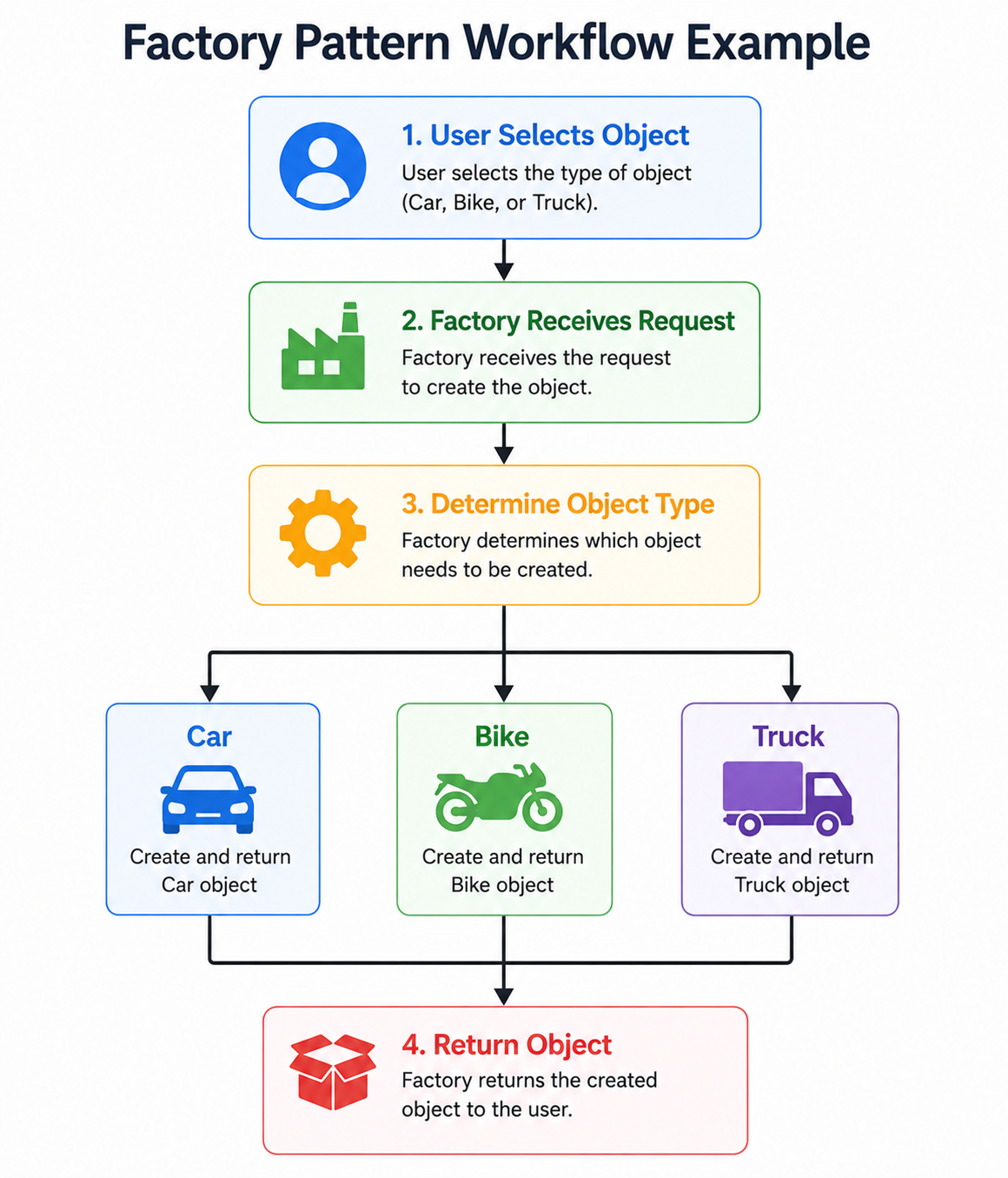
factory-pattern-workflow-example
Factory Pattern vs Constructor Function
| Factory Pattern | Constructor Function |
|---|---|
| Controls object creation | Creates one type of object |
| Hides creation logic | Requires new keyword |
| Creates multiple object types | Creates similar objects |
| Easier to extend | Less flexible |
Factory Pattern vs Singleton Pattern
| Factory | Singleton |
|---|---|
| Creates many objects | Creates only one object |
| Focuses on object creation | Focuses on shared instance |
| Multiple instances allowed | Single instance only |
| Flexible | Global shared object |
Advantages of Factory Pattern
Encapsulates Object Creation
Clients do not need to know how objects are created.
Improves Maintainability
Changes in object creation are made only in the factory.
Reduces Code Duplication
Object creation logic exists in one place.
Improves Scalability
Adding a new object type usually requires updating only the factory.
Loose Coupling
The client depends on the factory, not on concrete classes.
Disadvantages of Factory Pattern
- Additional abstraction.
- More classes/functions.
- Slightly increased complexity.
- Not necessary for very small applications.
Real-World Applications
Factory Pattern is commonly used for:
- UI Component Creation
- Authentication Systems
- Database Drivers
- Payment Gateways
- Notification Services
- API Clients
- Vehicle Manufacturing Systems
- Game Character Creation
- Cloud Service Providers
- Plugin Systems
When Should You Use Factory Pattern?
Use the Factory Pattern when:
- Multiple object types are required.
- Object creation logic is complex.
- You want to reduce coupling.
- New object types may be added later.
- You want to centralize object creation.
When Should You Avoid Factory Pattern?
Avoid using the Factory Pattern when:
- Only one simple object is created.
- Object creation logic is straightforward.
- Additional abstraction provides no benefit.
- The application is very small.
Best Practices
- Keep factory methods focused only on object creation.
- Avoid placing business logic inside the factory.
- Use meaningful factory names such as
UserFactoryorPaymentFactory. - Return objects that share a common interface when possible.
- Use
switchstatements or mapping objects for readability when handling many object types.
Common Mistakes
- Creating factories for trivial objects.
- Mixing business logic with object creation.
- Returning inconsistent object structures.
- Creating a very large factory responsible for unrelated object types.
- Ignoring error handling for unsupported object requests.
Prototype Design Pattern in JavaScript
What is the Prototype Pattern?
The Prototype Pattern is a Creational Design Pattern that creates new objects by cloning or inheriting from an existing object instead of creating them from scratch.
Unlike many object-oriented programming languages that rely solely on classes, JavaScript uses a prototype-based inheritance model. Every object in JavaScript has an internal link to another object called its prototype.
In simple words,
Prototype Pattern allows new objects to inherit properties and methods from existing objects.
This approach reduces memory usage, promotes code reuse, and improves performance by sharing methods across multiple objects.
Definition
The Prototype Pattern is a design pattern that:
- Creates new objects from existing objects.
- Shares methods through prototypes.
- Reduces duplicate code.
- Supports inheritance without copying methods into every object.
Why Do We Need the Prototype Pattern?
Suppose you create 1,000 student objects.
Without prototypes:
const student1 = {
    display() { }
};

const student2 = {
    display() { }
};

const student3 = {
    display() { }
};
Each object contains its own copy of the display() method.
This wastes memory.
Instead,
Student Object

        │

        ▼

Prototype

        │

        ▼

display()

        ▲

────────┼────────

│       │       │

Student1 Student2 Student3Real-World Analogy
Imagine a photocopy machine.
Original Document

        │

        ▼

Photocopy Machine

        │

───────────────

│       │       │

Copy1  Copy2  Copy3
Instead of creating each document manually, copies are produced from the original.
Similarly, the Prototype Pattern creates new objects using an existing prototype.
Characteristics of Prototype Pattern
- Creates objects through cloning or inheritance.
- Shares common methods.
- Reduces memory consumption.
- Improves performance.
- Supports prototype-based inheritance.
Prototype Workflow
Create Prototype Object

        │

        ▼

Add Shared Methods

        │

        ▼

Create New Objects

        │

───────────────

│       │       │

Object1 Object2 Object3

        │

        ▼

Shared Prototype Methods
Understanding JavaScript Prototypes
Every JavaScript object has an internal prototype.
const student = {

    name:"Akshay"

};

console.log(

Object.getPrototypeOf(student)

);
Output
{}Prototype Chain
When JavaScript searches for a property:
- It checks the current object.
- If not found, it checks the prototype.
- If still not found, it checks the next prototype.
- The process continues until
nullis reached.
Prototype Chain Workflow
Object

   │

Property Found?

│            │

Yes         No

│            ▼

Return     Prototype

              │

       Property Found?

         │          │

        Yes        No

         │          ▼

      Return      Next Prototype

                      │

                    null
Example 1: Prototype Method
function Student(name){

    this.name=name;

}

Student.prototype.display=function(){

    console.log(

    "Student :",this.name

    );

};

const student1=

new Student("Akshay");

const student2=

new Student("Rahul");

student1.display();

student2.display();
Output
Student : Akshay

Student : Rahul
Explanation
The display() method exists only once in memory and is shared by every Student object.
Example 2: Sharing Methods
function Employee(name){

    this.name=name;

}

Employee.prototype.work=function(){

    console.log(

    this.name+

    " is Working"

    );

};

const emp1=

new Employee("Rahul");

const emp2=

new Employee("Sneha");

emp1.work();

emp2.work();
Output
Rahul is Working

Sneha is Working
Example 3: Using Object.create()
JavaScript provides the Object.create() method to create objects from an existing prototype.
Syntax
Object.create(prototypeObject);Example
const person={

    greet(){

        console.log(

        "Welcome"

        );

    }

};

const student=

Object.create(person);

student.greet();WelcomeExplanation
The student object does not define the greet() method.
Instead, it inherits the method from person.
Example 4: Adding Properties
const person={

    greet(){

        console.log("Hello");

    }

};

const employee= Object.create(person);

employee.name="Akshay";

console.log(employee.name);

employee.greet();
Output
Akshay

Hello
Example 5: Prototype Inheritance
const animal={

    eat(){

        console.log(

        "Eating"

        );

    }

};

const dog=

Object.create(animal);

dog.bark=function(){

    console.log(

    "Barking"

    );

};

dog.eat();

dog.bark();
Output
Eating

Barking
Example 6: Checking Prototype
const student={

name:"Akshay"

};

console.log(

Object.getPrototypeOf(student)

);
Example 7: Setting Prototype
const person={

greet(){

console.log("Hello");

}

};

const student={

name:"Akshay"

};

Object.setPrototypeOf(

student,

person

);

student.greet();
Output
HelloPrototype Chain Visualization
Student Object

        │

        ▼

Student Prototype

        │

        ▼

Object Prototype

        │

        ▼

      null
Prototype vs ES6 Class
Although ES6 introduced the class keyword, JavaScript still uses prototypes internally.
Consider the following example:
class Student{

    display(){

        console.log("Student");

    }

}

const student=

new Student();

student.display();
Internally, JavaScript stores the display() method inside the class prototype.
Proof
console.log(

Student.prototype

);
Constructor Function vs Prototype Method
Constructor Function
function Student(name){

    this.name=name;

    this.display=function(){

        console.log(this.name);

    };

}
Every object receives its own copy of the display() method.
Prototype Method
function Student(name){

    this.name=name;

}

Student.prototype.display=function(){

    console.log(this.name);

};
Only one copy of the method exists.
Memory Comparison
Without Prototype

Student1 → display()

Student2 → display()

Student3 → display()

Three separate methods
With Prototype
Student1
Student2
Student3
│
▼
Shared display()Prototype vs Factory Pattern
| Prototype Pattern | Factory Pattern |
|---|---|
| Creates objects through cloning or inheritance | Creates objects through a factory |
| Shares methods | Centralizes object creation |
| Uses prototype chain | Uses factory methods |
| Memory efficient | Flexible object creation |
Advantages of Prototype Pattern
Memory Efficient
Methods are shared instead of duplicated.
Faster Object Creation
Objects inherit existing functionality.
Code Reusability
Common methods exist in one location.
Better Performance
Less memory is consumed for frequently created objects.
Native to JavaScript
Prototype-based inheritance is built into the language.
Disadvantages of Prototype Pattern
- Can be confusing for beginners.
- Long prototype chains make debugging harder.
- Modifying a prototype affects all objects using it.
- Less intuitive than ES6 classes.
Real-World Applications
Prototype Pattern is commonly used for:
- DOM Elements
- React Component Internals
- Node.js Objects
- Browser APIs
- Custom JavaScript Libraries
- Object Cloning
- Plugin Systems
- Game Development
When Should You Use Prototype Pattern?
Use the Prototype Pattern when:
- Many similar objects are created.
- Shared methods are required.
- Memory optimization is important.
- Prototype-based inheritance is appropriate.
When Should You Avoid Prototype Pattern?
Avoid using the Prototype Pattern when:
- Objects have completely unrelated behavior.
- Team members are unfamiliar with prototypes.
- Simpler class-based solutions are sufficient.
Best Practices
- Store shared methods on the prototype rather than inside constructors.
- Prefer ES6 classes for readability while understanding that they use prototypes internally.
- Keep prototype chains shallow to simplify debugging.
- Use
Object.create()when prototype-based inheritance is appropriate. - Avoid modifying built-in prototypes such as
Array.prototypeorObject.prototypein production applications.
Common Mistakes
- Defining methods inside constructors when they can be shared.
- Confusing prototypes with object copying.
- Overwriting a prototype without restoring the constructor reference.
- Creating unnecessarily deep prototype chains.
- Modifying native JavaScript prototypes in shared codebases.
Module Design Pattern in JavaScript
What is the Module Pattern?
The Module Pattern is a Structural Design Pattern that organizes code into independent, reusable modules while hiding internal implementation details.
A module groups related variables, functions, and objects together and exposes only the functionality that should be accessible from outside.
In simple words,
The Module Pattern helps organize code by keeping private data hidden and exposing only the required public methods.
It is one of the most widely used design patterns in JavaScript applications because it improves maintainability, avoids global variables, and promotes code reuse.
Definition
The Module Pattern is a design pattern that:
- Encapsulates related functionality.
- Hides private variables and methods.
- Exposes a controlled public API.
- Prevents global namespace pollution.
- Improves code organization.
Why Do We Need the Module Pattern?
Suppose an application contains hundreds of variables.
let username;

let password;

let cart;

let products;

let orders;

let payment;

let total;

let userRole;
All these variables exist in the global scope.
Problems include:
- Variable name conflicts.
- Accidental modification.
- Difficult debugging.
- Poor maintainability.
- Global namespace pollution.
Instead, group related functionality inside a module.
Real-World Analogy
Consider a Television Remote Control.
Television

│

├── Internal Circuit

├── Processor

├── Memory

└── Software

        ▲

        │

Remote Control

│

├── Power

├── Volume

└── Channel
Users interact only with the remote’s buttons.
The internal electronics remain hidden.
Similarly, a module exposes only the necessary functions while keeping implementation details private.
Characteristics of Module Pattern
A module:
- Groups related code.
- Protects private data.
- Exposes selected methods.
- Improves maintainability.
- Prevents global variable conflicts.
Module Pattern Workflow
Application

      │

      ▼

Module

      │

───────────────

│               │

Private Data   Public API

      │               │

Hidden      Accessible
Traditional JavaScript
Without modules:
let total = 0;

function add(){

}

function remove(){

}
Everything is accessible globally.
Module Organization
Shopping Module

│

├── Products

├── Cart

├── Payment

├── Orders

└── Reports
Each module is responsible for a specific task.
Creating Modules Using IIFE
Before ES6 modules were introduced, JavaScript developers used an Immediately Invoked Function Expression (IIFE).
What is an IIFE?
An IIFE is a function that executes immediately after it is defined.
Syntax
(function(){

})();
Why Use IIFE?
An IIFE creates a private scope.
Variables declared inside the function cannot be accessed from outside.
Example 1
(function(){

    console.log(

    "Module Loaded"

    );

})();
Output
Module LoadedExample 2: Private Variable
const Counter=(function(){

    let count=0;

    return{

        increment(){

            count++;

            console.log(count);

        }

    };

})();

Counter.increment();

Counter.increment();1
2Explanation
The variable count is private.
Only the increment() method can modify it.
Attempting Direct Access
console.log(Counter.count);undefinedPublic and Private Members
Module

│

├── Private Variables

├── Private Functions

│

└── Public Methods
Example 3: Calculator Module
const Calculator=(function(){

    function add(a,b){

        return a+b;

    }

    function subtract(a,b){

        return a-b;

    }

    return{

        add,

        subtract

    };

})();

console.log(

Calculator.add(20,10)

);

console.log(

Calculator.subtract(20,10)

);
Output
30

10
Example 4: Shopping Cart Module
const Cart=(function(){

    let items=[];

    function addItem(product){

        items.push(product);

    }

    function display(){

        console.log(items);

    }

    return{

        addItem,

        display

    };

})();

Cart.addItem("Laptop");

Cart.addItem("Mouse");

Cart.display();
Output
["Laptop","Mouse"]Example 5: User Authentication Module
const Auth=(function(){

    let loggedIn=false;

    function login(){

        loggedIn=true;

        console.log("Logged In");

    }

    function logout(){

        loggedIn=false;

        console.log("Logged Out");

    }

    return{

        login,

        logout

    };

})();

Auth.login();

Auth.logout();
Output
Logged In

Logged Out
ES6 Modules
Modern JavaScript introduced ES6 Modules.
Instead of using IIFEs, developers now use separate JavaScript files.
Exporting Functions
math.js
export function add(a,b){

    return a+b;

}

export function multiply(a,b){

    return a*b;

}
Importing Functions
app.js
import{

add,

multiply

}

from "./math.js";

console.log(

add(10,20)

);

console.log(

multiply(5,6)

);30
30Default Export
export default class Student{

    constructor(name){

        this.name=name;

    }

}
Import Default Module
import Student

from "./student.js";

const student=

new Student("Akshay");

console.log(student.name);AkshayNamed Export vs Default Export
| Named Export | Default Export |
|---|---|
| Multiple exports | One export |
Uses {} during import |
No braces |
| Import by exported name | Import using any valid name |
Module Folder Structure
Project

│

├── index.html

├── app.js

├── modules

│     │

│     ├── math.js

│     ├── auth.js

│     ├── cart.js

│     └── users.js

└── assets
Module Pattern Workflow
Application

      │

      ▼

Import Module

      │

      ▼

Public Methods

      │

      ▼

Private Data Updated
Module Pattern vs Singleton Pattern
| Module Pattern | Singleton Pattern |
|---|---|
| Organizes code | Controls object creation |
| Encapsulates functionality | Ensures one instance |
| Focuses on code structure | Focuses on shared objects |
| Uses private members | Uses shared instance |
Module Pattern vs Factory Pattern
| Module Pattern | Factory Pattern |
|---|---|
| Organizes code | Creates objects |
| Groups functions | Returns objects |
| Private data | Object creation logic |
Advantages of Module Pattern
Encapsulation
Private data remains hidden.
Better Organization
Related functionality stays together.
Reusability
Modules can be imported wherever needed.
Avoids Global Variables
Each module has its own scope.
Easier Maintenance
Applications become modular and scalable.
Disadvantages of Module Pattern
- More files in large projects.
- Incorrect imports may cause errors.
- Circular dependencies can occur.
- Beginners may initially find module organization challenging.
Real-World Applications
The Module Pattern is commonly used for:
- React Components
- Node.js Applications
- Authentication Systems
- Shopping Cart Modules
- API Services
- Database Access Layers
- Utility Libraries
- Payment Services
- State Management
- Configuration Management
When Should You Use Module Pattern?
Use the Module Pattern when:
- Building medium or large applications.
- Organizing related functionality.
- Avoiding global variables.
- Creating reusable libraries.
- Working in development teams.
When Should You Avoid Module Pattern?
Avoid the Module Pattern when:
- The application is very small.
- There is no reusable functionality.
- A single script file is sufficient.
Best Practices
- Keep each module focused on a single responsibility.
- Export only what is required.
- Keep sensitive data private.
- Use meaningful module names.
- Prefer ES6 modules over IIFEs for modern applications.
- Avoid circular dependencies between modules.
Common Mistakes
- Exporting everything unnecessarily.
- Mixing unrelated functionality in the same module.
- Overusing global variables alongside modules.
- Forgetting to import required members.
- Creating very large modules with multiple responsibilities.
Interview Questions
1. What is the Module Pattern?
A structural design pattern that organizes related code into reusable modules while hiding private implementation details.
2. Why were IIFEs used before ES6 Modules?
To create private scope and avoid polluting the global namespace.
3. What is the difference between named exports and default exports?
Named exports allow multiple exported members, while a default export allows one primary exported member.
4. Why is the Module Pattern important in modern JavaScript?
It improves code organization, reusability, maintainability, and scalability.
5. Where is the Module Pattern commonly used?
React, Node.js, Express.js, Vue.js, Angular, utility libraries, and large-scale web applications.
Adapter Design Pattern in JavaScript
What is the Adapter Pattern?
The Adapter Pattern is a Structural Design Pattern that allows two incompatible interfaces to work together by converting one interface into another expected by the client.
In simple words,
The Adapter Pattern acts as a translator between two incompatible systems.
Instead of modifying existing code, an adapter sits between two components and converts requests into a format that both understand.
The Adapter Pattern is widely used in modern web applications for integrating third-party APIs, payment gateways, cloud services, legacy systems, and browser APIs.
Definition
The Adapter Pattern is a design pattern that:
- Converts one interface into another.
- Enables communication between incompatible systems.
- Reuses existing classes without modification.
- Acts as a bridge between old and new components.
Why Do We Need the Adapter Pattern?
Suppose your application expects payment through a common interface.
Application

      │

      ▼

processPayment()
However, different payment providers expose different methods.
PayPal

pay()

---------------------

Stripe

makePayment()

---------------------

Razorpay

startTransaction()
Without an adapter, your application must know the implementation details of every provider.
Using the Adapter Pattern:
Application

      │

      ▼

Payment Adapter

      │

───────────────

│       │       │

PayPal Stripe Razorpay
The application communicates only with the adapter, while the adapter translates requests to the appropriate payment provider.
Real-World Analogy
Consider an international traveler carrying a laptop charger.
Different countries use different electrical socket standards.
Laptop Charger

      │

      ▼

Power Adapter

      │

      ▼

Different Wall Socket
The charger does not change, and the wall socket does not change.
The adapter allows them to work together.
Similarly, software adapters connect incompatible interfaces without modifying either system.
Characteristics of Adapter Pattern
An Adapter:
- Converts incompatible interfaces.
- Promotes code reuse.
- Avoids modifying existing classes.
- Simplifies third-party integrations.
- Improves maintainability.
Adapter Pattern Workflow
Client

   │

   ▼

Adapter

   │

   ▼

Existing Service

   │

   ▼

Required Output
Without Adapter Pattern
class PayPal{

    pay(){

        console.log(

        "Payment using PayPal"

        );

    }

}

const paypal=new PayPal();

paypal.pay();
Now imagine another provider.
class Stripe{

    makePayment(){

        console.log(

        "Payment using Stripe"

        );

    }

}
The application now has two different method names.
Problem
PayPal

pay()

-----------------

Stripe

makePayment()

-----------------

Razorpay

startTransaction()
Different interfaces increase application complexity.
Solution
Create a common adapter.
Application

       │

       ▼

processPayment()

       │

       ▼

Payment Adapter

       │

───────────────

│       │       │

PayPal Stripe Razorpay
Example 1: Basic Adapter
class OldPrinter{

    print(){

        console.log(

        "Printing Document"

        );

    }

}

class PrinterAdapter{

    constructor(printer){

        this.printer=printer;

    }

    printDocument(){

        this.printer.print();

    }

}

const adapter=

new PrinterAdapter(

new OldPrinter()

);

adapter.printDocument();
Output
Printing DocumentExplanation
The application expects a printDocument() method.
The old printer provides only print().
The adapter converts one method into another.
Example 2: Payment Gateway Adapter
class PayPal{

    pay(){

        console.log(

        "Paid using PayPal"

        );

    }

}

class PayPalAdapter{

    constructor(paypal){

        this.paypal=paypal;

    }

    processPayment(){

        this.paypal.pay();

    }

}

const payment=

new PayPalAdapter(

new PayPal()

);

payment.processPayment();Paid using PayPalExample 3: Stripe Adapter
class Stripe{

    makePayment(){

        console.log(

        "Paid using Stripe"

        );

    }

}

class StripeAdapter{

    constructor(stripe){

        this.stripe=stripe;

    }

    processPayment(){

        this.stripe.makePayment();

    }

}

const payment=

new StripeAdapter(

new Stripe()

);

payment.processPayment();Paid using StripeExample 4: Legacy API Adapter
Suppose an old API returns:
{

fullName:"Akshay",

age:25

}
But your new application expects:
{

name:"Akshay",

age:25

}
Adapter:
class UserAdapter{

    constructor(user){

        this.user=user;

    }

    getUser(){

        return{

            name:this.user.fullName,

            age:this.user.age

        };

    }

}

const oldUser={

fullName:"Akshay",

age:25

};

const adapter=

new UserAdapter(oldUser);

console.log(

adapter.getUser()

);
Output
{

name:"Akshay",

age:25

}
Example 5: Temperature Converter Adapter
class Fahrenheit{

    getTemperature(){

        return 98.6;

    }

}

class CelsiusAdapter{

    constructor(sensor){

        this.sensor=sensor;

    }

    getTemperature(){

        return(

        (this.sensor.getTemperature()-32)

        *5/9

        );

    }

}

const sensor=

new CelsiusAdapter(

new Fahrenheit()

);

console.log(

sensor.getTemperature()

.toFixed(1)

);
Output
37.0Example 6: File Reader Adapter
class TextReader{

    readText(){

        console.log(

        "Reading TXT File"

        );

    }

}

class ReaderAdapter{

    constructor(reader){

        this.reader=reader;

    }

    read(){

        this.reader.readText();

    }

}

const reader=

new ReaderAdapter(

new TextReader()

);

reader.read();
Output
Reading TXT FileAdapter Workflow Example
Application

      │

Expected Method

      │

      ▼

Adapter

      │

Converts Method

      │

      ▼

Existing Class
Object Adapter vs Class Adapter
| Object Adapter | Class Adapter |
|---|---|
| Uses composition | Uses inheritance |
| More common in JavaScript | Less common in JavaScript |
| Flexible | Tightly coupled |
| Wraps existing object | Extends existing class |
Since JavaScript favors composition, Object Adapters are the preferred approach.
Adapter Pattern vs Facade Pattern
| Adapter | Facade |
|---|---|
| Converts interfaces | Simplifies interfaces |
| Solves compatibility issues | Provides a simpler API |
| Used for integration | Used for abstraction |
| Focuses on one component | Often manages multiple components |
Advantages of Adapter Pattern
Code Reusability
Existing classes can be reused without modification.
Loose Coupling
Clients depend on adapters rather than implementation details.
Better Integration
Supports legacy systems and third-party libraries.
Easier Maintenance
Changes remain isolated inside the adapter.
Improved Scalability
Adding a new provider usually requires only a new adapter.
Disadvantages of Adapter Pattern
- Adds an extra abstraction layer.
- May increase the number of classes.
- Incorrect adapters can hide underlying problems.
- Overuse may complicate simple applications.
Real-World Applications
The Adapter Pattern is commonly used for:
- Payment Gateway Integration
- Legacy System Migration
- REST API Integration
- Cloud Service Providers
- Database Drivers
- Browser Compatibility
- File Format Conversion
- Authentication Providers
- Third-party SDK Integration
- IoT Device Communication
When Should You Use Adapter Pattern?
Use the Adapter Pattern when:
- Two systems expose different interfaces.
- Integrating third-party libraries.
- Migrating legacy applications.
- Reusing existing classes without modifying them.
- Supporting multiple service providers.
When Should You Avoid Adapter Pattern?
Avoid the Adapter Pattern when:
- Both systems already use compatible interfaces.
- The additional abstraction provides no value.
- The application is small and unlikely to require integration.
Best Practices
- Keep adapters focused on interface conversion only.
- Avoid embedding business logic inside adapters.
- Prefer composition over inheritance.
- Name adapters clearly, such as
PaymentAdapterorUserAdapter. - Use a consistent interface for all adapters.
Common Mistakes
- Using adapters to hide poor application design.
- Mixing conversion logic with business logic.
- Creating overly complex adapters.
- Modifying the original classes instead of wrapping them.
- Using multiple adapters where a single standardized interface would suffice.
Facade Design Pattern in JavaScript
What is the Facade Pattern?
The Facade Pattern is a Structural Design Pattern that provides a simple and unified interface to a complex subsystem.
Instead of interacting directly with multiple classes and methods, the client communicates with a single Facade object that coordinates all the underlying operations.
In simple words,
The Facade Pattern hides the complexity of a system by providing one simple interface.
This makes applications easier to use, maintain, and extend.
Definition
The Facade Pattern is a design pattern that:
- Simplifies complex systems.
- Provides a unified interface.
- Hides internal implementation.
- Reduces dependencies between clients and subsystems.
- Improves readability and maintainability.
Why Do We Need the Facade Pattern?
Imagine building an online shopping website.
To place an order, the application performs several operations.
Validate User

↓

Check Inventory

↓

Calculate Price

↓

Apply Discount

↓

Process Payment

↓

Generate Invoice

↓

Send Email

↓

Update Inventory
If the client has to call every service manually, the code becomes lengthy and difficult to maintain.
Instead,
Client

↓

OrderFacade.placeOrder()

↓

────────────────────────────────

Validate User

Check Inventory

Payment

Invoice

Email

Inventory Update

────────────────────────────────
The client makes only one method call.
Real-World Analogy
Imagine watching a movie using a home theater.
Without a facade,
Turn on TV

↓

Turn on Sound System

↓

Turn on DVD Player

↓

Select HDMI

↓

Adjust Volume

↓

Insert DVD

↓

Play Movie
Instead,
Press

"Watch Movie"

↓

Home Theater Controller

↓

TV

Sound System

DVD Player

Lights
The controller acts as the Facade.
Characteristics of Facade Pattern
A Facade:
- Provides a single entry point.
- Simplifies client interaction.
- Hides subsystem complexity.
- Improves maintainability.
- Promotes loose coupling.
Facade Pattern Workflow
Client

↓

Facade

↓

────────────────────────────

Subsystem A

Subsystem B

Subsystem C

Subsystem D

────────────────────────────
Without Facade Pattern
class Inventory{

    check(){

        console.log(

        "Inventory Checked"

        );

    }

}

class Payment{

    process(){

        console.log(

        "Payment Processed"

        );

    }

}

class Invoice{

    generate(){

        console.log(

        "Invoice Generated"

        );

    }

}

const inventory=new Inventory();

const payment=new Payment();

const invoice=new Invoice();

inventory.check();

payment.process();

invoice.generate();
Output
Inventory Checked

Payment Processed

Invoice Generated
The client must remember every step.
Using Facade Pattern
Client

↓

Order Facade

↓

Inventory

↓

Payment

↓

Invoice
Example 1: Order Facade
class Inventory{

    check(){

        console.log(

        "Inventory Checked"

        );

    }

}

class Payment{

    process(){

        console.log(

        "Payment Successful"

        );

    }

}

class Invoice{

    generate(){

        console.log(

        "Invoice Generated"

        );

    }

}

class OrderFacade{

    constructor(){

        this.inventory=new Inventory();

        this.payment=new Payment();

        this.invoice=

        new Invoice();

    }

    placeOrder(){

        this.inventory.check();

        this.payment.process();

        this.invoice.generate();

    }

}

const order=

new OrderFacade();

order.placeOrder();Inventory Checked
Payment Successful
Invoice GeneratedExplanation
The client only calls
order.placeOrder();The facade internally coordinates all subsystem operations.
Example 2: Home Theater Facade
class TV{

    on(){

        console.log("TV On");

    }

}

class SoundSystem{

    on(){

        console.log("Sound System On");

    }

}

class DVD{

    play(){

        console.log("Movie Started");

    }

}

class HomeTheater{

    constructor(){

        this.tv=new TV();

        this.sound=new SoundSystem();

        this.dvd=new DVD();

    }

    watchMovie(){

        this.tv.on();

        this.sound.on();

        this.dvd.play();

    }

}

const theater=

new HomeTheater();

theater.watchMovie();
Output
TV On

Sound System On

Movie Started
Example 3: Banking Facade
class Account{

    verify(){

        console.log(

        "Account Verified"

        );

    }

}

class Loan{

    approve(){

        console.log(

        "Loan Approved"

        );

    }

}

class SMS{

    send(){

        console.log(

        "SMS Sent"

        );

    }

}

class BankFacade{

    constructor(){

        this.account=new Account();

        this.loan=new Loan();

        this.sms=new SMS();

    }

    applyLoan(){

        this.account.verify();

        this.loan.approve();

        this.sms.send();

    }

}

const bank=

new BankFacade();

bank.applyLoan();
Output
Account Verified

Loan Approved

SMS Sent
Example 4: Authentication Facade
class Database{

    connect(){

        console.log(

        "Database Connected"

        );

    }

}

class Authentication{

    login(){

        console.log(

        "User Authenticated"

        );

    }

}

class Session{

    create(){

        console.log(

        "Session Created"

        );

    }

}

class LoginFacade{

    constructor(){

        this.database=

        new Database();

        this.authentication=

        new Authentication();

        this.session=

        new Session();

    }

    login(){

        this.database.connect();

        this.authentication.login();

        this.session.create();

    }

}

const login=

new LoginFacade();

login.login();Database Connected
User Authenticated
Session CreatedExample 5: API Service Facade
class UserAPI{

    getUsers(){

        console.log(

        "Users Loaded"

        );

    }

}

class ProductAPI{

    getProducts(){

        console.log(

        "Products Loaded"

        );

    }

}

class OrderAPI{

    getOrders(){

        console.log(

        "Orders Loaded"

        );

    }

}

class APIFacade{

    constructor(){

        this.users=new UserAPI();

        this.products=new ProductAPI();

        this.orders=new OrderAPI();

    }

    loadDashboard(){

        this.users.getUsers();

        this.products.getProducts();

        this.orders.getOrders();

    }

}

const api=

new APIFacade();

api.loadDashboard();
Output
Users Loaded

Products Loaded

Orders Loaded
Facade Pattern Workflow Example
User Clicks Checkout

        │

        ▼

Order Facade

        │

──────────────────────────

│

Validate User

↓

Check Inventory

↓

Payment

↓

Invoice

↓

Email

──────────────────────────

        │

        ▼

Success
Facade vs Adapter
| Facade Pattern | Adapter Pattern |
|---|---|
| Simplifies a subsystem | Converts interfaces |
| Provides one unified interface | Makes incompatible systems compatible |
| Focuses on usability | Focuses on compatibility |
| Controls multiple components | Usually wraps one component |
Facade vs Module Pattern
| Facade | Module |
|---|---|
| Simplifies subsystem interaction | Organizes related functionality |
| Coordinates multiple classes | Groups related code |
| Used by clients | Used for code organization |
Advantages of Facade Pattern
Simplifies Client Code
Clients interact with one object instead of many.
Loose Coupling
Subsystem changes rarely affect client code.
Easier Maintenance
Complex logic remains inside the facade.
Improved Readability
Applications become easier to understand.
Better Reusability
The same facade can be reused across different modules.
Disadvantages of Facade Pattern
- Can become a large “God Object” if too many responsibilities are added.
- May hide useful subsystem functionality.
- Adds another abstraction layer.
- Poorly designed facades can become difficult to maintain.
Real-World Applications
Facade Pattern is commonly used for:
- Payment Processing
- Authentication Systems
- Banking Applications
- Shopping Carts
- Home Automation
- Cloud Services
- Database Wrappers
- REST API Services
- Media Players
- Enterprise Software
When Should You Use Facade Pattern?
Use the Facade Pattern when:
- A subsystem contains many classes.
- Clients need a simple interface.
- You want to reduce dependencies.
- Multiple operations are commonly executed together.
When Should You Avoid Facade Pattern?
Avoid the Facade Pattern when:
- The subsystem is already simple.
- Clients require direct access to all subsystem features.
- The extra abstraction provides little benefit.
Best Practices
- Keep the facade focused on coordination, not business logic.
- Do not expose unnecessary subsystem details.
- Create multiple small facades instead of one massive facade.
- Use meaningful method names such as
placeOrder()orprocessPayment(). - Allow advanced users to access subsystems directly if necessary.
Common Mistakes
- Placing business logic inside the facade.
- Creating a facade with too many unrelated responsibilities.
- Using the facade as a replacement for all subsystem classes.
- Ignoring proper separation of concerns.
- Making the facade tightly coupled to client code.
Decorator Design Pattern in JavaScript
What is the Decorator Pattern?
The Decorator Pattern is a Structural Design Pattern that allows additional functionality to be added to an object dynamically without modifying its original implementation.
Instead of changing an existing class, the Decorator wraps the original object and extends its behavior.
In simple words,
The Decorator Pattern enhances an object’s functionality without changing its source code.
This approach follows the Open/Closed Principle (OCP), meaning software entities should be open for extension but closed for modification.
Definition
The Decorator Pattern is a design pattern that:
- Adds new functionality dynamically.
- Avoids modifying existing code.
- Uses composition instead of inheritance.
- Allows multiple decorators to be combined.
- Keeps classes simple and reusable.
Why Do We Need the Decorator Pattern?
Suppose you are building a coffee ordering system.
Initially, customers can order only plain coffee.
CoffeeLater, customers request additional options.
- Milk
- Sugar
- Chocolate
- Caramel
- Whipped Cream
Without the Decorator Pattern, you might create many classes.
Coffee

CoffeeWithMilk

CoffeeWithSugar

CoffeeWithChocolate

CoffeeWithMilkAndSugar

CoffeeWithMilkAndChocolate

CoffeeWithSugarAndChocolate

...
The number of classes grows rapidly.
Instead,
Coffee

      │

───────────────

│      │      │

Milk Sugar Chocolate

      │

      ▼

Customized Coffee
Decorators add features dynamically.
Real-World Analogy
Imagine purchasing a smartphone.
Initially, you buy only the phone.
Later, you add accessories.
Smartphone

      │

───────────────

│       │      │

Case Charger Earbuds

      │

      ▼

Customized Package
The smartphone itself does not change.
Accessories enhance its functionality.
The Decorator Pattern works in exactly the same way.
Characteristics of Decorator Pattern
A Decorator:
- Adds functionality dynamically.
- Wraps existing objects.
- Uses composition.
- Supports multiple decorators.
- Avoids modifying existing classes.
Decorator Pattern Workflow
Client

   │

   ▼

Decorator

   │

   ▼

Original Object

   │

   ▼

Enhanced Object
Without Decorator Pattern
class Coffee{

    cost(){

        return 100;

    }

}

const coffee=new Coffee();

console.log(coffee.cost());
Output
100Adding toppings requires changing the class.
With Decorator Pattern
Coffee

   │

Milk Decorator

   │

Sugar Decorator

   │

Chocolate Decorator

   │

Final Coffee
Each decorator adds new behavior.
Example 1: Coffee Decorator
class Coffee{

    cost(){

        return 100;

    }

}

function addMilk(coffee){

    const originalCost=coffee.cost;

    coffee.cost=function(){

        return originalCost.call(this)+20;

    };

}

const coffee=new Coffee();

addMilk(coffee);

console.log(coffee.cost());
Output
120Explanation
The original Coffee class remains unchanged.
The decorator simply extends its functionality.
Example 2: Multiple Decorators
class Coffee{

    cost(){

        return 100;

    }

}

function addMilk(coffee){

    const cost=coffee.cost;

    coffee.cost=function(){

        return cost.call(this)+20;

    };

}

function addSugar(coffee){

    const cost=coffee.cost;

    coffee.cost=function(){

        return cost.call(this)+10;

    };

}

const coffee=new Coffee();

addMilk(coffee);

addSugar(coffee);

console.log(coffee.cost());
Output
130Execution Flow
Coffee

100

↓

Milk Decorator

120

↓

Sugar Decorator

130
Example 3: Logging Decorator
function logger(target){

    return function(...args){

        console.log(

        "Method Called"

        );

        return target(...args);

    };

}

function add(a,b){

    return a+b;

}

const decorated=

logger(add);

console.log(

decorated(10,20)

);
Output
Method Called

30
Example 4: User Permission Decorator
function adminOnly(action){

    return function(role){

        if(role==="Admin"){

            action();

        }

        else{

            console.log(

            "Access Denied"

            );

        }

    };

}

function deleteUser(){

    console.log(

    "User Deleted"

    );

}

const secureDelete=

adminOnly(deleteUser);

secureDelete("Admin");

secureDelete("Student");
Output
User Deleted

Access Denied
Example 5: API Caching Decorator
function cache(fn){

    const data={};

    return function(value){

        if(data[value]){

            console.log(

            "From Cache"

            );

            return data[value];

        }

        console.log(

        "Fetching"

        );

        data[value]=fn(value);

        return data[value];

    };

}

function square(number){

    return number*number;

}

const cachedSquare=

cache(square);

console.log(

cachedSquare(5)

);

console.log(

cachedSquare(5)

);
Output
Fetching

25

From Cache

25
Example 6: Express Middleware (Decorator Concept)
Express middleware behaves similarly to decorators.
function logger(req,res,next){

    console.log(

    "Request Received"

    );

    next();

}
Each middleware decorates the request before passing it to the next middleware.
Decorator Workflow Example
Request

     │

     ▼

Authentication

     │

     ▼

Logger

     │

     ▼

Validation

     │

     ▼

Controller
Each middleware adds additional functionality.
Decorator vs Inheritance
| Decorator | Inheritance |
|---|---|
| Adds behavior dynamically | Adds behavior statically |
| Uses composition | Uses inheritance |
| Flexible | Less flexible |
| Runtime extension | Compile/design-time extension |
| Multiple decorators | Deep inheritance hierarchy |
Decorator vs Facade
| Decorator | Facade |
|---|---|
| Adds functionality | Simplifies functionality |
| Wraps one object | Coordinates multiple objects |
| Extends behavior | Simplifies access |
Advantages of Decorator Pattern
Dynamic Functionality
Features can be added at runtime.
Reusability
Decorators can be reused with different objects.
Follows Open/Closed Principle
Existing classes remain unchanged.
Flexible Design
Multiple decorators can be combined.
Better Maintainability
Avoids creating many subclasses.
Disadvantages of Decorator Pattern
- Too many decorators may increase complexity.
- Debugging wrapped objects can be difficult.
- Execution order matters when multiple decorators are applied.
- Overuse can reduce code readability.
Real-World Applications
Decorator Pattern is commonly used for:
- Express.js Middleware
- React Higher-Order Components (HOCs)
- Logging
- Authentication
- Authorization
- API Caching
- Input Validation
- Rate Limiting
- Compression
- Performance Monitoring
When Should You Use Decorator Pattern?
Use the Decorator Pattern when:
- Functionality should be added dynamically.
- Existing classes should remain unchanged.
- Different feature combinations are required.
- Composition is preferred over inheritance.
When Should You Avoid Decorator Pattern?
Avoid the Decorator Pattern when:
- The object behavior is unlikely to change.
- Simple inheritance provides a clearer solution.
- The added abstraction makes the code unnecessarily complex.
Best Practices
- Keep each decorator focused on a single responsibility.
- Preserve the original object’s interface.
- Apply decorators in a logical order.
- Avoid combining too many decorators.
- Prefer composition over deep inheritance hierarchies.
Common Mistakes
- Modifying the original class instead of decorating it.
- Mixing business logic into decorators.
- Creating decorators with multiple unrelated responsibilities.
- Applying decorators in an incorrect order.
- Using decorators where simple functions would be sufficient.
Observer Design Pattern in JavaScript
What is the Observer Pattern?
The Observer Pattern is a Behavioral Design Pattern that defines a one-to-many dependency between objects.
When one object (called the Subject) changes its state, all dependent objects (called Observers) are automatically notified and updated.
In simple words,
One object publishes changes, and many other objects automatically receive those updates.
This pattern is ideal for applications where multiple components need to stay synchronized without being tightly coupled.
Definition
The Observer Pattern is a design pattern that:
- Defines a one-to-many relationship.
- Automatically notifies dependent objects.
- Promotes loose coupling.
- Supports event-driven programming.
- Simplifies communication between objects.
Why Do We Need the Observer Pattern?
Imagine a stock market application.
When the stock price changes, multiple systems need to react.
- Mobile App
- Website Dashboard
- Email Service
- SMS Alerts
- Trading Bot
Without the Observer Pattern:
Stock Market

↓

Mobile

↓

Website

↓

Email

↓

SMS

↓

Trading Bot
The stock system must manually call every service.
Instead,
Stock Market

↓

Subject

↓

────────────────────────

│

Mobile

Website

Email

SMS

Trading Bot

────────────────────────
The Subject automatically notifies every observer.
Real-World Analogy
Consider a YouTube channel.
YouTube Channel

        │

Upload Video

        │

───────────────

│      │      │

Subscriber 1

Subscriber 2

Subscriber 3
Whenever a new video is uploaded, every subscriber receives a notification.
The channel does not need to contact each subscriber manually.
Characteristics of Observer Pattern
An Observer Pattern:
- Has one Subject.
- Has multiple Observers.
- Supports automatic notifications.
- Promotes loose coupling.
- Simplifies event communication.
Components of Observer Pattern
The Observer Pattern consists of two primary components.
Subject
The Subject:
- Stores observers.
- Registers observers.
- Removes observers.
- Notifies observers.
Observer
An Observer:
- Registers with the Subject.
- Receives updates.
- Performs actions when notified.
Observer Pattern Workflow
Subject

      │

State Changed

      │

      ▼

Notify()

      │

───────────────

│       │       │

Observer1

Observer2

Observer3
Example 1: Basic Observer Pattern
class Subject{

    constructor(){

        this.observers=[];

    }

    subscribe(observer){

        this.observers.push(observer);

    }

    notify(){

        this.observers.forEach(

            observer=>observer.update()

        );

    }

}

class Observer{

    update(){

        console.log(

        "Notification Received"

        );

    }

}

const subject=new Subject();

const observer1=new Observer();

const observer2=new Observer();

subject.subscribe(observer1);

subject.subscribe(observer2);

subject.notify();
Output
Notification Received

Notification Received
Explanation
The Subject does not know what each Observer actually does.
It simply calls:
observer.update();This makes the system loosely coupled.
Example 2: Weather Station
class WeatherStation{

    constructor(){

        this.observers=[];

    }

    subscribe(observer){

        this.observers.push(observer);

    }

    setTemperature(temp){

        console.log(

        "Temperature:",temp

        );

        this.observers.forEach(

            observer=>observer.update(temp)

        );

    }

}

class Mobile{

    update(temp){

        console.log(

        "Mobile:",temp

        );

    }

}

class Website{

    update(temp){

        console.log(

        "Website:",temp

        );

    }

}

const station=

new WeatherStation();

station.subscribe(new Mobile());

station.subscribe(new Website());

station.setTemperature(32);
Output
Temperature: 32

Mobile: 32

Website: 32
Example 3: News Channel
class NewsChannel{

    constructor(){

        this.subscribers=[];

    }

    subscribe(user){

        this.subscribers.push(user);

    }

    publish(news){

        this.subscribers.forEach(

            subscriber=>subscriber.update(news)

        );

    }

}

class Subscriber{

    constructor(name){

        this.name=name;

    }

    update(news){

        console.log(

        this.name+

        " received: "+news

        );

    }

}

const channel=

new NewsChannel();

channel.subscribe(

new Subscriber("Akshay")

);

channel.subscribe(

new Subscriber("Rahul")

);

channel.publish(

"JavaScript ES2026 Released"

);
Output
Akshay received: JavaScript ES2026 Released

Rahul received: JavaScript ES2026 Released
Example 4: Chat Application
class ChatRoom{

    constructor(){

        this.users=[];

    }

    join(user){

        this.users.push(user);

    }

    send(message){

        this.users.forEach(

            user=>user.receive(message)

        );

    }

}

class User{

    constructor(name){

        this.name=name;

    }

    receive(message){

        console.log(

        this.name+

        ": "+message

        );

    }

}

const room=new ChatRoom();

room.join(new User("Akshay"));

room.join(new User("Sneha"));

room.send("Welcome!");
Output
Akshay: Welcome!

Sneha: Welcome!
Example 5: Stock Market Updates
class Stock{

    constructor(){

        this.investors=[];

    }

    subscribe(investor){

        this.investors.push(investor);

    }

    updatePrice(price){

        this.investors.forEach(

            investor=>investor.update(price)

        );

    }

}

class Investor{

    constructor(name){

        this.name=name;

    }

    update(price){

        console.log(

        this.name+

        " Stock Price: ₹"+price

        );

    }

}

const stock=new Stock();

stock.subscribe(

new Investor("Akshay")

);

stock.subscribe(

new Investor("Rahul")

);

stock.updatePrice(1850);
Output
Akshay Stock Price: ₹1850

Rahul Stock Price: ₹1850
Example 6: JavaScript Event Listeners
JavaScript’s built-in event system is one of the best examples of the Observer Pattern.
const button=

document.querySelector("button");

button.addEventListener(

"click",

function(){

    console.log(

    "Button Clicked"

    );

}
);
Here:
- Button → Subject
- Event Listener → Observer
- Click Event → Notification
Observer Workflow Example
User Clicks Button

        │

        ▼

Button

        │

Notify()

        │

──────────────────────

│          │

Animation

Save Data

Show Message
One event notifies multiple listeners.
Publish–Subscribe (Pub/Sub)
The Observer Pattern is closely related to the Publish–Subscribe (Pub/Sub) pattern.
Observer Pattern
Subject

↓

Observers
Observers know the Subject.
Publish–Subscribe Pattern
Publisher

↓

Event Bus

↓

Subscribers
Publishers and subscribers communicate through an intermediary (event bus), making them even more loosely coupled.
Observer vs Publish–Subscribe
| Observer | Publish–Subscribe |
|---|---|
| Direct communication | Uses an event bus |
| Subject knows observers | Publisher doesn’t know subscribers |
| Tighter coupling | Looser coupling |
| Easier implementation | More scalable |
Advantages of Observer Pattern
Loose Coupling
Subjects do not need to know observer implementation details.
Automatic Updates
Observers receive notifications immediately after changes occur.
Scalability
New observers can be added without changing the subject.
Reusability
Observers can be reused across different subjects.
Event-Driven Architecture
Supports responsive and asynchronous applications.
Disadvantages of Observer Pattern
- Large numbers of observers may impact performance.
- Notification order may not be guaranteed.
- Memory leaks can occur if observers are not unsubscribed.
- Debugging notification chains may be difficult.
Real-World Applications
Observer Pattern is commonly used for:
- DOM Event Handling
- Chat Applications
- Weather Applications
- Stock Market Systems
- Notification Systems
- Email Alerts
- SMS Alerts
- Redux State Management
- Vue Reactivity
- RxJS Observables
- WebSocket Applications
When Should You Use Observer Pattern?
Use the Observer Pattern when:
- Multiple objects need updates from one source.
- Building event-driven applications.
- Developing notification systems.
- Managing application state.
- Creating real-time dashboards.
When Should You Avoid Observer Pattern?
Avoid the Observer Pattern when:
- Only one object needs updates.
- The notification overhead outweighs the benefits.
- A simpler callback or direct method call is sufficient.
Best Practices
- Unsubscribe observers when they are no longer needed.
- Keep observer logic lightweight.
- Avoid long chains of notifications.
- Use meaningful event names.
- Consider Pub/Sub for large distributed systems.
Common Mistakes
- Forgetting to remove observers.
- Performing heavy computations inside update methods.
- Creating circular notification loops.
- Using the Observer Pattern for simple one-to-one communication.
- Mixing business logic with notification handling.
Strategy Design Pattern in JavaScript
What is the Strategy Pattern?
The Strategy Pattern is a Behavioral Design Pattern that defines a family of algorithms, encapsulates each one separately, and allows them to be selected dynamically at runtime.
Instead of writing multiple if...else or switch statements, different algorithms are placed into separate strategy classes or objects. The client chooses the required strategy based on the situation.
In simple words,
The Strategy Pattern allows an application to switch between different algorithms without modifying the client code.
Definition
The Strategy Pattern is a design pattern that:
- Encapsulates algorithms into separate classes or objects.
- Allows algorithms to be changed at runtime.
- Eliminates complex conditional statements.
- Promotes flexibility and maintainability.
- Follows the Open/Closed Principle.
Why Do We Need the Strategy Pattern?
Suppose an e-commerce website supports multiple payment methods.
Without the Strategy Pattern:
if(payment=="Credit Card"){

}

else if(payment=="UPI"){

}

else if(payment=="PayPal"){

}

else if(payment=="Net Banking"){

}
As more payment methods are added, the code becomes difficult to maintain.
Instead,
Application

      │

      ▼

Payment Strategy

      │

────────────────────────

│      │      │      │

UPI   Card  PayPal  NetBanking
The application simply selects the required strategy.
Real-World Analogy
Imagine using Google Maps.
You can choose different routes.
Destination

      │

───────────────

│      │      │

Car  Bike  Walking
The destination remains the same.
Only the route changes.
The Strategy Pattern works in the same way.
Characteristics of Strategy Pattern
A Strategy Pattern:
- Encapsulates algorithms.
- Supports interchangeable behavior.
- Promotes loose coupling.
- Eliminates lengthy conditional statements.
- Allows runtime selection.
Components of Strategy Pattern
Context
The Context uses one strategy at a time.
Strategy
Defines the common interface.
Concrete Strategies
Each strategy implements a different algorithm.
Strategy Pattern Workflow
Client

     │

     ▼

Context

     │

Select Strategy

     │

───────────────

│      │      │

UPI  Card  PayPal

     │

     ▼

Execute Algorithm
Example 1: Basic Strategy Pattern
class Car{

    travel(){

        console.log(

        "Travelling by Car"

        );

    }

}

class Bike{

    travel(){

        console.log(

        "Travelling by Bike"

        );

    }

}

class Travel{

    constructor(strategy){

        this.strategy=strategy;

    }

    start(){

        this.strategy.travel();

    }

}

const trip=

new Travel(

new Bike()

);

trip.start();
Output
Travelling by BikeExplanation
The Travel class does not know how travelling happens.
It simply calls:
this.strategy.travel();Example 2: Payment Gateway
class CreditCard{

    pay(){

        console.log(

        "Paid using Credit Card"

        );

    }

}

class UPI{

    pay(){

        console.log(

        "Paid using UPI"

        );

    }

}

class PayPal{

    pay(){

        console.log(

        "Paid using PayPal"

        );

    }

}

class Payment{

    constructor(strategy){

        this.strategy=strategy;

    }

    checkout(){

        this.strategy.pay();

    }

}

const payment=

new Payment(

new UPI()

);

payment.checkout();
Output
Paid using UPIExample 3: Tax Calculator
class GST{

    calculate(amount){

        return amount*0.18;

    }

}

class VAT{

    calculate(amount){

        return amount*0.10;

    }

}

class TaxCalculator{

    constructor(strategy){

        this.strategy=strategy;

    }

    calculate(amount){

        console.log(

        this.strategy.calculate(amount)

        );

    }

}

const tax=

new TaxCalculator(

new GST()

);

tax.calculate(1000);
Output
180Example 4: Authentication Strategy
class GoogleLogin{

    login(){

        console.log(

        "Google Login"

        );

    }

}

class GitHubLogin{

    login(){

        console.log(

        "GitHub Login"

        );

    }

}

class Authentication{

    constructor(strategy){

        this.strategy=strategy;

    }

    authenticate(){

        this.strategy.login();

    }

}

const auth=

new Authentication(

new GitHubLogin()

);

auth.authenticate();
Output
GitHub LoginExample 5: Shipping Strategy
class StandardShipping{

    cost(){

        return 50;

    }

}

class ExpressShipping{

    cost(){

        return 150;

    }

}

class Shipping{

    constructor(strategy){

        this.strategy=strategy;

    }

    calculate(){

        console.log(

        "Shipping ₹"+

        this.strategy.cost()

        );

    }

}

const shipping=

new Shipping(

new ExpressShipping()

);

shipping.calculate();
Output
Shipping ₹150Example 6: Sorting Strategy
class Ascending{

    sort(data){

        return data.sort(

        (a,b)=>a-b

        );

    }

}

class Descending{

    sort(data){

        return data.sort(

        (a,b)=>b-a

        );

    }

}

class Sorter{

    constructor(strategy){

        this.strategy=strategy;

    }

    execute(data){

        console.log(

        this.strategy.sort(data)

        );

    }

}

const sorter=

new Sorter(

new Descending()

);

sorter.execute([5,2,9,1]);
Output
[9,5,2,1]Strategy Workflow Example
User Selects Payment

        │

        ▼

Payment Context

        │

Select Strategy

        │

───────────────

│      │      │

Card  UPI  PayPal

        │

        ▼

Execute Payment
Strategy vs Observer
| Strategy | Observer |
|---|---|
| Selects one algorithm | Notifies many objects |
| Focuses on behavior selection | Focuses on communication |
| One active strategy | Multiple observers |
| Runtime algorithm change | Runtime notification |
Strategy vs State
| Strategy | State |
|---|---|
| Client chooses algorithm | Object changes behavior automatically |
| Algorithms are independent | States are interconnected |
| Explicit selection | Automatic state transitions |
Advantages of Strategy Pattern
Eliminates Large Conditional Statements
No long if...else or switch blocks.
Easy to Extend
New strategies can be added without modifying existing code.
Promotes Reusability
Strategies can be reused across different contexts.
Supports Runtime Selection
Algorithms can be switched while the application is running.
Follows Open/Closed Principle
New functionality is added through new strategies rather than modifying existing code.
Disadvantages of Strategy Pattern
- Increases the number of classes or objects.
- Clients need to understand available strategies.
- Simple problems may not justify the additional abstraction.
Real-World Applications
The Strategy Pattern is commonly used for:
- Payment Gateways
- Authentication Systems
- Shipping Calculators
- Tax Calculation
- Data Compression
- Sorting Algorithms
- Image Processing
- Machine Learning Models
- Pricing Engines
- Recommendation Systems
When Should You Use Strategy Pattern?
Use the Strategy Pattern when:
- Multiple algorithms solve the same problem.
- Algorithms need to be switched at runtime.
- Conditional statements become large.
- You want independent, reusable algorithms.
When Should You Avoid Strategy Pattern?
Avoid the Strategy Pattern when:
- Only one algorithm exists.
- Algorithms rarely change.
- The added abstraction makes the solution unnecessarily complex.
Best Practices
- Define a common interface for all strategies.
- Keep each strategy focused on one algorithm.
- Inject the strategy into the context instead of creating it inside the context.
- Prefer composition over inheritance.
- Document available strategies clearly.
Common Mistakes
- Embedding business logic inside the context instead of strategies.
- Creating strategies for trivial variations.
- Using long
if...elseblocks inside strategy classes. - Making strategies depend on each other.
- Forgetting to validate the selected strategy.
Command Design Pattern in JavaScript
What is the Command Pattern?
The Command Pattern is a Behavioral Design Pattern that converts a request into a separate command object. This allows requests to be parameterized, queued, logged, stored, and even undone or redone.
Instead of directly calling a method on an object, the request is wrapped inside a command object.
In simple words,
The Command Pattern encapsulates a request as an object, allowing it to be executed, stored, queued, or undone independently of the object that performs the work.
Definition
The Command Pattern is a design pattern that:
- Encapsulates a request into an object.
- Decouples the sender from the receiver.
- Supports undo and redo operations.
- Allows commands to be queued or scheduled.
- Promotes flexible and extensible application design.
Why Do We Need the Command Pattern?
Suppose you are building a text editor.
Without the Command Pattern:
User

↓

Copy

↓

Paste

↓

Undo

↓

Redo

↓

Delete
Every button directly calls different methods.
As more operations are added, the application becomes tightly coupled.
Instead,
User

↓

Command

↓

──────────────────────────

│

Copy Command

Paste Command

Delete Command

Undo Command

──────────────────────────

↓

Receiver
The user interacts only with command objects.
Real-World Analogy
Consider a restaurant.
Customer

↓

Waiter

↓

Kitchen

↓

Food
The customer never communicates directly with the chef.
The waiter receives the order and forwards it to the kitchen.
Here:
- Customer → Client
- Waiter → Command
- Chef → Receiver
The waiter acts as the intermediary between the customer and the chef.
Components of the Command Pattern
The Command Pattern consists of four major participants.
Client
Creates command objects.
Command
Defines a common interface for executing commands.
Receiver
Performs the actual work.
Invoker
Stores and executes commands.
Command Pattern Workflow
Client

    │

    ▼

Command Object

    │

    ▼

Invoker

    │

    ▼

Receiver

    │

    ▼

Action Executed
Example 1: Basic Command Pattern
class Light{

    turnOn(){

        console.log(

        "Light Turned On"

        );

    }

}

class LightCommand{

    constructor(light){

        this.light=light;

    }

    execute(){

        this.light.turnOn();

    }

}

const light=new Light();

const command=

new LightCommand(light);

command.execute();
Output
Light Turned OnExplanation
Instead of calling
light.turnOn();the application calls
command.execute();The command forwards the request to the receiver.
Example 2: Remote Control
class TV{

    powerOn(){

        console.log(

        "TV Started"

        );

    }

}

class TVCommand{

    constructor(tv){

        this.tv=tv;

    }

    execute(){

        this.tv.powerOn();

    }

}

class Remote{

    setCommand(command){

        this.command=command;

    }

    pressButton(){

        this.command.execute();

    }

}

const remote=new Remote();

remote.setCommand(

new TVCommand(

new TV()

)

);

remote.pressButton();
Output
TV StartedExample 3: Calculator Command
class Calculator{

    add(a,b){

        console.log(a+b);

    }

}

class AddCommand{

    constructor(calculator,a,b){

        this.calculator=calculator;

        this.a=a;

        this.b=b;

    }

    execute(){

        this.calculator.add(

        this.a,

        this.b

        );

    }

}

const command=

new AddCommand(

new Calculator(),

20,

30

);

command.execute();
Output
50Example 4: File Download Queue
class Downloader{

    download(file){

        console.log(

        file+

        " Downloaded"

        );

    }

}

class DownloadCommand{

    constructor(receiver,file){

        this.receiver=receiver;

        this.file=file;

    }

    execute(){

        this.receiver.download(

        this.file

        );

    }

}

const command=

new DownloadCommand(

new Downloader(),

"JavaScript.pdf"

);

command.execute();
Output
JavaScript.pdf DownloadedExample 5: Undo Operation
class Editor{

    write(text){

        console.log(

        "Writing:",text

        );

    }

    undo(){

        console.log(

        "Undo"

        );

    }

}

class WriteCommand{

    constructor(editor,text){

        this.editor=editor;

        this.text=text;

    }

    execute(){

        this.editor.write(

        this.text

        );

    }

    undo(){

        this.editor.undo();

    }

}

const command=

new WriteCommand(

new Editor(),

"Hello"

);

command.execute();

command.undo();
Output
Writing: Hello

Undo
Example 6: Menu Command
class Save{

    execute(){

        console.log(

        "File Saved"

        );

    }

}

class Menu{

    constructor(command){

        this.command=command;

    }

    click(){

        this.command.execute();

    }

}

const menu=new Menu(new Save());

menu.click();
Output
File SavedCommand Queue Example
User Requests

        │

        ▼

Command Queue

        │

──────────────────────

│

Print

Save

Download

Email

──────────────────────

        │

        ▼

Execute One by One
Undo / Redo Workflow
Execute Command

        │

        ▼

History Stack

        │

──────────────

│

Undo

Redo

──────────────
Commands maintain execution history, enabling undo and redo functionality.
Command Pattern vs Strategy Pattern
| Command Pattern | Strategy Pattern |
|---|---|
| Encapsulates requests | Encapsulates algorithms |
| Focuses on actions | Focuses on behavior selection |
| Supports undo/redo | Supports algorithm switching |
| Commands can be queued | Strategies are selected dynamically |
Command Pattern vs Observer Pattern
| Command | Observer |
|---|---|
| Executes requests | Sends notifications |
| One command at a time | One subject to many observers |
| Supports history | Supports event communication |
Advantages of Command Pattern
Loose Coupling
The sender does not depend directly on the receiver.
Supports Undo/Redo
Commands can implement both execute() and undo() methods.
Queueing Requests
Commands can be stored and executed later.
Logging
Commands can be logged for auditing purposes.
Extensibility
Adding a new command usually requires creating only a new command class.
Disadvantages of Command Pattern
- Increases the number of classes.
- Small applications may not benefit from the extra abstraction.
- Command history consumes additional memory.
- Overuse can complicate simple workflows.
Real-World Applications
The Command Pattern is commonly used for:
- Text Editors
- IDEs
- Remote Controls
- Task Schedulers
- Job Queues
- Transaction Processing
- Database Operations
- Menu Systems
- Workflow Engines
- Automation Scripts
When Should You Use Command Pattern?
Use the Command Pattern when:
- Requests should be encapsulated as objects.
- Undo and redo functionality is required.
- Commands need to be queued or scheduled.
- Operations should be logged or replayed.
- Senders should remain independent of receivers.
When Should You Avoid Command Pattern?
Avoid the Command Pattern when:
- The application performs only a few simple actions.
- Undo, scheduling, or logging is unnecessary.
- The added abstraction outweighs its benefits.
Best Practices
- Define a common command interface with methods such as
execute()andundo(). - Keep each command focused on a single responsibility.
- Store command history only when undo or redo functionality is required.
- Separate business logic from command objects.
- Use meaningful command names such as
SaveCommandorDeleteCommand.
Common Mistakes
- Embedding business logic directly in the invoker.
- Combining multiple unrelated actions in one command.
- Ignoring error handling during command execution.
- Forgetting to maintain command history for undo operations.
- Creating unnecessary command classes for trivial actions.
State Design Pattern in JavaScript
What is the State Pattern?
The State Pattern is a Behavioral Design Pattern that allows an object to change its behavior automatically when its internal state changes.
Instead of using multiple if...else or switch statements to determine behavior, each state is represented as a separate class or object. The Context delegates behavior to the current state.
In simple words,
The State Pattern allows an object to behave differently depending on its current state without changing its class.
This pattern is commonly used in workflow systems, order processing, authentication, media players, vending machines, games, and finite state machines (FSMs).
Definition
The State Pattern is a design pattern that:
- Encapsulates state-specific behavior.
- Allows objects to change behavior automatically.
- Eliminates large conditional statements.
- Makes state transitions easier to manage.
- Improves maintainability.
Why Do We Need the State Pattern?
Suppose an online shopping application manages order status.
Without the State Pattern:
if(status=="Pending"){

}

else if(status=="Processing"){

}

else if(status=="Shipped"){

}

else if(status=="Delivered"){

}

else if(status=="Cancelled"){

}
As the application grows, managing these conditions becomes difficult.
Instead,
Order

      │

      ▼

Current State

      │

────────────────────────

│

Pending

Processing

Shipped

Delivered

Cancelled
Each state manages its own behavior.
Real-World Analogy
Consider a traffic signal.
Traffic Signal

      │

───────────────

│      │      │

Red  Yellow Green
The traffic signal behaves differently depending on its current state.
Drivers don’t decide which state comes next.
The traffic signal changes automatically.
The State Pattern works in the same way.
Characteristics of State Pattern
A State Pattern:
- Represents each state separately.
- Automatically changes behavior.
- Eliminates complex conditions.
- Makes transitions explicit.
- Promotes clean architecture.
Components of State Pattern
Context
Maintains the current state.
State
Defines a common interface.
Concrete States
Implement behavior for each state.
State Pattern Workflow
Application

      │

      ▼

Context

      │

Current State

      │

───────────────

│      │      │

State A

State B

State C

      │

      ▼

Execute Behavior
Example 1: Basic State Pattern
class Online{

    handle(){

        console.log(

        "User is Online"

        );

    }

}

class Offline{

    handle(){

        console.log(

        "User is Offline"

        );

    }

}

class User{

    constructor(state){

        this.state=state;

    }

    setState(state){

        this.state=state;

    }

    showStatus(){

        this.state.handle();

    }

}

const user=

new User(

new Online()

);

user.showStatus();

user.setState(

new Offline()

);

user.showStatus();
Output
User is Online

User is Offline
Explanation
The User object remains the same.
Only its state changes.
Example 2: Traffic Signal
class Red{

    show(){

        console.log(

        "Stop"

        );

    }

}

class Green{

    show(){

        console.log(

        "Go"

        );

    }

}

class Yellow{

    show(){

        console.log(

        "Ready"

        );

    }

}

class Signal{

    constructor(state){

        this.state=state;

    }

    change(state){

        this.state=state;

    }

    display(){

        this.state.show();

    }

}

const signal=

new Signal(

new Red()

);

signal.display();

signal.change(

new Green()

);

signal.display();
Output
Stop

Go
Example 3: Media Player
class Playing{

    action(){

        console.log(

        "Playing Music"

        );

    }

}

class Paused{

    action(){

        console.log(

        "Music Paused"

        );

    }

}

class MediaPlayer{

    constructor(state){

        this.state=state;

    }

    setState(state){

        this.state=state;

    }

    execute(){

        this.state.action();

    }

}

const player=

new MediaPlayer(

new Playing()

);

player.execute();

player.setState(

new Paused()

);

player.execute();
Output
Playing Music

Music Paused
Example 4: Order Processing
class Pending{

    status(){

        console.log(

        "Order Pending"

        );

    }

}

class Shipped{

    status(){

        console.log(

        "Order Shipped"

        );

    }

}

class Delivered{

    status(){

        console.log(

        "Order Delivered"

        );

    }

}

class Order{

    constructor(state){

        this.state=state;

    }

    setState(state){

        this.state=state;

    }

    process(){

        this.state.status();

    }

}

const order=

new Order(

new Pending()

);

order.process();

order.setState(

new Shipped()

);

order.process();

order.setState(

new Delivered()

);

order.process();
Output
Order Pending

Order Shipped

Order Delivered
Example 5: Authentication State
class LoggedOut{

    access(){

        console.log(

        "Please Login"

        );

    }

}

class LoggedIn{

    access(){

        console.log(

        "Dashboard Opened"

        );

    }

}

class User{

    constructor(state){

        this.state=state;

    }

    setState(state){

        this.state=state;

    }

    open(){

        this.state.access();

    }

}

const account=

new User(

new LoggedOut()

);

account.open();

account.setState(

new LoggedIn()

);

account.open();
Output
Please Login

Dashboard Opened
Example 6: Vending Machine
class HasMoney{

    buy(){

        console.log(

        "Dispensing Item"

        );

    }

}

class NoMoney{

    buy(){

        console.log(

        "Insert Money"

        );

    }

}

class Machine{

    constructor(state){

        this.state=state;

    }

    setState(state){

        this.state=state;

    }

    purchase(){

        this.state.buy();

    }

}

const machine=

new Machine(

new NoMoney()

);

machine.purchase();

machine.setState(

new HasMoney()

);

machine.purchase();
Output
Insert Money

Dispensing Item
State Transition Workflow
Pending

   │

   ▼

Processing

   │

   ▼

Shipped

   │

   ▼

Delivered
Authentication Workflow
User Opens Website

        │

        ▼

Logged Out

        │

Login

        ▼

Logged In

        │

Logout

        ▼

Logged Out
State Pattern vs Strategy Pattern
| State Pattern | Strategy Pattern |
|---|---|
| Behavior changes automatically | Client selects algorithm |
| Represents object state | Represents interchangeable algorithms |
| States transition internally | Strategies are chosen externally |
| Models workflows | Models alternative solutions |
State Pattern vs Command Pattern
| State Pattern | Command Pattern |
|---|---|
| Changes behavior based on state | Encapsulates requests |
| Represents current status | Represents actions |
| Focuses on object lifecycle | Focuses on executing operations |
Advantages of State Pattern
Eliminates Large Conditional Statements
No need for long if...else or switch blocks.
Better Organization
Each state manages its own behavior.
Easier Maintenance
Adding a new state usually requires creating only a new state class.
Improved Readability
State transitions become clear and explicit.
Follows Open/Closed Principle
New states can be added without modifying existing state implementations.
Disadvantages of State Pattern
- Introduces additional classes or objects.
- May be unnecessary for applications with very few states.
- State transitions require careful planning.
- Increases overall application structure.
Real-World Applications
The State Pattern is commonly used for:
- Order Processing Systems
- Authentication Workflows
- Traffic Light Controllers
- Media Players
- Vending Machines
- Game Characters
- Workflow Engines
- Document Approval Systems
- ATM Software
- Robotics
When Should You Use State Pattern?
Use the State Pattern when:
- An object’s behavior depends on its current state.
- The object transitions between multiple well-defined states.
- Large conditional statements become difficult to maintain.
- State-specific behavior needs to be isolated.
When Should You Avoid State Pattern?
Avoid the State Pattern when:
- The object has only one or two simple states.
- State transitions are unlikely to change.
- The additional abstraction provides little benefit.
Best Practices
- Define a common interface for all states.
- Keep each state responsible only for its own behavior.
- Clearly document valid state transitions.
- Avoid storing unrelated business logic inside state classes.
- Use descriptive state names such as
PendingStateorDeliveredState.
Common Mistakes
- Using the State Pattern for simple boolean flags.
- Allowing state classes to become tightly coupled.
- Performing unrelated business logic inside state classes.
- Creating unnecessary state objects.
- Ignoring invalid state transitions.
MVC (Model–View–Controller) Architecture in JavaScript
What is MVC?
MVC (Model–View–Controller) is an Architectural Design Pattern that divides an application into three interconnected components:
- Model – Manages data and business logic.
- View – Displays information to the user.
- Controller – Handles user input and coordinates communication between the Model and the View.
Instead of placing all application logic inside one file, MVC separates responsibilities, making applications easier to develop, maintain, test, and extend.
In simple words,
MVC separates an application into data, user interface, and control logic, allowing each part to evolve independently.
MVC is widely used in:
- Express.js
- Laravel
- ASP.NET MVC
- Django (MVT variation)
- Ruby on Rails
- Spring MVC
- Many enterprise applications
Definition
MVC is an architectural pattern that:
- Separates application concerns.
- Promotes modular development.
- Improves maintainability.
- Encourages code reuse.
- Simplifies testing.
Why Do We Need MVC?
Suppose you build a student management application using only one JavaScript file.
// HTML

// CSS

// Fetch Data

// Form Validation

// API Calls

// DOM Manipulation

// Business Logic

// Event Handling
Everything exists in one place.
Problems include:
- Difficult debugging.
- Poor readability.
- Duplicate code.
- Difficult testing.
- Hard to scale.
Instead,
Student Management

        │

────────────────────────────

│          │            │

Model      View     Controller
Each component has one responsibility.
Real-World Analogy
Consider a restaurant.
Customer

      │

      ▼

Waiter

      │

      ▼

Chef

      │

      ▼

Food

      │

      ▼

Customer
Here,
| Restaurant | MVC |
|---|---|
| Customer | User |
| Waiter | Controller |
| Chef | Model |
| Food Served | View |
The customer never communicates directly with the chef.
Similarly,
The View never directly changes the Model.
Everything passes through the Controller.
Components of MVC
MVC consists of three major components.

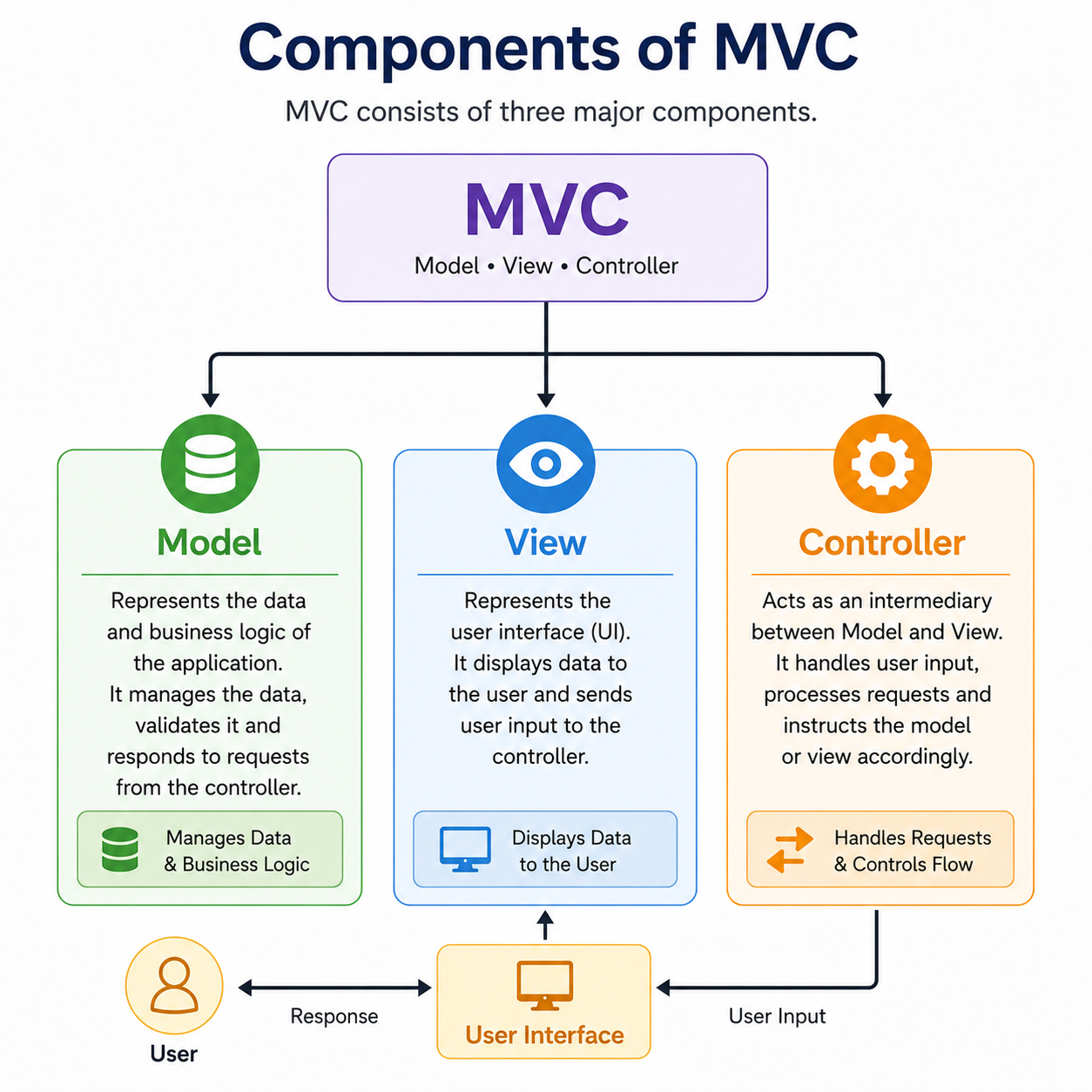
1. Model
The Model represents the application’s data and business logic.
Responsibilities include:
- Managing data.
- Performing calculations.
- Fetching data from APIs.
- Database operations.
- Validation.
- Business rules.
The Model never interacts directly with the user interface.
Example
class Student{

    constructor(name,marks){

        this.name=name;

        this.marks=marks;

    }

}
The Model stores only data.
2. View
The View is responsible for presenting information to users.
Responsibilities include:
- HTML
- CSS
- User Interface
- Displaying data
- Forms
- Tables
- Buttons
The View should not contain business logic.
Example
<h2>Student Details</h2>

<p>Name : Akshay</p>

<p>Marks : 95</p>
3. Controller
The Controller acts as the intermediary between the Model and the View.
Responsibilities include:
- Handling button clicks.
- Processing user input.
- Calling Model methods.
- Updating the View.
- Managing application flow.
Example
function displayStudent(){

    const student=new Student("Akshay",95);

    showStudent(student);

}
MVC Workflow

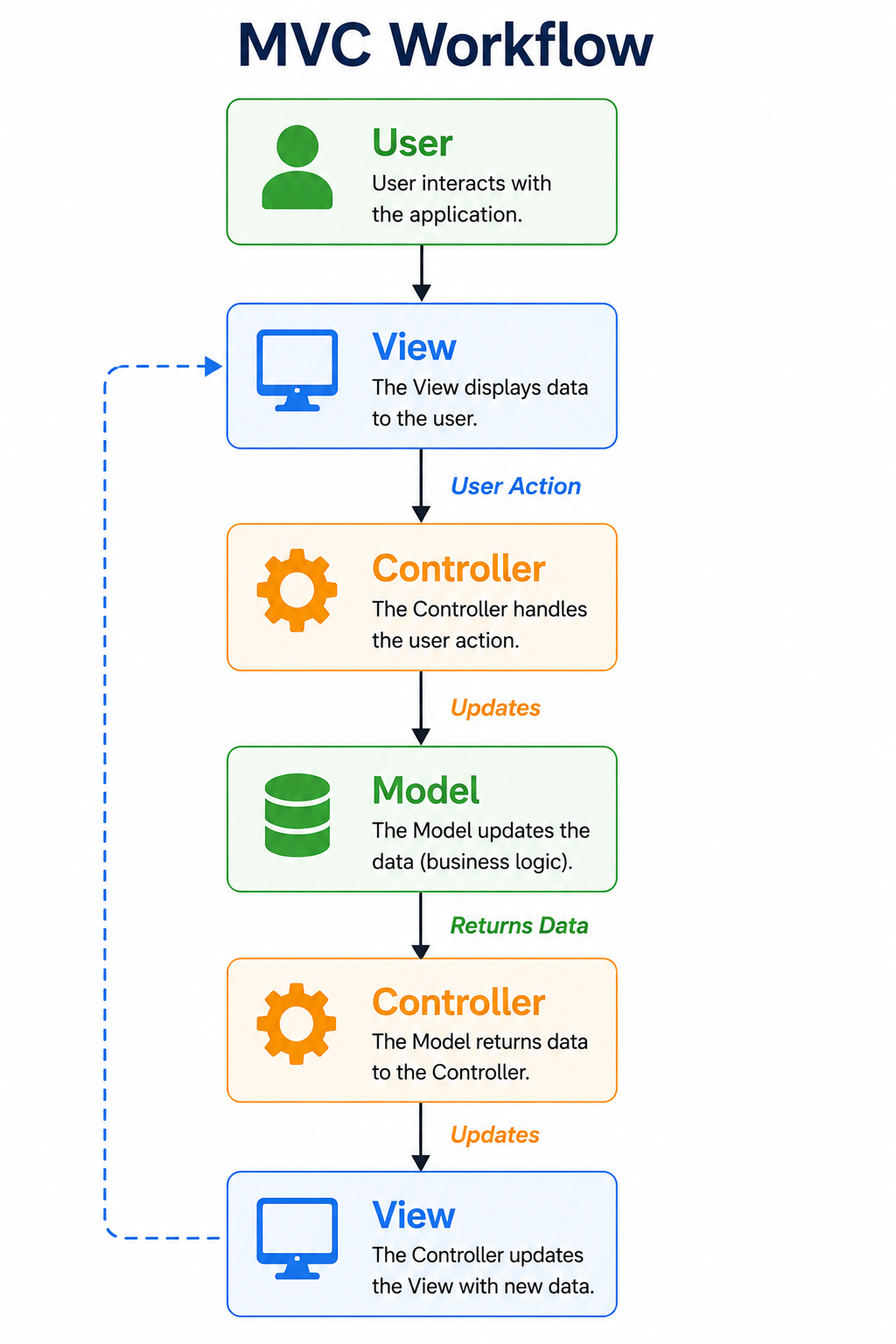
Detailed MVC Request Flow
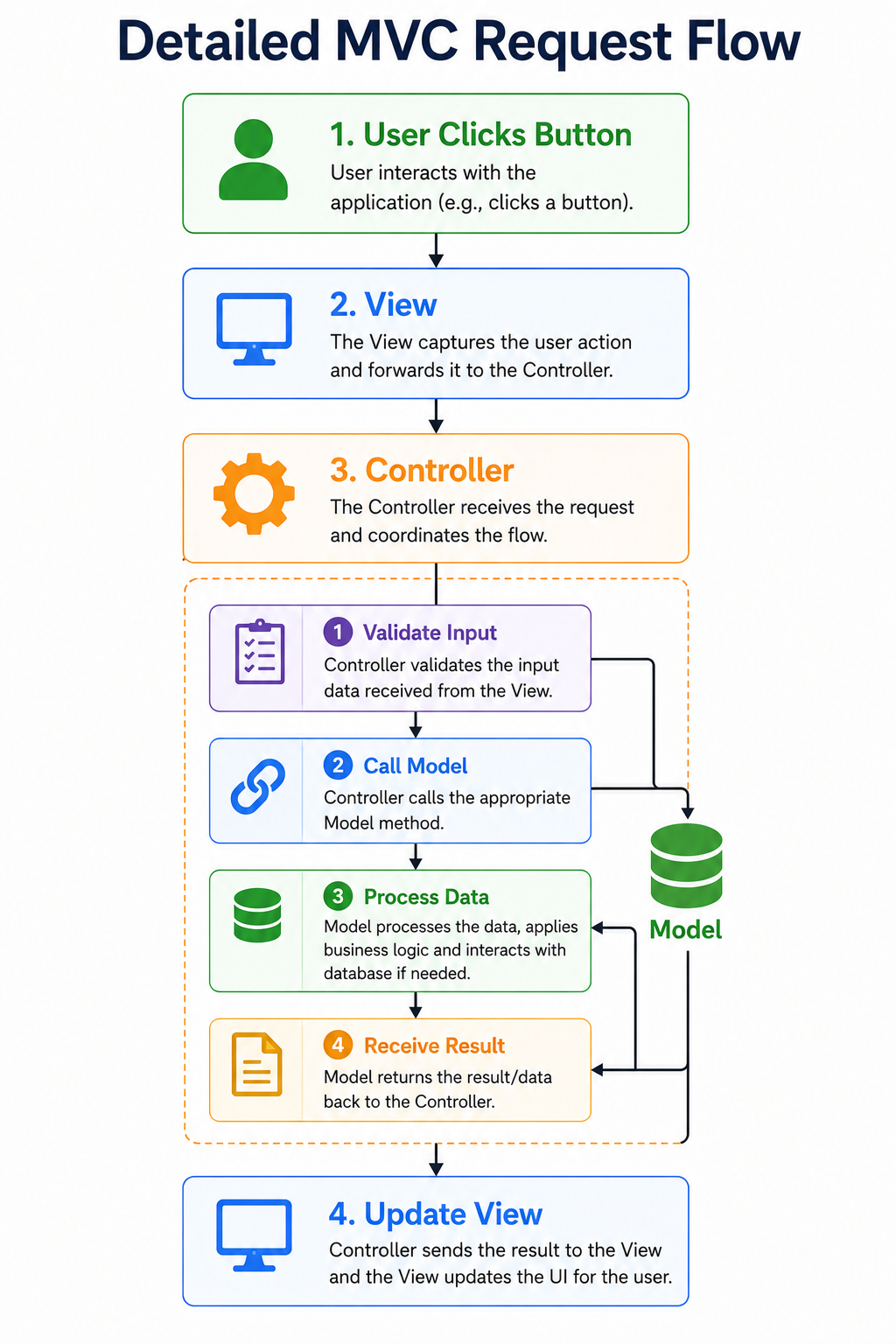

Responsibilities of Each Component
| Component | Responsibilities |
|---|---|
| Model | Data, validation, business logic |
| View | User interface and display |
| Controller | User interaction and coordination |
Example 1: Simple MVC
Model
class Student{

    constructor(name){

        this.name=name;

    }

}
View
class StudentView{

    display(student){

        console.log(

        "Student:",

        student.name

        );

    }

}
Controller
class StudentController{

    constructor(model,view){

        this.model=model;

        this.view=view;

    }

    updateView(){

        this.view.display(

        this.model

        );

    }

}

const student=new Student("Akshay");

const view=new StudentView();

const controller=new StudentController(student,view);

controller.updateView();
Output
Student: AkshayMVC Communication Diagram

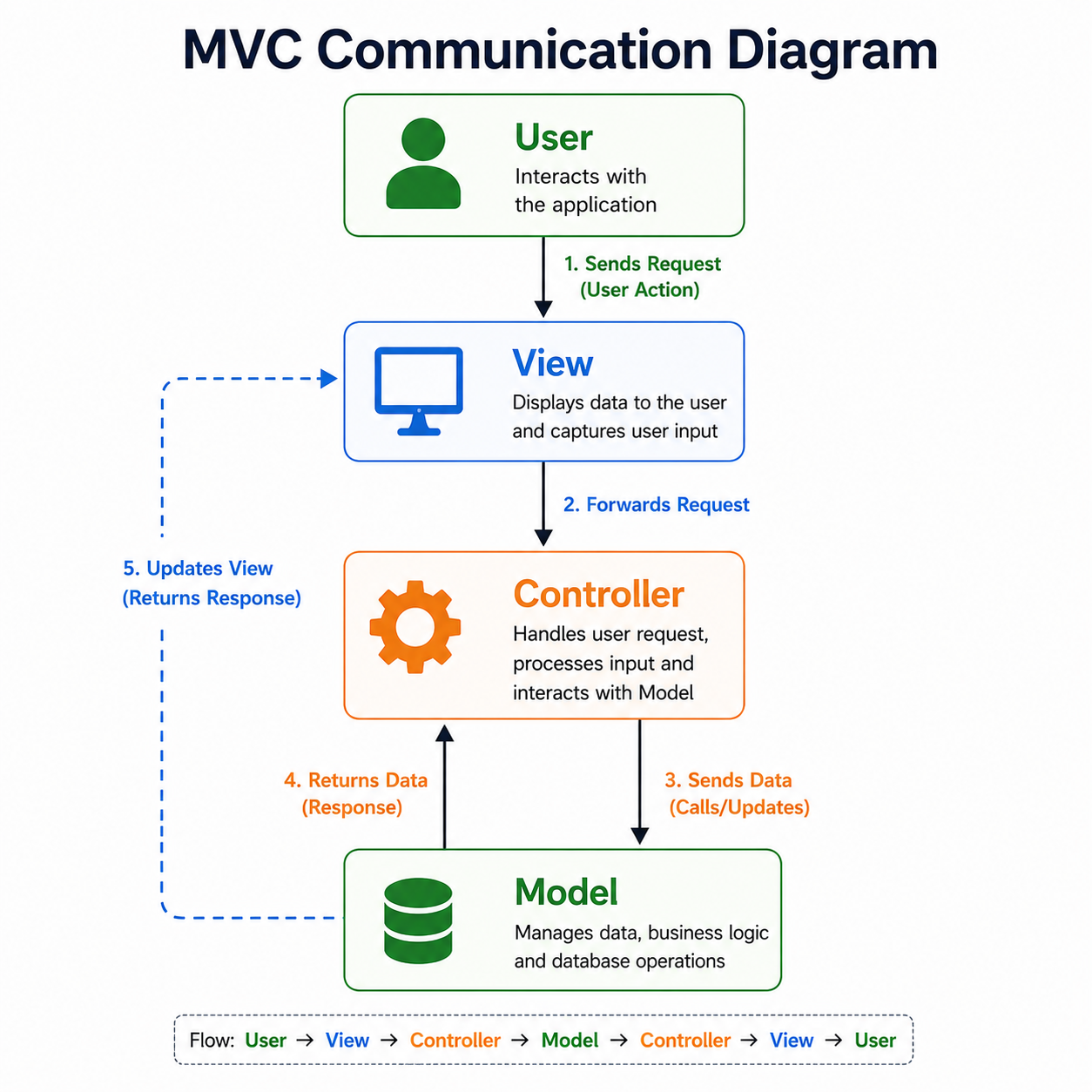
Folder Structure
A well-organized MVC project typically looks like this:
StudentMVC

│

├── index.html

├── css

│     └── style.css

├── js

│

│     ├── models

│     │      Student.js

│     │

│     ├── views

│     │      StudentView.js

│     │

│     ├── controllers

│     │      StudentController.js

│     │

│     └── app.js

└── assets
Benefits of MVC Folder Structure
- Easy navigation.
- Better scalability.
- Independent development.
- Cleaner code.
- Easier debugging.
- Reusable components.
Example 2: Student Registration Flow
Student Fills Form

        │

        ▼

View

        │

        ▼

Controller

        │

Validate Input

        │

        ▼

Model

        │

Save Data

        │

        ▼

Controller

        │

Update

        ▼

View
MVC in Modern JavaScript Frameworks
Although frameworks may not implement classic MVC exactly, they use similar separation of concerns.
| Technology | Pattern Used |
|---|---|
| Express.js | MVC |
| Laravel | MVC |
| ASP.NET MVC | MVC |
| Spring MVC | MVC |
| Django | MVT (MVC variation) |
| React | Component-Based Architecture |
| Angular | MVVM-inspired |
| Vue.js | MVVM-inspired |
MVC vs MVVM
| MVC | MVVM |
|---|---|
| Controller | ViewModel |
| User actions handled by Controller | Data binding handled by ViewModel |
| Manual updates | Automatic two-way binding |
| Common in backend frameworks | Common in frontend frameworks |
MVC vs Component-Based Architecture
| MVC | Component Architecture |
|---|---|
| Organizes applications into Model, View, Controller | Organizes UI into reusable components |
| Common in server-side frameworks | Common in React, Vue, and Svelte |
| Strong separation of concerns | Component encapsulation and reusability |
| Suitable for large web applications | Suitable for interactive user interfaces |
Advantages of MVC
Separation of Concerns
Each component has a clearly defined responsibility.
Better Maintainability
Changes in one layer have minimal impact on others.
Easier Testing
Models, Views, and Controllers can be tested independently.
Code Reusability
Components can be reused across multiple projects.
Team Collaboration
Frontend and backend developers can work independently on different layers.
Disadvantages of MVC
- Initial project structure can be more complex.
- Small applications may not need MVC.
- More files to manage.
- Beginners may require time to understand layer separation.
Real-World Applications
MVC is commonly used for:
- Student Management Systems
- E-Commerce Websites
- Banking Applications
- Hospital Management Systems
- Learning Management Systems (LMS)
- Content Management Systems (CMS)
- ERP Applications
- Social Media Platforms
- Online Booking Systems
- Enterprise Software
When Should You Use MVC?
Use MVC when:
- Building medium or large applications.
- Multiple developers work on the project.
- Maintainability is important.
- Business logic should be separated from the UI.
When Should You Avoid MVC?
Avoid MVC when:
- The application is a small utility or prototype.
- There is minimal business logic.
- The additional structure outweighs the benefits.
Best Practices
- Keep business logic inside the Model.
- Keep the View focused only on presentation.
- Use the Controller to coordinate interactions.
- Avoid direct communication between the View and the Model.
- Organize files into dedicated folders for models, views, and controllers.
Common Mistakes
- Placing business logic inside the View.
- Accessing the Model directly from the View.
- Creating overly large Controllers.
- Mixing presentation code with data access.
- Ignoring proper separation of responsibilities.
Design Pattern Selection Guide
Learning design patterns is only the first step. The real challenge is selecting the most appropriate pattern for a given problem.
Many beginners make the mistake of trying to apply a design pattern to every problem. However, design patterns are solutions to recurring software design problems, not mandatory rules.
A good software developer first understands the problem and then chooses the pattern that best fits the situation.
Why Choosing the Right Design Pattern Matters
Suppose you are developing a large e-commerce application.
The application contains:
- User Authentication
- Shopping Cart
- Product Catalog
- Payment Gateway
- Order Management
- Notifications
- Inventory
- Reports
Using the same design pattern everywhere would create unnecessary complexity.
Instead, different parts of the application require different patterns.
For example:

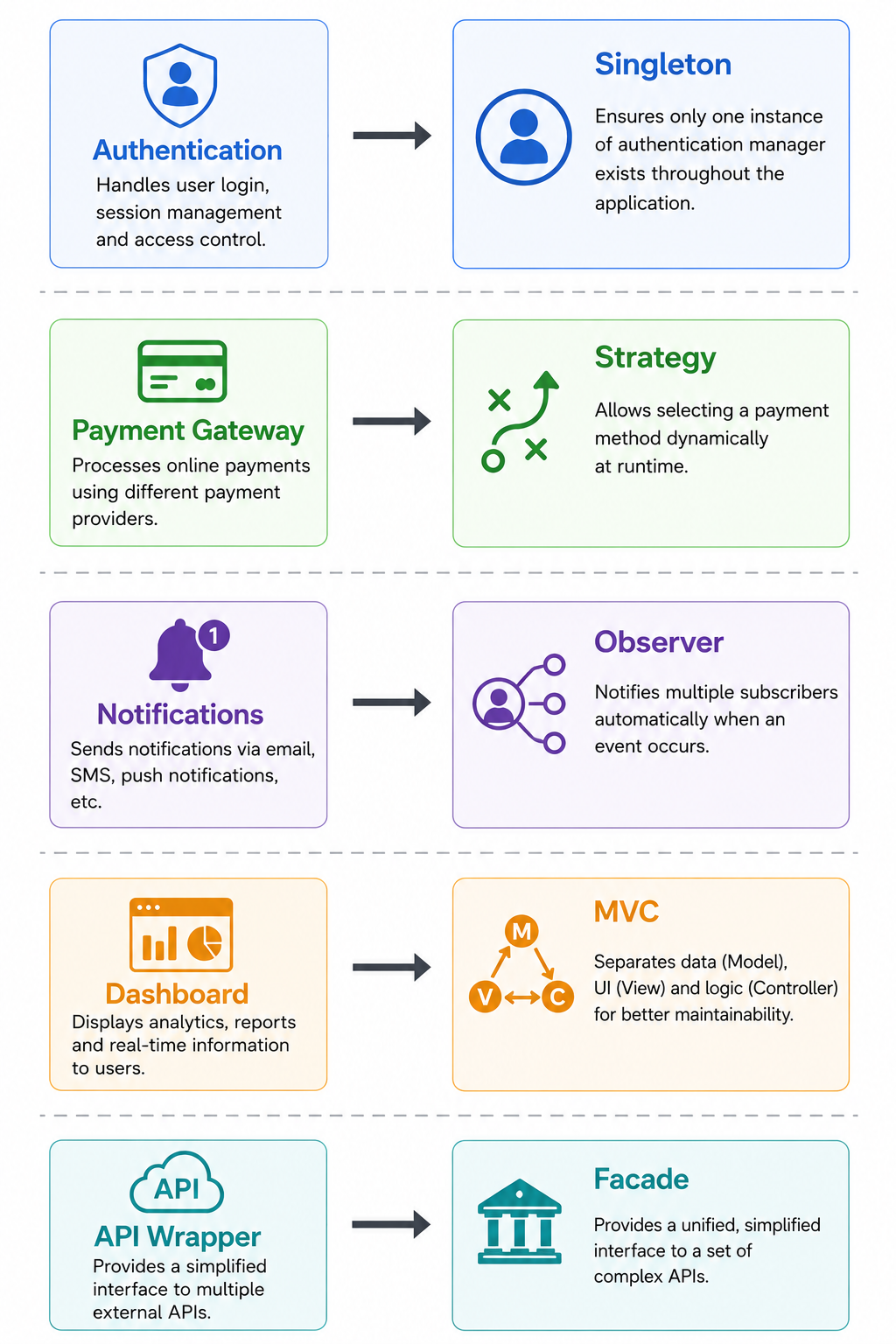
Choosing the correct pattern makes applications easier to maintain, extend, and test.
Pattern Selection Workflow

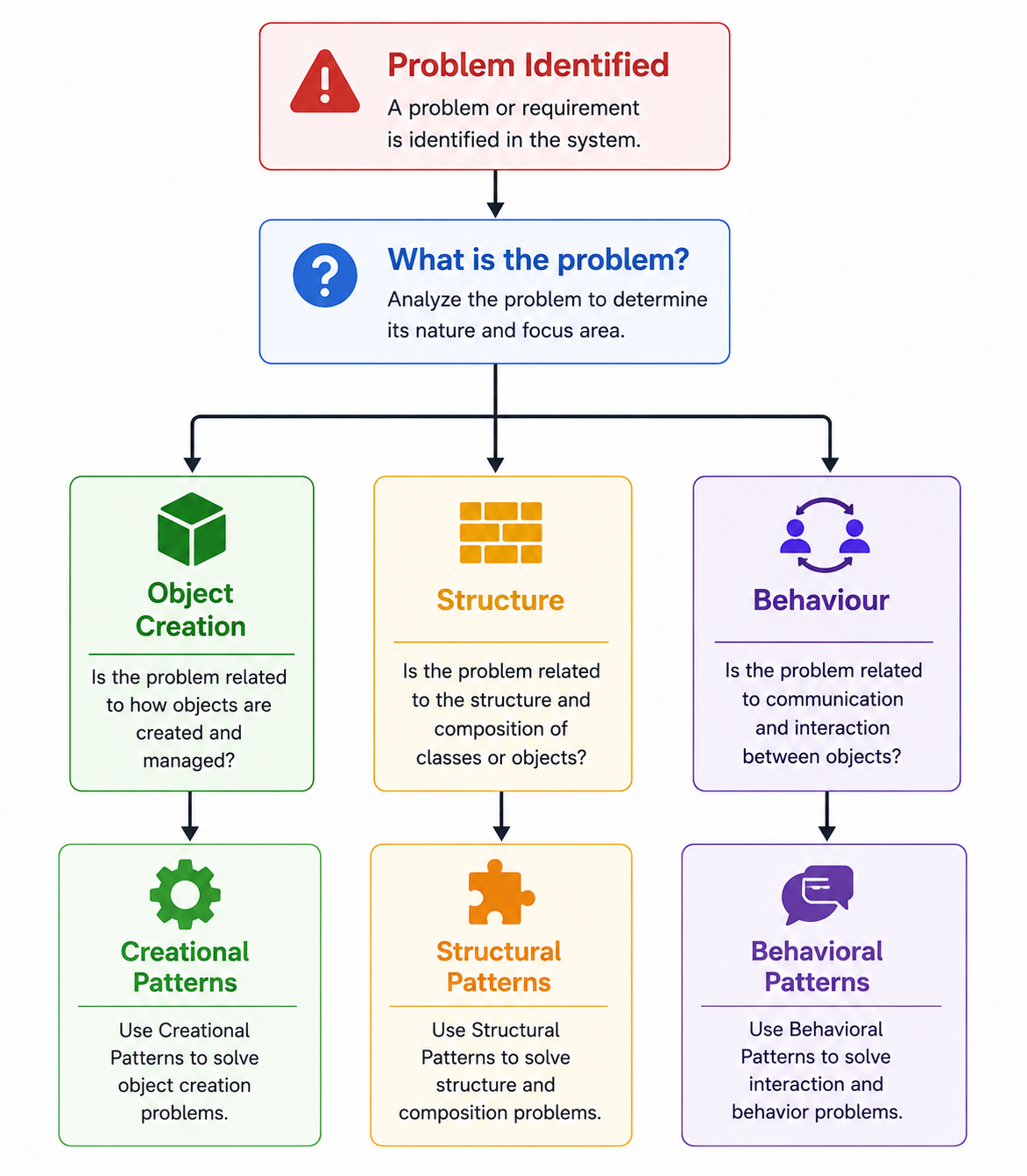
Decision Tree
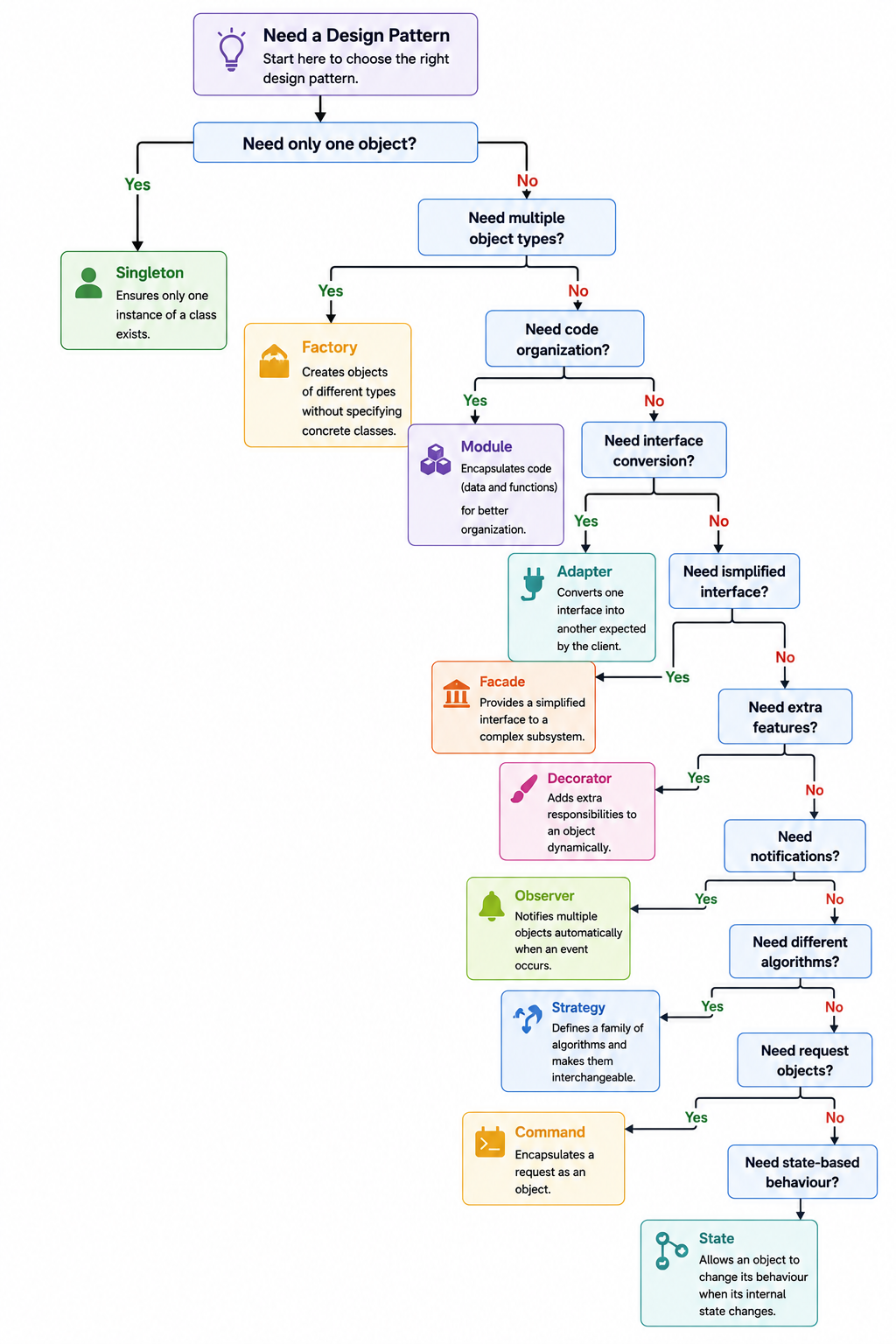
When to Use Each Pattern
Singleton
Use when:
- Only one instance should exist.
- Global configuration is required.
- Shared resources must be managed.
Examples:
- Logger
- Database Connection
- Configuration Manager
- Theme Manager
Factory
Use when:
- Different object types must be created.
- Object creation logic is complex.
- New object types may be added later.
Examples:
- Payment Providers
- Authentication Providers
- Vehicle Factory
- Employee Factory
Prototype
Use when:
- Many similar objects are created.
- Shared methods improve memory efficiency.
- Cloning existing objects is beneficial.
Examples:
- Object Templates
- Plugin Systems
- Game Characters
Module
Use when:
- Organizing related code.
- Avoiding global variables.
- Creating reusable functionality.
Examples:
- Authentication Module
- Shopping Cart Module
- Utility Library
Adapter
Use when:
- Integrating third-party libraries.
- Connecting legacy systems.
- Working with incompatible interfaces.
Examples:
- Payment Gateway Integration
- Browser Compatibility
- External APIs
Facade
Use when:
- A subsystem is complex.
- Clients need a simple interface.
- Multiple services are commonly called together.
Examples:
- Order Processing
- Banking
- API Wrapper
- Home Theater
Decorator
Use when:
- Functionality should be added dynamically.
- Existing classes should remain unchanged.
- Multiple feature combinations are required.
Examples:
- Logging
- Authentication
- Middleware
- Caching
Observer
Use when:
- Many objects depend on one object.
- Notifications are required.
- Real-time updates are needed.
Examples:
- Chat Applications
- Weather Apps
- Stock Market
- Event Handling
Strategy
Use when:
- Multiple algorithms solve the same problem.
- Algorithms change at runtime.
- Large
if...elseblocks exist.
Examples:
- Payment Methods
- Tax Calculation
- Shipping Charges
- Authentication
Command
Use when:
- Requests must be queued.
- Undo/Redo is required.
- Tasks need scheduling.
Examples:
- Text Editors
- IDEs
- Remote Controls
- Job Queues
State
Use when:
- Object behavior depends on state.
- Workflow changes automatically.
- Large conditional statements exist.
Examples:
- Traffic Lights
- Order Status
- Media Players
- Authentication
MVC
Use when:
- Building medium or large applications.
- Separating business logic from presentation.
- Multiple developers work on the project.
Examples:
- CMS
- ERP
- Student Management System
- Banking Applications
Pattern Selection Matrix
| Problem | Recommended Pattern |
|---|---|
| Only one object required | Singleton |
| Multiple object types | Factory |
| Clone existing objects | Prototype |
| Organize application code | Module |
| Convert incompatible interfaces | Adapter |
| Simplify complex systems | Facade |
| Add functionality dynamically | Decorator |
| Notify multiple objects | Observer |
| Switch algorithms dynamically | Strategy |
| Encapsulate requests | Command |
| Change behavior based on state | State |
| Organize complete application | MVC |
Real-World Web Application Architecture
Consider an online shopping application.

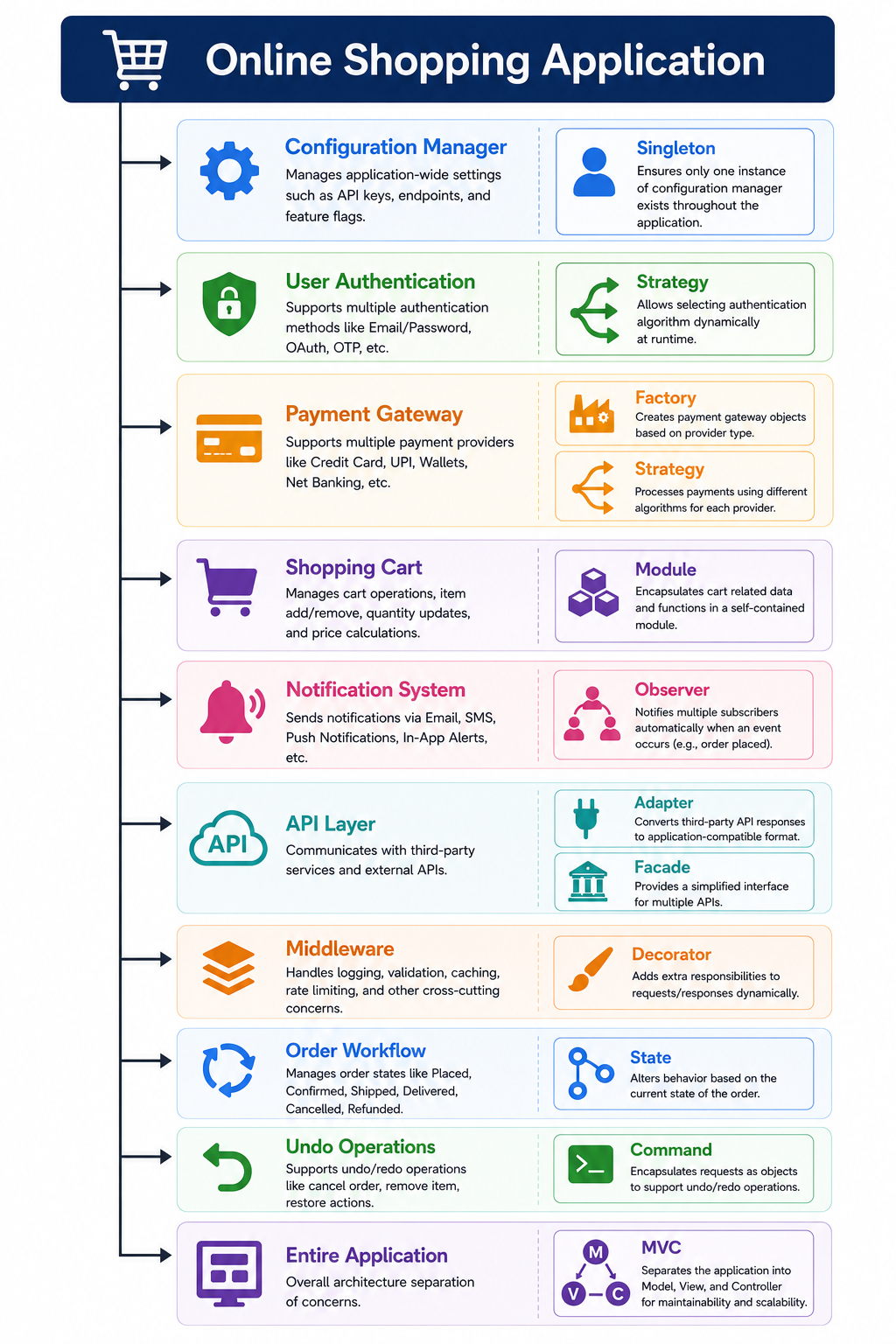
Pattern Relationships
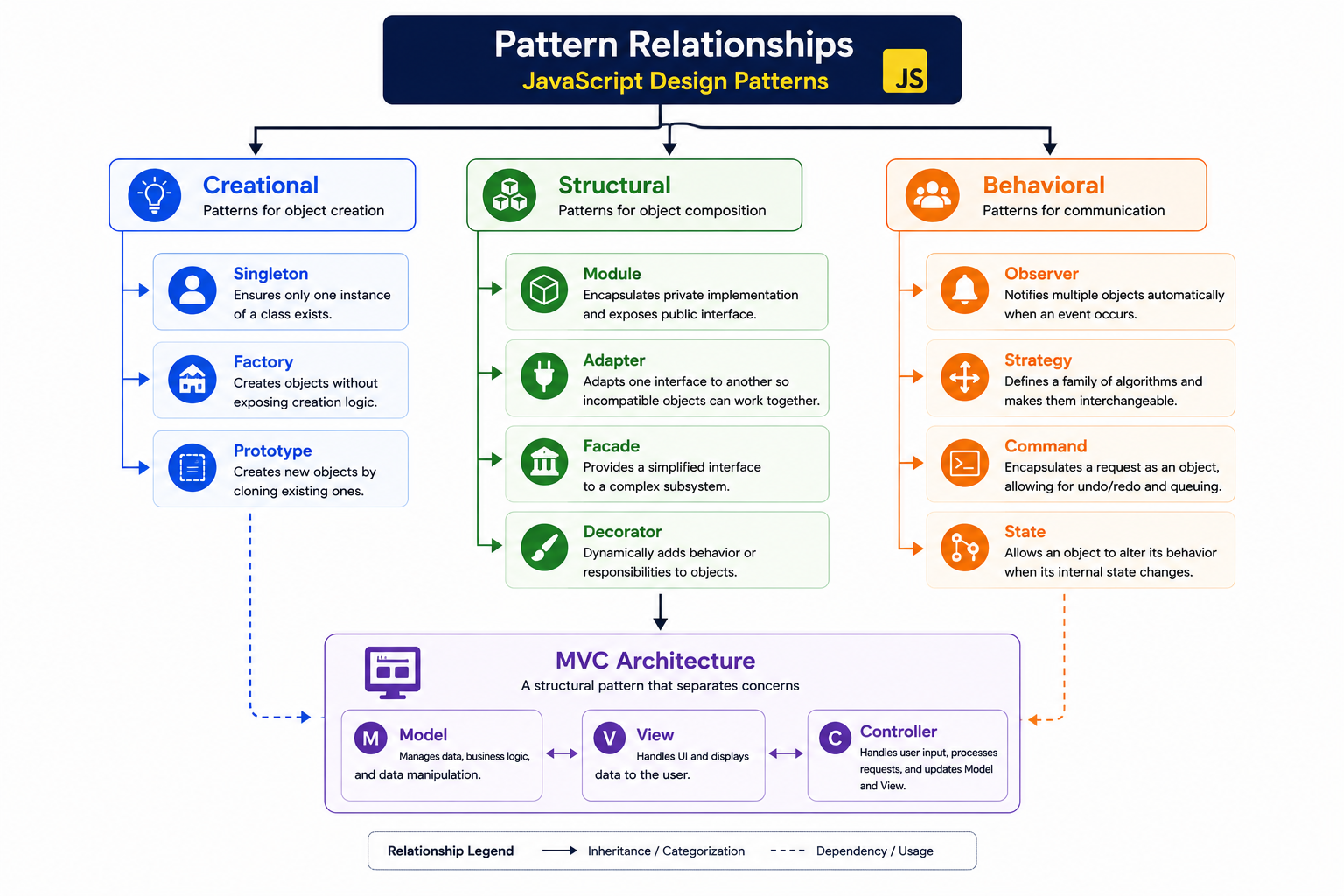
Common Mistakes When Choosing Patterns
Avoid these common mistakes:
- Applying a design pattern when a simple function is enough.
- Selecting a pattern before understanding the problem.
- Mixing responsibilities between multiple patterns.
- Creating unnecessary abstraction in small applications.
- Using Singleton for every shared object.
- Replacing straightforward code with overly complex pattern implementations.
- Ignoring maintainability in favor of “using more patterns.”
Best Practices for Pattern Selection
- Start with the simplest solution.
- Introduce a design pattern only when it solves a real problem.
- Prefer composition over inheritance.
- Keep each pattern focused on one responsibility.
- Follow the SOLID principles.
- Avoid overengineering.
- Document why a particular pattern was chosen.
Design Pattern Cheat Sheet
| If You Need To… | Use This Pattern |
|---|---|
| Create only one object | Singleton |
| Create different object types | Factory |
| Clone similar objects | Prototype |
| Organize reusable code | Module |
| Connect incompatible systems | Adapter |
| Simplify complex subsystems | Facade |
| Extend functionality dynamically | Decorator |
| Notify many objects | Observer |
| Change algorithms dynamically | Strategy |
| Queue or undo operations | Command |
| Handle changing object states | State |
| Structure an entire application | MVC |
Interview Tips
When asked “Which design pattern would you choose?”, avoid answering with only the pattern name.
Structure your answer as follows:
- Describe the problem.
- Explain why the chosen pattern fits.
- Mention an alternative and why it is less suitable.
- Give a practical example.
For example:
“If an application supports multiple payment methods that can change over time, I would use the Strategy Pattern because it encapsulates each payment algorithm separately and allows runtime selection without modifying existing code.”
Practical Mini Projects
The best way to understand design patterns is by implementing them in real applications. In this section, you will build six practical projects that demonstrate how different design patterns solve common software design problems.
Each project includes:
- Problem Statement
- Design Pattern Used
- Features
- Workflow
- Project Structure
- Complete HTML Code
- Complete CSS Code
- Complete JavaScript Code
- Expected Output
- Learning Outcomes
Practical Mini Project 1
Configuration Manager
Design Pattern Used
Singleton Pattern
Problem Statement
Large web applications require centralized configuration settings such as:
- Theme
- Language
- Currency
- API URL
- Date Format
Creating multiple configuration objects may lead to inconsistent application behavior.
Using the Singleton Pattern ensures that the entire application shares one configuration object.
Features
- Single configuration instance
- Theme switching
- Language management
- Shared configuration
- Runtime updates
- Memory efficient
Workflow
Application Starts

       │

       ▼

Configuration Requested

       │

Instance Exists?

 ┌─────────────┐

 │             │

No            Yes

 │             │

 ▼             ▼

Create      Return Existing

       │

       ▼

Shared Configuration
Project Structure
ConfigurationManager

│

├── index.html

├── style.css

└── script.js
Learning Outcomes
After completing this project, readers will understand:
- Singleton Pattern
- Shared Objects
- Static Properties
- Object Reuse
- Memory Optimization
Practical Mini Project 2
Employee Management System
Design Pattern Used
Factory Pattern
Problem Statement
An organization has multiple employee roles.
- Manager
- Developer
- Tester
- HR
- Designer
Instead of manually creating every employee type, use a Factory to create the correct employee object.
Features
- Dynamic employee creation
- Different employee roles
- Shared interface
- Centralized object creation
- Easy scalability
Workflow
Select Employee

      │

      ▼

Employee Factory

      │

──────────────

│     │     │

HR Developer Manager

      │

      ▼

Employee Object
Project Structure
EmployeeFactory

│

├── index.html

├── style.css

└── script.js
Learning Outcomes
Readers will learn:
- Factory Pattern
- Dynamic Object Creation
- Polymorphism
- Loose Coupling
Practical Mini Project 3
Theme Switcher Application
Design Pattern Used
Module Pattern
Problem Statement
A website requires:
- Dark Theme
- Light Theme
- Blue Theme
The theme logic should remain private while exposing only public methods.
Features
- Private Variables
- Public Methods
- Theme Switching
- Modular JavaScript
- Encapsulation
Workflow
User Click

     │

     ▼

Theme Module

     │

Private Variables

     │

     ▼

Update Theme
Learning Outcomes
Readers will understand:
- Module Pattern
- IIFE
- Private Members
- Public API
- ES6 Modules
Practical Mini Project 4
Notification Center
Design Pattern Used
Observer Pattern
Problem Statement
Whenever a notification is published,
all registered users should automatically receive it.
Features
- Subscribe
- Unsubscribe
- Broadcast Notifications
- Multiple Users
- Event Driven
Workflow
Admin
│
Publish Notification
│
Subject
│
───────────────
│ │ │
User1 User2 User3
│
▼
Notification DeliveredLearning Outcomes
Readers will learn:
- Observer Pattern
- Event Communication
- Loose Coupling
- Publish–Subscribe Concepts
Practical Mini Project 5
Online Payment Gateway
Design Pattern Used
Strategy Pattern
Problem Statement
Customers can choose different payment methods.
- Credit Card
- Debit Card
- UPI
- PayPal
- Net Banking
The application should switch payment algorithms dynamically.
Features
- Runtime Strategy Selection
- Multiple Payment Options
- Shared Interface
- Easy Extension
Workflow
Customer
│
Select Payment
│
Payment Strategy
│
───────────────
│ │ │
UPI Card PayPal
│
▼
Payment SuccessfulLearning Outcomes
Readers will understand:
- Strategy Pattern
- Runtime Algorithm Selection
- Composition
- Open/Closed Principle
Practical Mini Project 6
Student Management System
Design Pattern Used
MVC Architecture
Problem Statement
Develop a complete student management application.
Features include:
- Add Student
- Update Student
- Delete Student
- Search Student
- Display Students
Workflow
User
│
▼
View
│
▼
Controller
│
▼
Model
│
Database / Array
│
▼
Controller
│
▼
Updated ViewProject Structure
StudentMVC
│
├── index.html
├── css
│ style.css
├── js
│
├── models
│ Student.js
│
├── views
│ StudentView.js
│
├── controllers
│ StudentController.js
│
└── app.jsLearning Outcomes
Readers will learn:
- MVC Architecture
- CRUD Operations
- Separation of Concerns
- DOM Manipulation
- Event Handling
- JavaScript Classes
- ES6 Modules
Which Project Should Be Built First?
The projects are arranged in increasing order of complexity.
| Project | Pattern | Difficulty |
|---|---|---|
| Configuration Manager | Singleton | Beginner |
| Employee Management System | Factory | Beginner |
| Theme Switcher | Module | Beginner–Intermediate |
| Notification Center | Observer | Intermediate |
| Online Payment Gateway | Strategy | Intermediate |
| Student Management System | MVC | Advanced |
This progression allows readers to build confidence by starting with simpler implementations before tackling larger architectural projects.
Project Summary
| Project | Pattern | Real-World Use Case |
|---|---|---|
| Configuration Manager | Singleton | Shared application settings |
| Employee Management System | Factory | Dynamic object creation |
| Theme Switcher | Module | Code organization and encapsulation |
| Notification Center | Observer | Event-driven communication |
| Online Payment Gateway | Strategy | Runtime algorithm selection |
| Student Management System | MVC | Full application architecture |
JavaScript Design Patterns Interview Questions (2026)
Design patterns are frequently asked in JavaScript, React, Angular, Node.js, and Full Stack Developer interviews. Interviewers often assess not only your understanding of each pattern but also your ability to choose the appropriate pattern for real-world scenarios.
This section contains commonly asked interview questions ranging from beginner to advanced level.
Beginner Level Questions
1. What is a Design Pattern?
A design pattern is a proven, reusable solution to a commonly occurring software design problem. It provides a template or blueprint for solving recurring design challenges but is not a complete implementation.
2. Why are Design Patterns important?
Design patterns help developers write code that is:
- Reusable
- Maintainable
- Scalable
- Flexible
- Easy to understand
They reduce code duplication and improve software architecture.
3. How many categories of Design Patterns exist?
There are three major categories introduced by the Gang of Four (GoF):
- Creational Patterns
- Structural Patterns
- Behavioral Patterns
In addition, architectural patterns such as MVC are commonly used in application development.
4. What are Creational Design Patterns?
Creational patterns focus on object creation and provide flexible ways to create objects.
Examples:
- Singleton
- Factory
- Prototype
5. What are Structural Design Patterns?
Structural patterns define how classes and objects are organized into larger structures.
Examples:
- Module
- Adapter
- Facade
- Decorator
6. What are Behavioral Design Patterns?
Behavioral patterns define communication and interaction between objects.
Examples:
- Observer
- Strategy
- Command
- State
7. What is the Singleton Pattern?
The Singleton Pattern ensures that only one instance of a class exists throughout the application and provides a global access point to that instance.
8. Give real-world examples of the Singleton Pattern.
- Database Connection
- Logger
- Configuration Manager
- Theme Manager
- Cache Manager
9. What is the Factory Pattern?
The Factory Pattern centralizes object creation and returns different object types based on input without exposing the object creation logic.
10. What is the Prototype Pattern?
The Prototype Pattern creates new objects by inheriting or cloning an existing object instead of creating everything from scratch.
Intermediate Level Questions
11. What is the Module Pattern?
The Module Pattern organizes related functionality into reusable modules while keeping implementation details private.
12. Why were IIFEs used before ES6 Modules?
IIFEs (Immediately Invoked Function Expressions) created private scope and prevented global namespace pollution before native module support became available.
13. What is the Adapter Pattern?
The Adapter Pattern converts one interface into another so incompatible classes or systems can work together.
14. Give real-world examples of the Adapter Pattern.
- Payment gateway integration
- Third-party API integration
- Browser compatibility
- Legacy system migration
15. What is the Facade Pattern?
The Facade Pattern provides a simple interface to a complex subsystem, hiding internal implementation details.
16. How is the Facade Pattern different from the Adapter Pattern?
| Facade | Adapter |
|---|---|
| Simplifies a subsystem | Converts incompatible interfaces |
| Focuses on usability | Focuses on compatibility |
| Usually coordinates multiple components | Usually wraps one component |
17. What is the Decorator Pattern?
The Decorator Pattern dynamically adds new functionality to an object without modifying its original implementation.
18. Where is the Decorator Pattern commonly used?
- Express.js middleware
- Logging
- Authentication
- Caching
- React Higher-Order Components
19. What is the Observer Pattern?
The Observer Pattern establishes a one-to-many relationship where one object automatically notifies multiple dependent objects whenever its state changes.
20. Give examples of the Observer Pattern in JavaScript.
addEventListener()- Notification systems
- Chat applications
- Redux
- Vue.js reactivity
- RxJS Observables
21. What is the Strategy Pattern?
The Strategy Pattern encapsulates multiple algorithms and allows them to be selected dynamically at runtime.
22. What is the Command Pattern?
The Command Pattern encapsulates a request as an object, enabling execution, logging, scheduling, queueing, and undo/redo functionality.
23. What is the State Pattern?
The State Pattern allows an object to change its behavior automatically when its internal state changes.
24. What is MVC?
MVC (Model–View–Controller) is an architectural pattern that separates an application into three layers:
- Model
- View
- Controller
25. Why is MVC useful?
MVC improves:
- Separation of concerns
- Maintainability
- Scalability
- Testability
- Team collaboration
Advanced Interview Questions
26. What is the difference between the Factory and Singleton patterns?
| Factory | Singleton |
|---|---|
| Creates many objects | Creates only one object |
| Controls object creation | Controls object instance |
| Flexible | Shared globally |
27. What is the difference between the Strategy and State patterns?
| Strategy | State |
|---|---|
| Client selects the algorithm | Object changes behavior automatically |
| Independent algorithms | State-driven behavior |
28. Explain loose coupling.
Loose coupling means that components depend only on well-defined interfaces rather than concrete implementations, making systems easier to modify and maintain.
29. Why is composition preferred over inheritance?
Composition provides greater flexibility, avoids deep inheritance hierarchies, and allows behavior to be combined dynamically.
30. What is the Open/Closed Principle?
Software entities should be:
- Open for extension.
- Closed for modification.
Many design patterns, such as Strategy and Decorator, follow this principle.
31. Which design pattern is best for payment gateways?
The Strategy Pattern, because different payment algorithms (UPI, Credit Card, PayPal, etc.) can be selected dynamically.
32. Which pattern is commonly used in Express.js middleware?
The Decorator Pattern, as each middleware adds additional behavior to the request–response pipeline.
33. Which pattern is used in JavaScript event handling?
The Observer Pattern, because event listeners are notified when events occur.
34. Why are ES6 Modules preferred over IIFEs?
ES6 Modules provide:
- Native browser support
- Static analysis
- Better dependency management
- Tree shaking
- Improved maintainability
35. Explain the difference between a Design Pattern and an Architectural Pattern.
| Design Pattern | Architectural Pattern |
|---|---|
| Solves a specific design problem | Organizes an entire application |
| Smaller scope | Larger scope |
| Example: Strategy | Example: MVC |
Scenario-Based Questions
36. An application supports multiple payment methods. Which pattern would you use?
Strategy Pattern
Reason: Different payment algorithms can be selected at runtime.
37. An application should have only one database connection. Which pattern is suitable?
Singleton Pattern
38. You need to integrate a legacy API with a modern application. Which pattern would you use?
Adapter Pattern
39. A notification should be sent to thousands of users whenever a new article is published. Which pattern is appropriate?
Observer Pattern
40. A text editor requires Undo and Redo functionality. Which pattern should be used?
Command Pattern
41. A shopping website performs inventory checks, payment processing, invoice generation, and email notifications with one method call. Which pattern is suitable?
Facade Pattern
42. An application changes behavior based on order status (Pending, Processing, Delivered). Which pattern fits best?
State Pattern
43. A project needs to organize authentication, cart, and utility functions into separate reusable units. Which pattern is appropriate?
Module Pattern
44. You want to add logging and caching without modifying existing classes. Which pattern would you use?
Decorator Pattern
45. A system creates different employee objects based on department. Which pattern is suitable?
Factory Pattern
Coding Questions
46. Implement a Singleton class in JavaScript.
Expected concepts:
- Static property
- Constructor
- Shared instance
47. Write a Factory that creates different vehicle objects.
Expected concepts:
- Factory Method
- Polymorphism
48. Create an Observer pattern for a notification system.
Expected concepts:
- Subject
- Observer
- Subscribe
- Notify
49. Implement a Strategy pattern for payment methods.
Expected concepts:
- Strategy Interface
- Runtime Selection
50. Build a simple MVC-based CRUD application.
Expected concepts:
- Model
- View
- Controller
- Event Handling
- DOM Manipulation
Frequently Asked Interview Topics
Interviewers also ask about:
- SOLID Principles
- Dependency Injection
- Composition vs Inheritance
- Event Loop
- Closures
- Modules
- Promises
- Async/Await
- Clean Code
- Software Architecture
Interview Preparation Tips
- Understand the problem each pattern solves before memorizing definitions.
- Be prepared to explain real-world use cases.
- Compare similar patterns such as Strategy vs State or Adapter vs Facade.
- Practice implementing patterns with small JavaScript projects.
- Explain why a chosen pattern is appropriate for a given scenario rather than simply naming it.
JavaScript Design Patterns Best Practices and Common Mistakes (2026)
Writing software is not just about making an application work. Professional developers focus on creating software that is easy to maintain, extend, test, and understand.
Design patterns help achieve these goals, but they should be applied thoughtfully. Using too many patterns or choosing the wrong pattern can make software unnecessarily complex.
This section covers industry best practices, common mistakes, performance considerations, SOLID principles, and practical recommendations for using design patterns effectively.
Why Best Practices Matter
Suppose two developers build the same application.
Developer A writes everything in one file.
// HTML
// CSS
// API
// Validation
// Database
// UI
// Business LogicDeveloper B organizes the application using appropriate design patterns.
Application
│
├── Model
├── View
├── Controller
├── Services
├── Utilities
└── ComponentsBoth applications may work correctly, but the second application is much easier to maintain and scale.
General Best Practices
1. Understand the Problem Before Choosing a Pattern
Do not start by asking:
“Which design pattern should I use?”
Instead ask:
“What problem am I trying to solve?”
Choose a pattern only after identifying the actual problem.
2. Prefer Simplicity
Simple solutions are often better than complex ones.
Avoid introducing design patterns into small applications unless they provide clear benefits.
Remember:
The simplest solution that solves the problem is usually the best solution.
3. Follow the SOLID Principles
Many design patterns are based on the SOLID principles of object-oriented design.
S — Single Responsibility Principle (SRP)
Each class or module should have only one responsibility.
Example:
Good
UserService
↓
Handles Users Only
------------------------
Bad
UserService
↓
Users
Emails
Payments
AuthenticationO — Open/Closed Principle (OCP)
Software should be:
- Open for extension
- Closed for modification
Patterns such as:
- Strategy
- Decorator
- Factory
support this principle.
L — Liskov Substitution Principle (LSP)
Derived classes should be usable wherever the base class is expected without changing the correctness of the program.
I — Interface Segregation Principle (ISP)
Create focused interfaces instead of one large interface with unrelated responsibilities.
D — Dependency Inversion Principle (DIP)
Depend on abstractions rather than concrete implementations.
Instead of:
const payment = new PayPal();Prefer:
const payment = new PaymentStrategy();The actual implementation can then be injected when needed.
Prefer Composition Over Inheritance
Inheritance creates tight coupling.
Composition provides greater flexibility.
Instead of:
Vehicle
↓
Car
↓
SportsCar
↓
ElectricSportsCarUse:
Car
↓
Engine
↓
GPS
↓
Music System
↓
Air ConditionerComposition is one of the core ideas behind patterns such as Strategy, Decorator, and Adapter.
Keep Classes Small
Large classes become difficult to maintain.
Instead of one class containing:
- Authentication
- Logging
- Validation
- Database
Split responsibilities into dedicated classes or modules.
Keep Methods Focused
A method should perform one clear task.
Poor example:
registerUser(){
// Validation
// Database
// Email
// Logging
// Notifications
}Better approach:
validateUser();
saveUser();
sendEmail();
writeLog();Each method has a single responsibility.
Avoid Global Variables
Global variables increase coupling and make debugging difficult.
Instead:
- Use Modules
- Use ES6 Imports/Exports
- Use Singleton only when a shared instance is genuinely required
Encapsulate Data
Avoid exposing internal implementation details.
Instead of allowing direct access to object properties, expose controlled methods when appropriate.
Benefits:
- Better security
- Easier maintenance
- Improved flexibility
Write Reusable Components
Avoid duplicate code.
Instead of copying similar logic into multiple files, create reusable modules, utility functions, or classes.
Name Classes Clearly
Choose names that describe responsibility.
Good examples:
- PaymentStrategy
- UserFactory
- NotificationService
- AuthenticationController
- ThemeManager
Avoid vague names such as:
- Data
- Utils
- Helper1
- Temp
Keep Patterns Independent
One design pattern should not depend heavily on another unless there is a clear architectural reason.
For example:
MVC
↓
Strategy
↓
Observer
↓
Decoratoris acceptable when each pattern solves a distinct problem.
However, avoid forcing unnecessary combinations.
Common Mistakes to Avoid
Mistake 1: Using Design Patterns Everywhere
Not every problem requires a design pattern.
Sometimes a simple function is enough.
Mistake 2: Overengineering
Creating unnecessary classes, interfaces, and abstractions increases complexity without adding value.
Mistake 3: Ignoring Readability
Readable code is often more valuable than clever code.
If other developers struggle to understand the implementation, reconsider the design.
Mistake 4: Deep Inheritance Hierarchies
Avoid structures such as:
Animal
↓
Mammal
↓
Dog
↓
PoliceDog
↓
RescueDog
↓
MountainRescueDogPrefer composition where possible.
Mistake 5: Large Controllers
Controllers should coordinate application flow.
They should not contain:
- Business logic
- Database queries
- Validation
- HTML generation
Delegate these responsibilities to appropriate layers.
Mistake 6: Large Classes
If a class exceeds several hundred lines or has many unrelated responsibilities, consider splitting it into smaller classes.
Mistake 7: Copy-Paste Programming
Repeated code often indicates the need for abstraction.
Extract shared logic into reusable components.
Mistake 8: Ignoring Error Handling
Always anticipate failures.
Handle:
- Invalid input
- Network errors
- Database failures
- API exceptions
Use meaningful error messages and graceful recovery.
Mistake 9: Tight Coupling
Avoid direct dependencies on concrete implementations.
Prefer interfaces, abstractions, or dependency injection where appropriate.
Mistake 10: Poor Naming
Clear, descriptive names improve readability and reduce onboarding time for new developers.
Performance Considerations
Design patterns improve maintainability, but they also introduce abstraction.
Keep the following in mind:
- Do not create unnecessary objects.
- Avoid deep chains of decorators when a simpler approach works.
- Use Singleton carefully to prevent hidden shared state.
- Remove unused observers to prevent memory leaks.
- Avoid excessive inheritance.
- Optimize only after identifying real performance bottlenecks.
Clean Code Guidelines
Professional JavaScript code should be:
- Readable
- Modular
- Reusable
- Consistent
- Testable
- Well documented
Before writing code, ask:
- Can this be simplified?
- Can this be reused?
- Is the responsibility clear?
- Will another developer understand this in six months?
Professional Development Tips
Developers should strive to:
- Write meaningful commit messages.
- Follow a consistent coding style.
- Use version control effectively.
- Write unit tests where appropriate.
- Review code before merging.
- Document public APIs and complex logic.
- Refactor regularly as requirements evolve.
Recommended Learning Path After Design Patterns
Once readers are comfortable with design patterns, the next topics to study include:
- SOLID Principles
- Clean Architecture
- Domain-Driven Design (DDD)
- Test-Driven Development (TDD)
- Dependency Injection
- Microservices Architecture
- Event-Driven Architecture
- Progressive Web Apps (PWA)
- Performance Optimization
- System Design
These topics build on the concepts introduced in this guide and prepare developers for enterprise-scale applications.
Final Revision Table
| Topic | Key Takeaway |
|---|---|
| Keep it Simple | Do not use patterns unnecessarily |
| SOLID Principles | Build maintainable software |
| Composition | Prefer over deep inheritance |
| Small Classes | One responsibility per class |
| Reusability | Avoid duplicated code |
| Loose Coupling | Reduce dependencies |
| Encapsulation | Protect internal implementation |
| Readability | Write code for humans first |
| Performance | Optimize after measuring |
| Continuous Learning | Improve architecture over time |
Complete Guide Summary
Throughout this guide, you learned:
- The fundamentals of software design patterns
- Why design patterns are important
- The Gang of Four (GoF) pattern categories
- Creational, Structural, and Behavioral patterns
- MVC architecture
- Practical use cases for each pattern
- Real-world examples
- Interview questions
- Best practices
- Common mistakes to avoid
By applying these concepts, you can write JavaScript applications that are more organized, scalable, maintainable, and easier to extend as requirements grow.