


Introduction
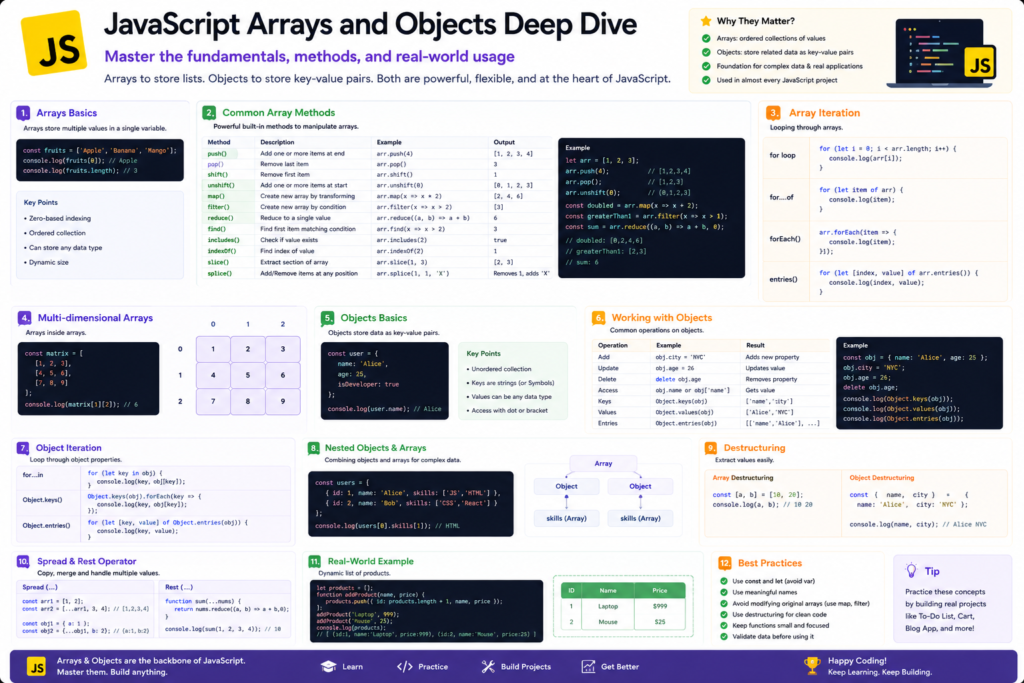
Arrays and Objects are among the most important data structures in JavaScript.
Almost every modern JavaScript application uses them:
- React Applications
- Node.js Applications
- REST APIs
- JSON Data
- E-Commerce Websites
- Dashboards
- Data Management Systems
Understanding Arrays and Objects is essential before learning:
- AJAX
- Fetch API
- React
- Node.js
- Express.js
- MongoDB
What is an Array?
An Array stores multiple values in a single variable.
Without Arrays:
let subject1 = "HTML";
let subject2 = "CSS";
let subject3 = "JavaScript";let subjects = [
"HTML",
"CSS",
"JavaScript"
];Creating Arrays
Method 1: Array Literal
let colors = [
"Red",
"Green",
"Blue"
];Method 2: Array Constructor
let numbers = new Array(
10,20,30
);Accessing Array Elements
Array indexing starts from 0.
let fruits = [
"Apple",
"Mango",
"Orange"
];
console.log(fruits[0]);
console.log(fruits[1]);Output:
Apple
MangoModifying Array Elements
let fruits = [
"Apple",
"Mango",
"Orange"
];
fruits[1] = "Banana";
console.log(fruits);Output:
["Apple","Banana","Orange"]Array Properties
length
let fruits = [
"Apple",
"Mango",
"Orange"
];
console.log(
fruits.length
);3Common Array Methods
push()
Adds item at the end.
let colors = [
"Red",
"Green"
];
colors.push("Blue");
console.log(colors);["Red","Green","Blue"]pop()
Removes last element.
colors.pop();shift()
Removes first element.
colors.shift();unshift()
Adds item at beginning.
colors.unshift("Black");Iterating Through Arrays
for Loop
let colors = [
"Red",
"Green",
"Blue"
];
for(let i=0;
i<colors.length;
i++){
console.log(
colors[i]
);
}for…of Loop
for(let color of colors){
console.log(color);
}forEach()
colors.forEach(
function(color){
console.log(color);
}
);Searching Arrays
includes()
let subjects = [
    "HTML",
    "CSS",
    "JavaScript"
];
console.log(
subjects.includes(
"CSS"
)
);Output:
trueindexOf()
console.log(
subjects.indexOf(
"JavaScript"
)
);Output:
2Advanced Array Methods
map()
Creates a new array.
let numbers = [
1,2,3,4,5
];
let squares =
numbers.map(
num => num*num
);
console.log(
squares
);Output:
[1,4,9,16,25]filter()
Filters data.
let numbers =
[10,20,30,40,50];
let result =
numbers.filter(
num => num > 25
);
console.log(result);Output:
[30,40,50]find()
Returns first matching value.
let result =
numbers.find(
num => num > 25
);Output:
30reduce()
Used for calculations.
let numbers =
[10,20,30];
let total =
numbers.reduce(
(sum,num)=>
sum+num,0
);
console.log(total);Output:
60What is an Object?
Objects store data as key-value pairs.
let student = {
name:"Akshay",
age:25,
course:"JavaScript"
};Accessing Object Properties
Dot Notation
console.log(
student.name
);Bracket Notation
console.log(
student["course"]
);Adding Properties
student.city =
"Sangli";Updating Properties
student.age = 30;Deleting Properties
delete student.city;Object Methods
Objects can contain functions.
let student = {
name:"Akshay",
display:function(){
console.log(
this.name
);
}
};
student.display();Looping Through Objects
for…in
let student = {
name:"Akshay",
age:25,
course:"JavaScript"
};
for(let key in student){
console.log(
key,
student[key]
);
}Nested Objects
let student = {
name:"Akshay",
address:{
city:"Sangli",
state:"Maharashtra"
}
};
console.log(
student.address.city
);Array of Objects
Most common real-world structure.
let students = [
{
id:1,
name:"Akshay"
},
{
id:2,
name:"Rahul"
},
{
id:3,
name:"Priya"
}
];Access Array of Objects
console.log(
students[0].name
);Output:
AkshayES6 Destructuring
Array Destructuring
let colors = [
    "Red",
    "Green",
    "Blue"
];
let [
first,
second
] = colors;
console.log(first);Object Destructuring
let student = {
name:"Akshay",
age:25
};
let {
name,
age
} = student;
console.log(name);Spread Operator (…)
let arr1 = [
1,2,3
];
let arr2 = [
...arr1,
4,5
];
console.log(arr2);Output:
[1,2,3,4,5]JSON and Objects
Object:
let student = {
name:"Akshay",
age:25
};let jsonData =
JSON.stringify(
student
);
console.log(jsonData);{"name":"Akshay","age":25}Convert JSON to Object
let data =
'{"name":"Akshay","age":25}';
let student =
JSON.parse(data);
console.log(
student.name
);Mini Project 1: Student Management System
let students = [];

students.push({

id:1,

name:"Akshay",

course:"JavaScript"

});

students.push({

id:2,

name:"Rahul",

course:"HTML"

});

console.log(students);
Concepts Covered:
- Arrays
- Objects
- Array of Objects
- push()
Output:


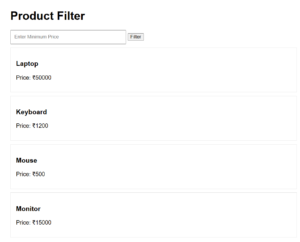
Mini Project 2: Product Filter
let products = [

{
name:"Laptop",
price:50000
},

{
name:"Mouse",
price:500
},

{
name:"Keyboard",
price:1200
}

];

let expensive =
products.filter(
product =>
product.price > 1000
);

console.log(expensive);
Concepts Covered:
- Arrays
- Objects
- filter()
- Arrow Functions
Output:

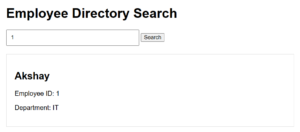
Mini Project 3: Employee Directory Search
let employees = [

{
id:1,
name:"Akshay"
},

{
id:2,
name:"Rahul"
}

];

let employee =
employees.find(
emp =>
emp.id === 2
);

console.log(employee);- find()
- Objects
- Arrays
- Search Operations
Output:

Arrays vs Objects
| Feature | Array | Object |
|---|---|---|
| Data Storage | Ordered | Key-Value |
| Index Access | Yes | No |
| Property Access | No | Yes |
| Best For | Lists | Entities |
Common Interview Questions
What is an Array?
What is an Object?
Difference between Arrays and Objects?
What is map()?
Difference between map() and forEach()?
What is filter()?
What is reduce()?
What is Destructuring?
What is Spread Operator?
Difference between JSON.stringify() and JSON.parse()?
Summary
In this tutorial, we explored JavaScript Arrays and Objects in depth. Arrays help manage collections of data, while Objects store structured information using key-value pairs.
We learned:
✔ Array Creation and Access
✔ Array Methods (push, pop, shift, unshift)
✔ map(), filter(), find(), reduce()
✔ Object Properties and Methods
✔ Nested Objects
✔ Array of Objects
✔ Destructuring
✔ Spread Operator
✔ JSON Conversion
✔ Real-World Mini Projects
Arrays and Objects form the foundation of modern JavaScript development and are heavily used in APIs, databases, React applications, Node.js projects, and full-stack web development.